




A customer calls your AI voice agent with a billing question. Two seconds of silence. They say “Hello?” Another pause. They hang up and call back — this time pressing zero for a human.
That two-second gap has a name: voice AI latency. And it has a measurable price tag.
Businesses are deploying voice agents at scale to improve customer experience and reduce operational costs. Many are succeeding. But a significant number are quietly losing callers — not to bad answers, but to slow ones.
This article breaks down what latency is, what it costs, and how to fix it — written for business leaders who need to make decisions, not debug pipelines. With more companies exploring how to use AI voice assistants across industries, getting this right is no longer optional. Read the article to learn how to build low latency voice AI that keeps conversations fast and natural.
Table of Contents
KEY TAKEAWAYS
- The 2025 industry benchmark for acceptable voice AI response time is under 800 ms end-to-end. Above 1,500 ms, user experience degrades sharply.
- Real-world tail latency is much larger than the voice AI latency benchmark: p90 (the slowest 10% of calls) commonly lands at 3,300–3,800 ms — more than four times the 800 ms voice AI response time target, and within the range where callers hang up.
- High latency directly correlates with rising abandonment rates, lower CSAT, and costly escalation to human agents.
- Most vendor latency claims measure only one stage of the pipeline, not what users actually experience on a real call.
- Optimization delivers the most return when built into architecture from the start, not bolted on after deployment.
- Platform selection is as important as optimization.The right choice depends on your use case, industry, and compliance requirements.
What Voice AI Latency Actually Means, And Why Most Vendor Numbers Are Misleading
End-to-end latency is the only metric that matters from a caller’s perspective. It measures the gap between the moment a user stops speaking and the moment the AI’s audio response begins. Not the speed of one internal component. Not the time-to-first-token of a language model. The full, mouth-to-ear silence the caller actually hears.
This distinction matters because there is no industry standard for how vendors report latency. A provider might advertise “sub-200 ms response time.” But that figure may only reflect how fast its language model produces the first token – ignoring speech recognition, synthesis, network transit, and telephony overhead entirely. Real round-trip performance on actual phone calls typically runs 1–2+ seconds, even for systems marketing sub-second numbers.
Part of the gap is architectural: a cascaded voice agent architecture runs each stage of the voice AI pipeline in sequence. This way, STT, LLM, and TTS latencies stack on top of each other. A different approach — a parallel, incremental architecture overlaps them – streams each stage’s partial output into the next before the previous one finishes. Thus,o a figure measured on one design rarely holds true on the other.
The human benchmark sets the stakes. Cross-linguistic research on conversational turn-taking has studied this rigorously – spanning ten languages and thousands of recorded exchanges.
- The finding: the modal gap between speakers is approximately 200 ms, with medians ranging up to 300 ms depending on language and context. That’s roughly the length of a single syllable.
When an AI response exceeds this natural window, the interaction starts to feel off.
- Above roughly 1,500 ms, the experience deteriorates rapidly.
- At two seconds or more, callers frequently start talking again – forcing the pipeline to reset and the conversation to collapse into a loop of interruptions.
There is also a penalty that no software can erase. Real telephone calls routed through the PSTN carry 200–500 ms of unavoidable latency from carrier routing, codec processing, and network traversal before a single AI process has even started. Any vendor benchmark measured over a browser or WebRTC connection simply does not reflect what happens on a production phone call.
Think of it this way: imagine a video call where the other person freezes for two seconds before responding to every sentence you say. You would assume the connection is broken. Except voice AI customers don’t give you a second chance. They hang up or escalate.
Latency is not a background technical metric. The importance of latency in voice AI cannot be overstated. It is the primary factor that determines whether a voice agent sounds like a human or a broken recording.
The Business Cost of High Voice AI Latency
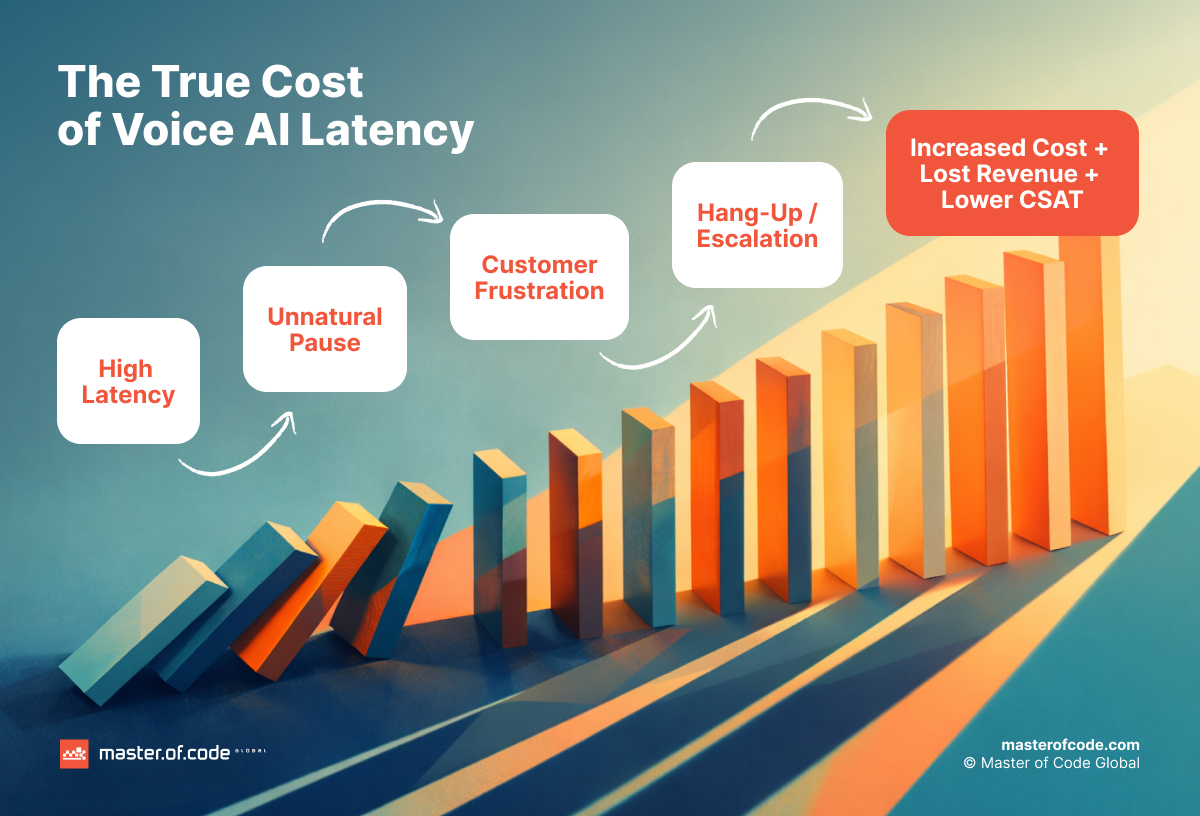
Milliseconds have dollar signs attached to them. The gap between a responsive voice agent and a sluggish one shows up in abandonment, satisfaction scores, and the escalation costs that were supposed to disappear when the AI was deployed.
Customer Abandonment and Churn
A slow AI response creates the same psychological experience as being put on hold. The frustration doesn’t start when the AI pauses — it compounds one that’s already there. ContactBabel puts the US average speed to answer at 99 seconds in 2024, roughly double the pre-pandemic figure. By the time a caller reaches your voice agent, many have already spent well over a minute waiting. A multi-second silence inside the conversation lands on top of that accumulated impatience. This is why AI voice agent latency that looks minor in isolation can be the moment a caller decides they’re done.
Research published in the Journal of Retailing quantified the damage: customers who wait longer than expected are 18% less satisfied with their overall experience. And dissatisfaction spikes to 262% of baseline when wait time significantly exceeds expectations. In a voice interaction measured in seconds rather than minutes, that threshold arrives fast.
The consequences compound. According to PwC, 32% of consumers will stop doing business with a brand they love after a single bad experience — and in the U.S., 17% will walk away after just one, even from a company they like.
In the context of a voice agent interaction, “bad experience” does not require a wrong answer. A long, awkward silence is enough.
Latency spikes don’t just cause hang-ups. They drive up the abandonment rate, trigger repeat contacts, negative sentiment cascades, and escalation requests – even on calls that technically reach a resolution. The call may be logged as “completed,” but the customer’s trust was lost somewhere in the silence.
CSAT and Brand Perception
IBM’s research on AI-powered customer service makes the connection directly: faster responses correlate with higher CSAT, and slow response times erode trust before a problem has even been addressed. Mature AI adopters — organizations that have operationalized AI in customer service — report 17% higher customer satisfaction than those still experimenting, alongside a 38% lower average inbound call handling time. Responsiveness and satisfaction move together.
A Forrester Consulting study reinforces the point from the loyalty side: 83% of consumers say they are more loyal to brands that respond to and resolve issues quickly. A sluggish voice agent doesn’t just frustrate individual callers – it reflects on the organization’s competence. Customers don’t blame the technology. They blame the company that chose it.
Escalation and Operational Cost
When a voice agent pauses too long, callers interrupt, repeat themselves, or ask to speak with a human. Each escalation reverses the cost savings that justified deploying the AI in the first place. If 15% of calls escalate due to latency-related frustration, the ROI model breaks – not because the AI can’t answer, but because it can’t answer fast enough.
In industries where decisiveness is critical, the tolerance drops even further. Financial services, healthcare triage, and insurance claims processing all involve callers who expect immediate responsiveness. A detailed look at voice latency in finance illustrates how even sub-second delays carry specific, measurable consequences in high-stakes verticals.
It’s worth being precise about which metric latency actually impacts. Average handle time (AHT) is the number most operations teams watch, but ICMI’s guidance is that AHT belongs to internal capacity planning – forecasting how many agents you need – not to customer experience. Driving it down by rushing callers is a known failure mode. End-of-turn detection is where much of the recoverable delay hides: trimming the dead air between a caller finishing and the agent responding shortens handle time without cutting a single second of actual problem-solving. That’s the distinction that matters. The goal was never to minimize AHT – it’s to remove the silence that pads it, frustrates the caller, and pushes them toward the “agent” button.
The Invisible Problem
Here is what makes latency particularly dangerous: it often does not surface in standard dashboards. A call might be logged as resolved. The containment rate might look healthy. The CSAT survey might never be sent because the interaction was technically “completed.”
But the customer left frustrated. Their next call – or their decision to switch providers – won’t appear in voice AI metrics at all. You can be losing customers on calls your system reports as successes.
Where Voice AI Latency Comes From: A Plain-English Pipeline Breakdown*
Voice AI is not one process. It is a chain of processes, each adding delay. The total is cumulative, and an unoptimized implementation typically lands at roughly 1.1 seconds of AI processing time before any telephony overhead is even counted.
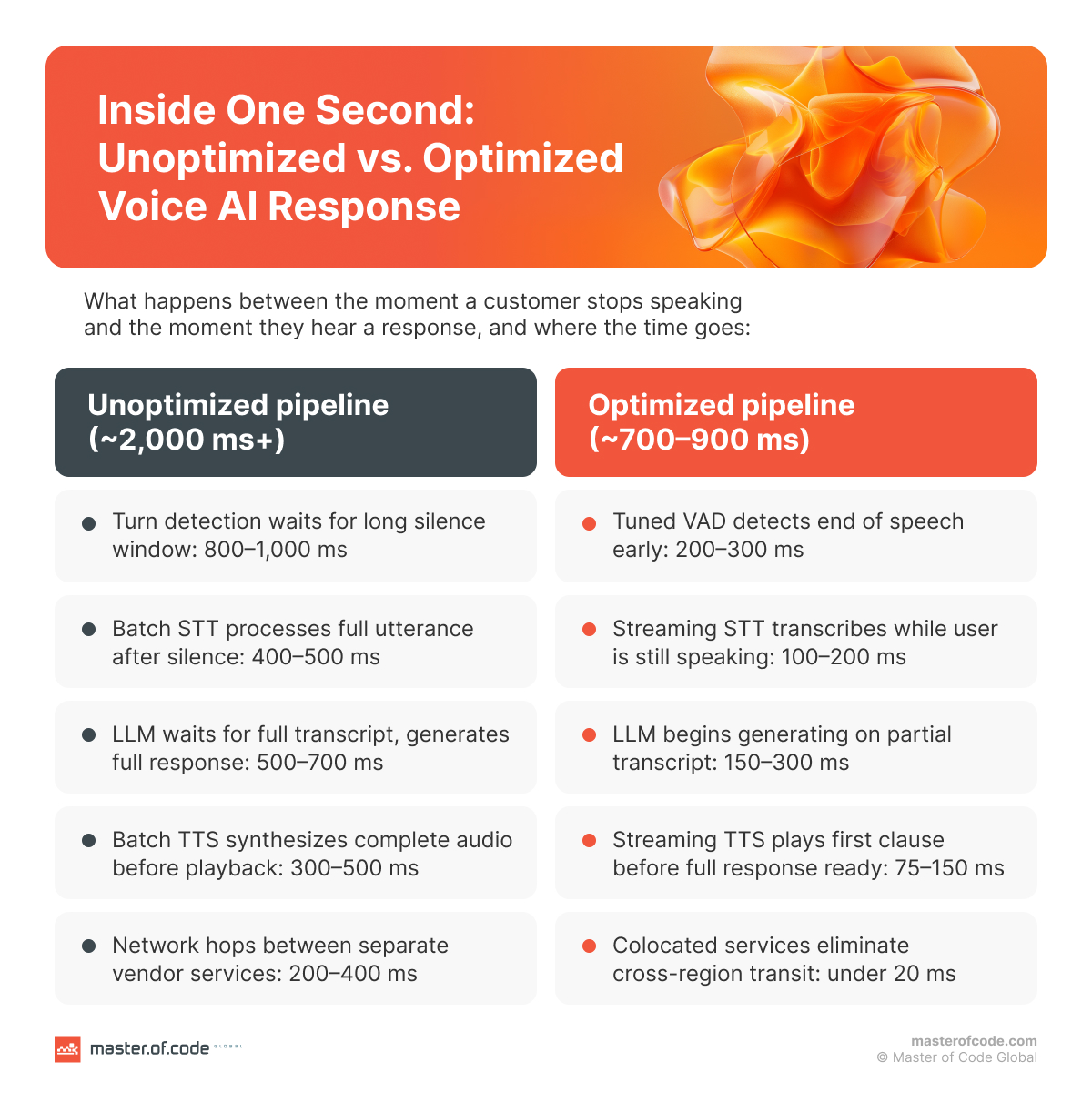
Here is what happens between the moment a caller finishes speaking and the moment they hear a reply.
| Pipeline Stage | Typical Latency Range |
|---|---|
| Turn Detection (VAD / end-of-speech) | 200–500 ms |
| Speech-to-Text (STT) | 100–500 ms |
| LLM Inference | 200–2,000 ms |
| Text-to-Speech (TTS) | 100–400 ms |
| Network & Infrastructure | 40–200 ms |
Stage 1 – Turn Detection (End-of-Speech / VAD)
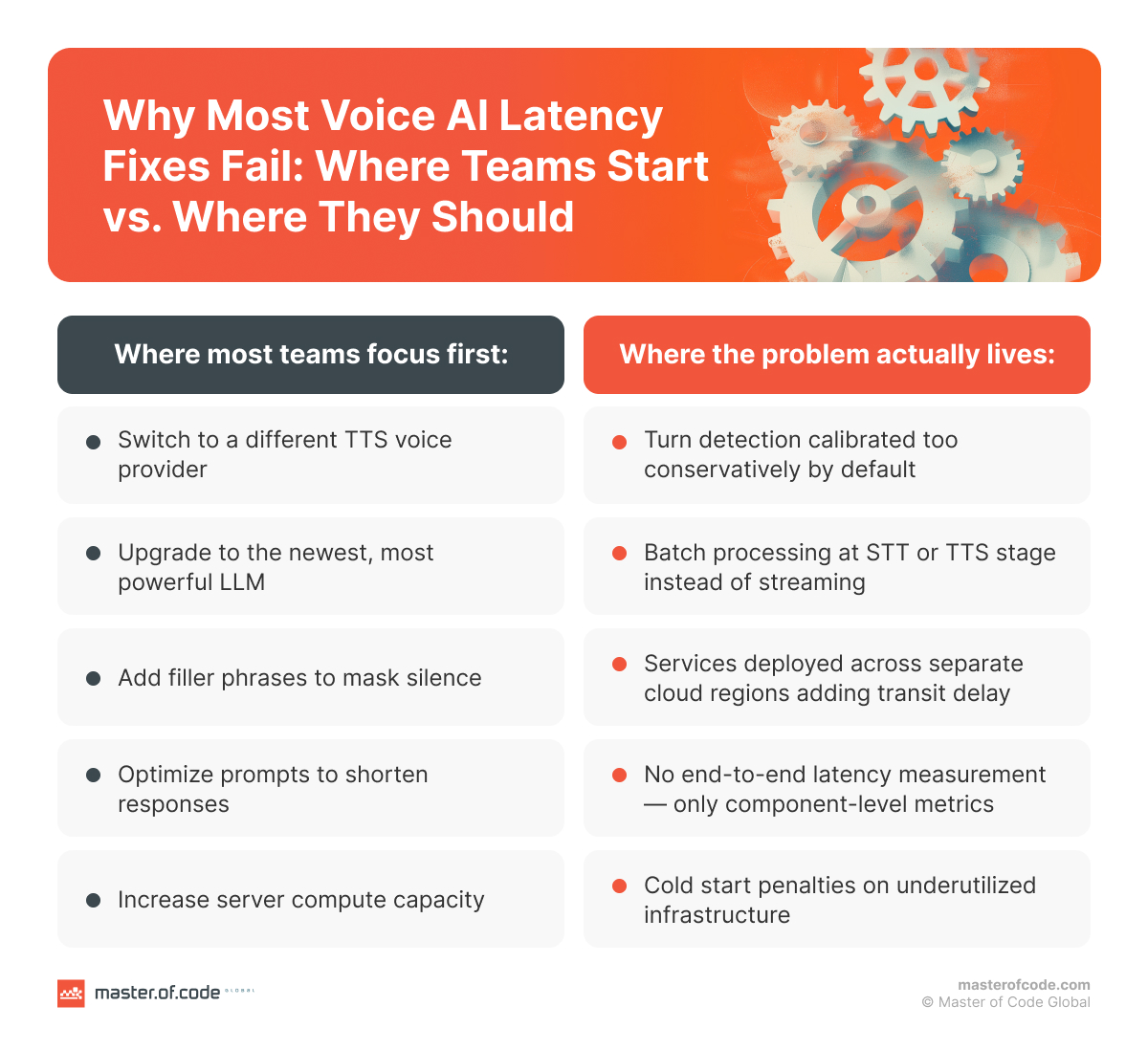
Before the AI can begin processing, it needs to determine that the caller has actually finished speaking. Set the detection threshold too aggressively, and the system interrupts mid-sentence. Set it too conservatively, and it adds several hundred milliseconds of dead air after every utterance.
Turn detection contributes 200–500 ms and is frequently the single largest – and least discussed – source of latency. It also carries the highest penalty for failure: if the AI responds to an incomplete thought, the resulting correction loop can add many seconds to what should have been a brief exchange. A caller trying to give a ten-digit account number who gets interrupted at digit seven will not be patient about repeating it.
Stage 2 – Speech-to-Text (STT)
Once the system decides the caller has finished, the audio is converted to text so the language model can process it.
The approach matters enormously. Batch STT – which waits for the complete utterance before transcribing – adds 200–500 ms. Streaming STT – which transcribes in real-time as the caller speaks – cuts this to 100–200 ms because much of the transcription is already done by the time the caller stops talking.
But speed without accuracy is counterproductive. A mistranscription that forces a clarification exchange (“Did you say ‘billing’ or ‘building’?”) adds far more time than the STT stage saved. Well-optimized production systems land in the range of 100–350 ms for this stage.
Stage 3 – LLM Inference
The language model reads the transcribed input and generates a response. The critical sub-metric here is time-to-first-token (TTFT): how quickly the model begins producing output, not how long the full response takes.
TTFT ranges from roughly 350 ms for smaller, task-specific models to over 1,000 ms for large frontier models. Reasoning-class models – the ones that “think” before answering – are generally too slow for live voice loops. Production-viable voice deployments typically target 100–500 ms TTFT, which means model selection is a latency decision, not just a capability decision.
Streaming the model’s output – sending each generated clause to the text-to-speech engine as it arrives, rather than waiting for the full response – can shave hundreds of milliseconds off this stage.
Stage 4 – Text-to-Speech (TTS)
The language model’s text output is synthesized into audio. First-byte TTS latency – the point at which audio begins playing, before the complete response is ready – ranges from 75–300 ms in optimized systems.
Streaming TTS, which begins playing the first sentence while the rest is still being synthesized, is significantly faster than waiting for the full response to be generated before any audio plays. The difference between the two approaches can be 500 ms or more for longer responses.
Network and Infrastructure
This is where well-intentioned architecture decisions quietly add up. Each vendor boundary in a multi-service stack – telephony provider, STT service, LLM host, TTS service, orchestration layer – adds 10–100 ms of network transit. A stack that separates five services across different providers can accumulate 500–1,000 ms in pure transit before any AI processing occurs.
Add the 300–500 ms PSTN telephony overhead that no software optimization can remove, and the math becomes uncomfortable. A system that benchmarks at 600 ms in a lab environment might deliver 1,500 ms or more on a real phone call.
_______________
*Note: The latency ranges above are derived from documented benchmarks across production voice AI implementations. Individual results will vary depending on platform choice, model selection, infrastructure configuration, and network conditions.
Cascading vs. Parallel: How Architecture Sets Your Latency Ceiling
Before you optimize a single stage, one earlier decision has already set the boundary of what optimization can achieve: the architecture itself. Two systems can use identical STT, LLM, and TTS components and still deliver wildly different call experiences. The reason is that what governs perceived speech latency is not which parts you pick but how they pass work to one another.
A cascaded voice agent architecture (also known as sequential) runs the pipeline as a relay. STT waits for the caller to finish, transcribes the full utterance, and hands it to the LLM. The LLM reads the complete transcript, generates its full response, and hands that to TTS. It synthesizes the audio — and only then does the caller hear a reply.
Each stage waits for the one before it to finish, so the delays don’t overlap – they stack on top of each other. In practice, a sequential cascade lands in the range of 800–2,000 ms of processing before you can add telephony overhead to the calculation. Hamming AI, drawing on an analysis of more than 4 million production calls, puts the industry median P50 for cascading architectures at 1.5–1.7 seconds – a useful voice AI latency benchmark for any team sizing up its own numbers – and sets a well-tuned target of under 1.5 seconds.
A parallel, incremental architecture overlaps the stages instead of sequencing them. Streaming STT transcribes as the caller speaks, so the transcript is nearly complete the moment they stop. The LLM begins generating on partial input and streams its output clause by clause. TTS starts synthesizing the first clause while the model is still composing the rest – driving time-to-first-audio down to a fraction of what a sequential design allows. Because the stages run concurrently rather than in series, their latencies fold into one another rather than being summed. This is what makes sub-500 ms real-time voice AI achievable. Not faster components, but overlapping ones.
Why this matters: When you’re choosing an architecture, you’re also deciding on a ceiling – and, in effect, your latency budget before you can apply a single tactic. Every optimization tactic in the next section – streaming, aggressive endpointing, model right-sizing, colocation – operates within the limit your architecture defines.
A sequential cascade that starts above 1,500 ms can be tuned, trimmed, and tightened, but it cannot overlap work it was never designed to overlap; no configuration change collapses sequential stages into concurrent ones. That’s why the same tactic yields a few hundred milliseconds in one system and breaks the sub-second barrier in another.
The tactics tell you how to win milliseconds. The architecture tells you how many are available to win.
As Olga Hrom, Chief Delivery Officer at Master of Code Global, puts it: “The whole technical game comes down to one idea — don’t make the user wait for things to happen in sequence when they could happen in parallel, or start before they’re even finished.”
How to Fix High Latency Voice AI – Practical Optimization Tactics
Before reaching for any of these tactics, it’s worth thinking about one caveat that will determine whether they’ll pay off. Voice AI latency optimization only works if the architecture underneath is already right. As we laid out in the previous section, a sequential cascade has a latency ceiling that no amount of tuning can break through – streaming, endpointing, and colocation win milliseconds within that ceiling, but they can’t raise it. If your system is losing whole seconds to a fundamentally sequential design, how to reduce latency in voice AI becomes a question of architecture first, tactics second – so start there, not here.
That said, whether you are building new low latency voice AI or diagnosing an existing deployment, the tactics below represent the current engineering consensus on where milliseconds are won and lost.
Tactic 1 – Enable Streaming at Every Pipeline Stage
The single highest-impact change is switching from batch to streaming processing at every layer simultaneously.
Streaming STT transcribes audio in real-time as the caller speaks, so most of the transcription is already finished when the utterance ends. Streaming LLM output starts feeding text to the TTS engine before the full response is generated – the AI begins speaking its first sentence while still composing the third. Streaming TTS begins audio playback on the first clause, not the complete response.
Each of these individually saves 100–300 ms. Combined, they can cut perceived latency by 500 ms or more – often the difference between an interaction that feels natural and one that feels broken.
Tactic 2 – Tune Turn Detection Aggressively
Default platform settings for voice activity detection (VAD) and endpointing are typically conservative. They are calibrated to avoid interrupting callers, which is reasonable – but the resulting silence penalty can be 400 ms or more per turn.
Purpose-built endpointing models, trained on the specific conversation patterns of your use case, can cut this substantially. Advanced configurations add entity-aware logic: the system learns not to trigger end-of-speech mid-phone-number, mid-address, or mid-credit-card-number. This avoids the transcription errors that cost far more time than aggressive turn detection saves.
Tactic 3 – Right-Size the Language Model
Not every use case requires a frontier model. A billing inquiry or appointment confirmation does not need the same model as a complex technical support conversation. Smaller, task-specific models can handle well-scoped interactions with dramatically lower LLM inference latency – sometimes 3–5x faster TTFT.
The default assumption that the newest or largest model is always best is incorrect for voice applications. First-token latency frequently increases with model generation. Any evaluation of models for voice should include TTFT measurement alongside accuracy scoring.
Two additional techniques compound the gains. Cache frequent responses for known interaction patterns. Pre-generate filler phrases (“Let me check on that for you…”) that keep the conversation alive while the model processes complex queries.
Tactic 4 – Colocate Infrastructure
Run STT, LLM, and TTS in the same cloud region – or ideally, the same data center. Colocation reduces inter-service latency dramatically; geographic distribution across regions adds measurable per-hop delay that compounds across a multi-service pipeline.
Use persistent WebSocket or WebRTC connections rather than per-utterance REST/HTTPS requests. Each new HTTP connection adds handshake overhead – TLS negotiation, TCP setup – that accumulates across a conversation with dozens of turns.
Tactic 5 – Parallelize Independent Processing
Tasks that don’t depend on each other should run concurrently, not sequentially. Knowledge retrieval, abuse detection, compliance checks, and CRM lookups can all execute in parallel while the LLM generates its response.
Start TTS synthesis on the first generated sentence while the model continues generating the rest. Pre-warm compute resources; cold starts after periods of inactivity can noticeably slow the first interaction in a session, creating the worst possible first impression.
Tactic 6 – Measure What Users Actually Experience
Average latency hides the calls that break conversational flow. The callers who say “Hello? Are you there?” are experiencing p90 or p99 latency – not the median. Both percentiles need to be tracked and reported alongside the median.
The correct measurement is mouth-to-ear delay on real phone calls – not synthetic benchmarks on browser connections, not single-component tests, and not lab environments. Measure before and after each voice AI latency optimization change, because changes that improve the median can sometimes worsen the tail.
Tactic 7 – Design for the Wait You Can’t Engineer Away
Not every millisecond can be removed. Some delay (say, for a genuine database lookup) is unavoidable. This way, your goal shifts from eliminating it to managing how it feels. At this point, the quest to find out how to reduce latency in voice AI stops being purely a technical question and becomes a design one.
Olga Hrom frames the principle around how people already behave: “Some amount of delay is unavoidable — and that’s fine, because humans do this too. When a support agent needs a moment to pull up your account, they don’t go silent. They say ‘hang on, let me look that up.’ You’re waiting the same number of seconds, but you’re no longer wondering if something broke.”
In practice, this means acknowledging the request before processing it, for example, “Let me check that,” and varying filler phrases so the bot does not sound scripted. In multimodal deployments, a visual cue can also fill a gap that audio alone cannot. The other half is keeping the caller in control rather than idle. Barge-in is the highest-impact version of this: “Users should be able to interrupt the bot mid-sentence the way they’d interrupt a person,” Hrom notes. “That alone removes a huge amount of the perceived latency — the user is never stuck waiting for the bot to finish before they can redirect it.”
A Note on Speech-to-Speech Architectures
Unified speech-to-speech models collapse the full pipeline into a single model, removing inter-stage latency entirely and pushing voice-to-voice latency toward its theoretical floor. This is worth understanding as an emerging option – but the latency gain comes with three specific trade-offs that matter for enterprise deployments.
Less control over conversation logic. In a cascaded pipeline, the text transcript between STT and TTS provides a point for inspection, logging, and intervention. Teams can use it to enforce business rules, add compliance checks, and correct intent before the model takes action. A speech-to-speech model reasons directly from audio to audio with no exposed text step, so that control point disappears. You get a more fluid conversation and less ability to constrain what it does.
Higher cost per minute. Unified audio models are generally priced well above the combined cost of equivalent STT, LLM, and TTS components. The per-minute cost of a premium speech-to-speech model can be ten times higher than an assembled cascade, significantly increasing voice AI development costs at scale. At low call volumes, that’s negligible; at enterprise scale, it compounds into a material line item.
Limited customization. A cascade lets you swap any stage independently – a different STT vendor, a task-specific LLM, a branded voice — and tune each to your use case. A single unified model is largely take-it-or-leave-it. You inherit its voice options, its conversational style, and its behavior as a package, with far fewer levers to adapt it to a specific industry or brand.
For most high-volume enterprise deployments, these trade-offs make speech-to-speech unsuitable today — though the landscape is evolving quickly, and the calculus is already different for narrow, high-frequency use cases where latency dominates, and deep customization isn’t required.
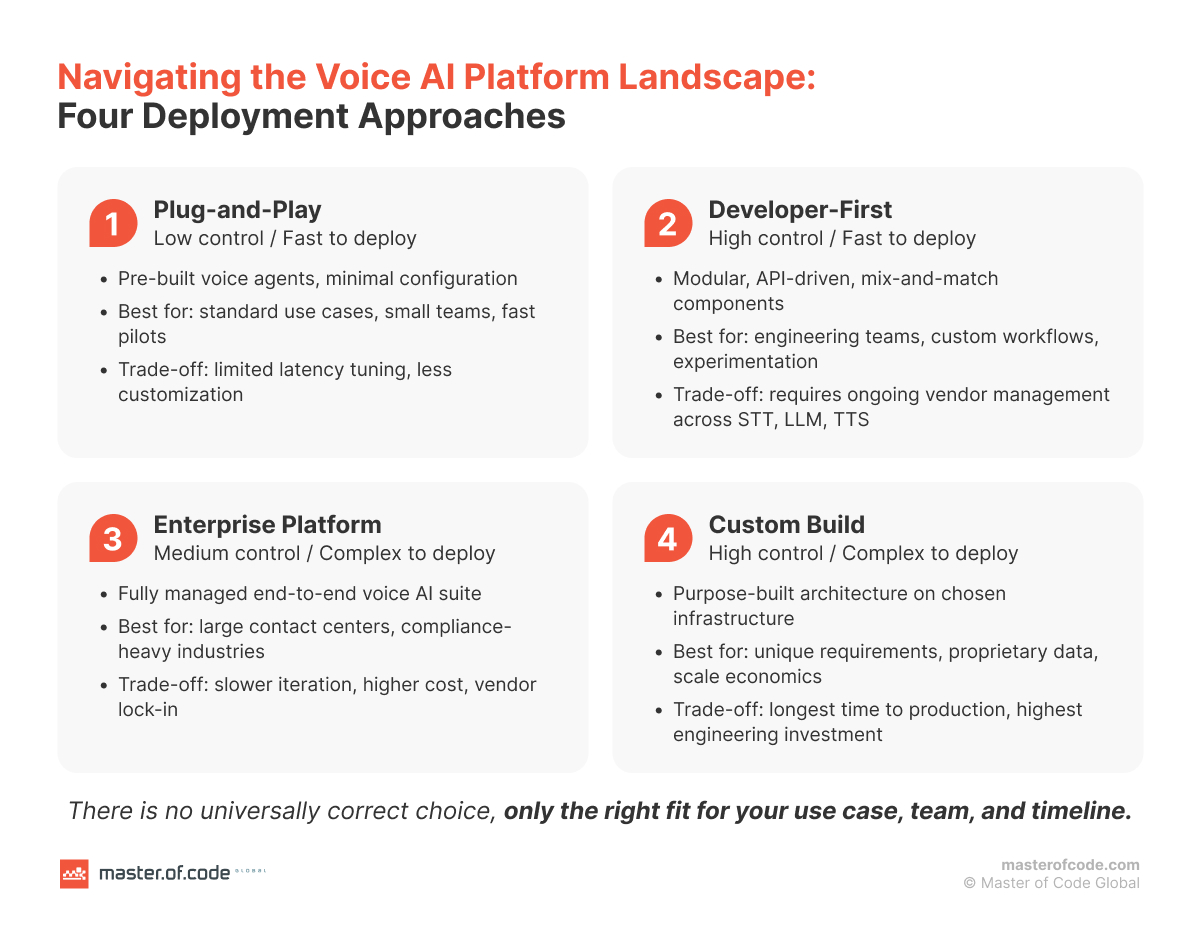
Choosing the Right Platform for Low Latency Voice AI
Platform choice sets the latency ceiling. No amount of application-layer optimization will overcome a foundation that introduces unnecessary delay at the architectural level. Building low latency voice AI starts with the right platform decision.
Two Architectural Categories
- Cascaded (modular): STT → LLM → TTS as separate, specialized services connected through an orchestration layer. This is the dominant approach for enterprise deployments. It offers flexibility – you can select best-in-class components for each stage and swap them independently. But each integration boundary introduces latency, and a five-service stack can accumulate significant transit delay.
- Unified / speech-to-speech: A single model handles the full voice interaction. Lower latency potential, but with trade-offs: reduced control over conversation logic, fewer customization options, and higher per-minute operational cost. Better suited to narrow, high-frequency use cases than broad enterprise workflows.
A third category is emerging: hybrid architectures that combine elements of both approaches. These typically use a cascaded pipeline for reasoning and tool integration while routing the audio layer through a unified model for lower-latency, more natural output.
The Platform Landscape – Representative Examples
Master of Code Global partners with platforms across this space. The examples below give context to the landscape – they are not rankings or recommendations. The right choice depends entirely on what your deployment requires.
- ElevenLabs – Focuses on voice synthesis quality and expressiveness. Widely used for applications where brand voice and emotional nuance are priorities.
- Deepgram – Specializes in real-time speech recognition with low-latency transcription designed for production voice pipelines.
- WhisperAI (OpenAI) – Open-source speech recognition model widely adopted as an STT layer in custom voice stacks.
- VoiceFlow – Conversation design and orchestration platform. Suited for teams building and iterating on voice agent logic without deep infrastructure involvement.
- Parloa – Enterprise-focused Conversational AI platform with strong telephony integration. Notable traction in European markets and regulated industries.
- SoundHound – End-to-end voice AI platform with on-device and cloud processing options. Notable in automotive, hospitality, and IoT applications.
Each represents a different approach and set of trade-offs. None is universally best.
What to Demand From Any Vendor
Before signing a contract, ensure your vendor can provide:
- Round-trip mouth-to-ear latency measured on real phone calls, not partial pipeline metrics or WebRTC-only benchmarks
- Configurable turn detection – the ability to adjust or replace endpointing behavior
- Transparent pricing – whether costs are stacked per-minute across components or flat
- Compliance alignment with your industry (healthcare, finance, telecom, etc.)
But providing figures and committing to them are different things. The single most important protection is a latency SLA written into the contract – with two non-negotiables. First, it must specify p95/p99 targets, not averages: a “sub-second average” is compatible with 15% of calls exceeding two seconds – the exact calls where customers hang up – so the tail is what the guarantee has to name, along with the remedy if it’s missed. Second, it must specify mouth-to-ear measurement on real PSTN calls, not a WebRTC or browser demo that omits the 300–500 ms of telephony overhead every live call carries.
If a vendor resists putting p95/p99 targets or PSTN-based measurement into the contract, treat that as your answer. Confidence in real-world performance looks like a willingness to be held to it.
How Master of Code Global Solves Latency at Each Pipeline Stage
Voice AI latency is won or lost stage by stage, so that’s where we work. Rather than treating latency as a single knob to turn after launch, we address each source in the pipeline directly — matching the fix to where the milliseconds actually go.
| Pipeline Stage | The Problem | What Master Of Code Global Does |
|---|---|---|
| Turn detection | Default VAD settings are calibrated conservatively, padding every turn with 400 ms or more of dead air. | Configures purpose-built endpointing tuned to the specific use case, with entity-aware logic that won’t cut off a caller mid–account-number. |
| Speech-to-text | Batch transcription waits for the full utterance before it starts, adding needless delay. | Implements streaming STT that transcribes as the caller speaks, so the text is ready the moment they stop. |
| LLM inference | A frontier model chosen by default can push time-to-first-token past 1,000 ms. | Right-sizes the model to the task — a smaller, task-specific model handles well-scoped calls at a fraction of the TTFT. |
| TTS & network | Full-response synthesis and multi-vendor hops stack up hundreds of milliseconds. | Streams audio from the first clause and colocates services to strip out inter-service transit. |
These aren’t theoretical. Across real deployments – from an eCommerce voice assistant that handled over 121,000 interactions, to voice agents for financial services and hospitality – the same stage-by-stage discipline is what keeps conversations feeling natural rather than broken. These are the kinds of voice AI use cases for business where latency discipline directly determines whether the deployment succeeds.
Where Master of Code Global Fits
The through-line of everything above is that latency is an architecture-and-execution problem, not a metric you patch after launch – and that’s exactly where we work.
Master of Code Global matches platform capabilities to what your deployment actually requires: traffic volume, industry constraints, latency targets, and how much engineering control your team needs to retain. Our AI voice bot solutions practice covers the full arc, from platform selection through the stage-by-stage tuning outlined above to production deployment.
The results show up where they matter – in the numbers. The eCommerce engagement referenced earlier generated $28,000+ in recovered revenue across 6,754 answered calls in five months, on the back of conversations fast enough that callers stayed on the line instead of dropping to a human. It’s a concrete illustration of the ROI of voice AI for enterprises when latency is treated as a first-class design constraint.
The goal is simple: get the foundation right the first time and avoid the months of rework that follow a mismatched platform choice. A rigorous technical audit for AI platforms up front – measuring real performance before committing – is almost always cheaper than the alternative, because fixing latency later is always slower and more expensive than building it out correctly from the start.
If you’re evaluating a first voice deployment or diagnosing a live one, start with a conversation. Reach out through our Conversational AI services to map your latency targets to the right architecture.
The Silence Your Dashboard Doesn’t Show
Voice AI latency is a business problem, not a technical footnote. It determines whether a deployment quietly succeeds or quietly fails – bleeding customers on calls that your system logs as victories.
The human threshold is unforgiving. Every response under 800 ms feels natural. Every response above that tests the caller’s confidence in the interaction – and in your brand. At two seconds, most people have already decided the system is broken.
If there’s one place to start, it’s an end-to-end latency measurement at p90 on real PSTN calls – that single number tells you more than any vendor benchmark, because it captures what your slowest 10% of callers actually hear, and the gap between it and what your dashboard reports is usually wider than expected.
Or, as Olga Hrom puts it: “Latency in voice bots isn’t just a performance metric — it’s a trust metric. The bots that feel the most human aren’t necessarily the fastest ones. They’re the ones that handle the wait the way a good human would.”
Whether you are evaluating a first voice AI deployment or diagnosing a live system, Master of Code Global helps – from platform selection to custom build. Reach out through our AI consulting services to start a conversation.
Discover how Master of Code Global can help enhance your customer’s experience and boost sales growth.