


Picture a 400-person insurance broker planning an AI assistant that drafts client summaries from policy documents. A cloud API would let the team start next month without new hardware. A local deployment would keep the model on servers the company controls. The right choice depends on usage, data rules, the quality bar, and whether IT can run it.
This guide to on-premise AI vs cloud AI for mid-market businesses gives you a workload comparison, a cost formula, a security check, and questions for an implementation partner. Want to run this comparison on your own workloads? Our AI consulting team can help.
Table of Contents
Key Takeaways
- Choose deployment per workload. Different workflows in one company can justify different environments.
- Managed cloud AI fits uncertain demand and thin infrastructure capacity, with no upfront hardware commitment.
- On-premise cost advantages depend on high utilization, equivalent task quality, and a complete operating bill.
- Sensitive data requires documented controls and an approved data path. Hosting location alone does not settle security.
- Hybrid AI can separate workloads with different requirements, but it adds integration and operating work.
What Are You Actually Comparing When You Choose an AI Deployment Model?
You are making two decisions at once: where the model runs and who operates it. In the State of FinOps 2026 survey, 98% of 1,192 respondents said their FinOps practice manages or plans to manage AI spend. The sample is cloud-cost practitioners, not mid-market firms, but AI is clearly budgeted as infrastructure.
What Counts as On-Premise AI?
On-premise AI runs on servers in a facility your company operates: a self-hosted LLM or other model, a serving layer that exposes it as an internal API, and connections to your apps and data. This article covers inference, meaning serving models for business tasks, not training them.
What Does Cloud AI Include?
Cloud AI covers two arrangements with very different cost and staffing:
- Managed model API. The provider runs the model and its serving. You pay for usage.
- Model on cloud GPU instances. You rent compute and deploy a model, but your team or a partner may still run serving and patching.
Where Do Hybrid AI and Private Cloud Fit?
Hybrid AI combines local and cloud components or places workloads in different environments, a broader idea than hybrid cloud in NIST SP 800-145. NIST defines private cloud as infrastructure for one organization’s exclusive use, on or off premises. A virtual private cloud (VPC) in a public cloud is logically isolated but not automatically dedicated.
| Arrangement | Where the model runs | Who usually operates serving |
|---|---|---|
| On-premise | Your own facility | Your team, often with a partner |
| Colocation | Rented space in a third-party facility | Your team or a partner |
| Hosted private cloud | Dedicated infrastructure at a provider | Provider, under a responsibility agreement |
| Self-hosted model on cloud GPUs | Shared public cloud | Your team or a partner |
| Managed model API | Shared public cloud | Provider |
On-Premise AI vs Cloud AI: Which Fits Your Workloads?
Decide workload by workload. One business can pilot an assistant on a managed API, keep a document pipeline local, and route restricted work separately.
When Should You Start With Cloud AI?
Take a 250-person professional-services firm testing an assistant over its knowledge base. Nobody knows whether 20 or 200 people will use it daily. A managed API removes the hardware commitment, offers elastic scalability, and its models may already meet the quality bar. AWS’s Generative AI Lens notes that the full cost of hosting a foundation model is hard to pin down, which makes managed hosting a sensible default. Check data terms and cost at realistic usage before the pilot grows.
When Should You Evaluate On-Premise AI?
Now take a logistics company processing thousands of shipping documents a day, with steady volume, local source files, and a defined accuracy threshold. A plant whose inspection assistant must work through internet outages is another strong candidate.
High volume alone does not justify GPUs. First validate a model that meets the accuracy bar, a serving stack that handles peak load, and local capacity for both.
When Should You Split Workloads Across Environments?
A distributor may analyze supplier contracts that forbid external processing while running a customer assistant over public product data. Local inference for contracts and a managed API for the assistant can satisfy both under shared routing rules and governance. Either way, the application must fit the workflow, which is where custom AI development services build around the chosen deployment.
On-premise AI vs cloud AI: starting points by business situation
| Business situation | Deployment to evaluate | Main reason | What must be validated |
|---|---|---|---|
| Pilot with uncertain adoption | Managed cloud API | Lower initial infrastructure commitment | Data terms and cost at realistic usage |
| Continuous local document processing | On-premise or self-hosted cloud model | Predictable workload and control of serving | Task quality, capacity, and complete TCO |
| Restricted and unrestricted workflows | Hybrid AI | Different placement requirements | Routing rules and shared governance |
| Exclusive infrastructure with external operations | Hosted private cloud | Isolation plus delegated operations | Contracted isolation and responsibility split |
These are starting points, not universal recommendations.
When Does On-Premise AI Become Cheaper Than Cloud AI?
On-premise becomes cheaper only when sustained, well-utilized volume meets an equal quality bar and the full operating bill is counted. No universal threshold in users or requests exists, but the calculation below finds yours.
How Do You Compare Total Cost of Ownership Over Three to Five Years?
Any comparison of cloud AI vs on-premise AI infrastructure starts with CapEx / OpEx. On-premise front-loads a hardware purchase, while cloud turns spending into recurring service charges. Both still carry ongoing costs.
A fair total cost of ownership (TCO) model compares the same workload at equal task quality, latency, availability, and peak capacity, counting only costs that differ by deployment. For five years, add hardware refresh, contract renewals, and exit costs. Count the hardware purchase or its depreciation, never both.
Which Hidden Costs Belong in the Calculation?
- On-premise: GPU infrastructure and setup, staff time, serving licenses, power and cooling, storage, monitoring, patching, redundancy, security reviews, and upgrades.
- Managed cloud API: input and output tokens, context resent with each call, agent loops, embeddings and retrieval, guardrails, logging, support, and network charges.
- Self-hosted cloud model: GPU instance hours, idle capacity, serving operations, storage, networking, and support.
Idle capacity costs money everywhere: owned hardware is paid for whether busy or not, and reserved cloud capacity bills by the hour. AWS notes that self-hosted endpoints charge for uptime plus storage and network, while managed models on Amazon Bedrock charge per token, at rates that vary by model and pricing mode.
How Do You Calculate Your Own Break-Even Point?
First, define one workload unit, such as a completed task with a fixed input and output length. Then compare monthly costs over the same period:
On-premise monthly equivalent = upfront cost ÷ analysis months + local fixed monthly costs + monthly units × local variable unit cost
Cloud monthly cost = cloud fixed monthly costs + monthly units × cloud variable unit cost
Setting the two equal gives the volume above which on-premise costs less:
Break-even units per month = (upfront cost ÷ analysis months + local fixed costs − cloud fixed costs) ÷ (cloud unit cost − local unit cost)
This holds only within the local system’s measured capacity. Past it, you need another GPU or server, and the upfront cost steps up.
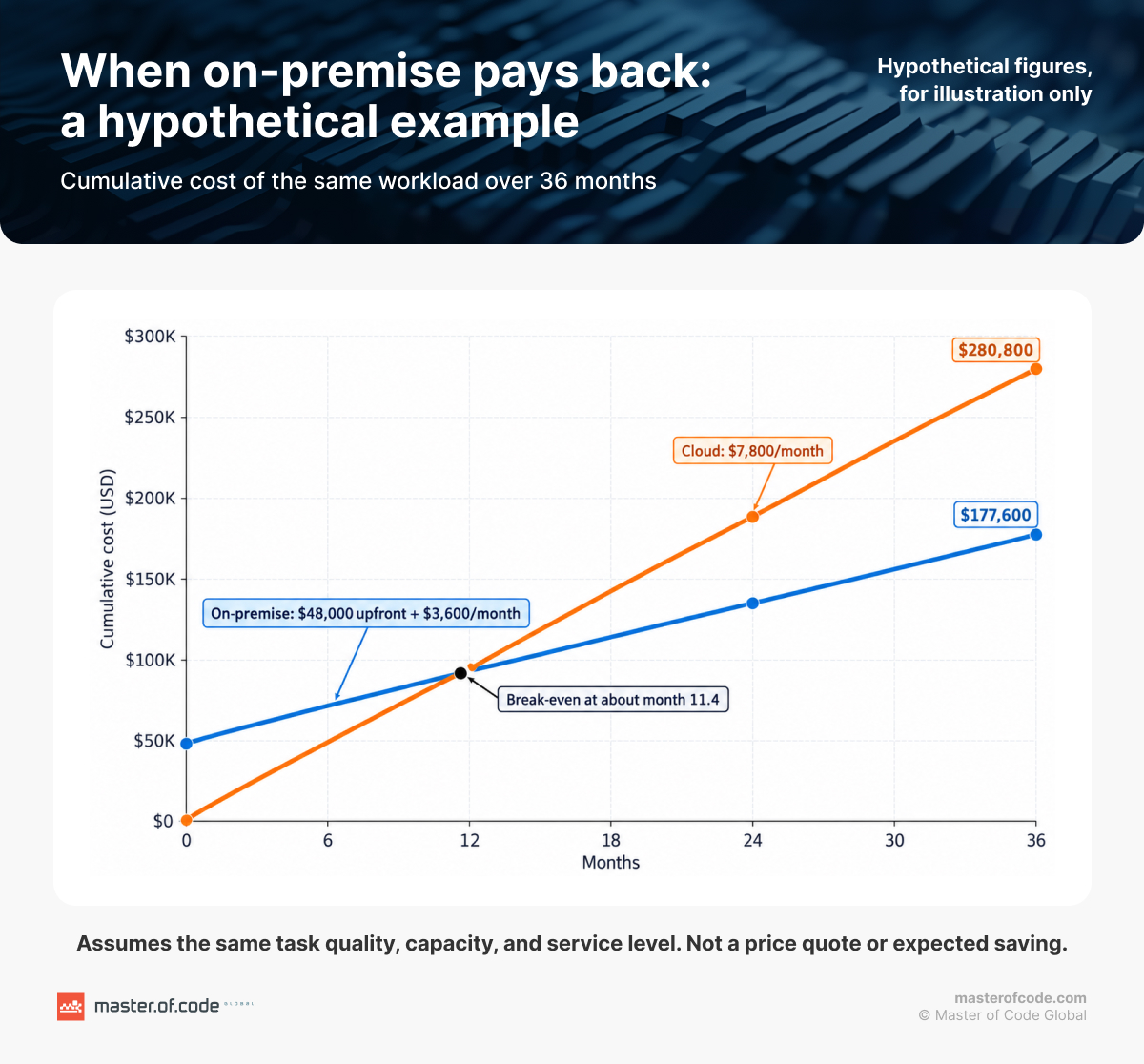
Hypothetical example: invented figures, for arithmetic only
| Assumption | On-premise | Cloud |
|---|---|---|
| Upfront deployment-specific cost | $48,000 | $0 |
| Monthly operating cost for the same workload | $3,600 | $7,800 |
| Three-year total | $177,600 | $280,800 |
| Five-year total, assuming one $24,000 hardware expansion in year four | $288,000 | $468,000 |
The $48,000 is CapEx. The monthly figures are OpEx. Over 36 months, the on-premise monthly equivalent is about $4,933, and simple payback comes at about 11.4 months. These are not quotes or market prices, and they assume equal quality, capacity, and service level within the same cost scope.
Utilization, prompt length, model choice, batching, caching, after-hours support, and extra hardware all move the result. Quality matters most: a cheaper local model that triggers manual rework can erase its cost advantage.
Can Cloud AI Meet Your Security and Data Requirements?
For many workloads, yes. Cloud AI can handle sensitive data when a documented requirement allows it and the right controls surround it.
What Requirement Actually Determines Where Data Can Go?
Start by naming the rule. Four kinds of requirements decide placement:
- Data residency: where data must be stored or processed.
- Data sovereignty: which jurisdiction and legal control apply to the data.
- Handling rules: who may access it, how long it is kept, and which third parties may process it.
- Explicit restrictions: contracts, regulations, or internal policies that forbid external processing.
On-premise becomes a requirement only when one of these explicitly excludes cloud processing, or when the system must run disconnected. Healthcare shows why: HHS guidance permits cloud processing of electronic protected health information, provided the organization signs a HIPAA-compliant business associate agreement and meets its other HIPAA obligations. Compliance rests on the agreement and safeguards, not the server’s address.
A restriction on external processing does not automatically mean buying GPUs either. A credit union with 45,000+ members could not send data to external AI services, so Master of Code Global built its knowledge assistant inside the Microsoft environment it already used, in four weeks. Staff now spend 85% less time searching for policies, procedure tickets fell 42%, and users rate 93% of answers accurate and helpful.
Which Controls Should You Compare in Both Environments?
Compare the same controls in both: least-privilege access, encryption and key management, audit logs, network boundaries, retention, data-use terms, application permissions, incident response, and recovery.
On a managed service, the provider secures the infrastructure, while your team controls access, configuration, and what the application sends, as AWS’s Bedrock data protection documentation explains. On-premise, nearly all of it moves to you.
Read data terms precisely: “not used for training” and “not retained” are different promises. Bedrock does not train on your prompts and completions, yet its retention settings show some models require retention for abuse detection. Google Cloud separates the same two promises. On Vertex AI, zero retention means requesting an exception from abuse-monitoring logs and skipping features such as Grounding with Google Search. Check the exact service, model, region, and configuration before showing either claim to an auditor.
Application risks travel with the system: retrieval that surfaces documents a user should not see, or an agent with excess permissions. Reviewing architecture and controls before deployment is the job of AI security consulting services.
What Does Your IT Team Need to Run AI Reliably?
You do not need an AI research team, but you need a named owner for serving, data security, releases, and recovery. The deployment decides how much of that lands on your staff.
Which Responsibilities Stay With Your Team?
| Responsibility | On-premise | Self-hosted model on cloud GPUs | Managed model API |
|---|---|---|---|
| Hardware, power, and facility | Your team | Cloud provider | Cloud provider |
| Model serving, scaling, and patching | Your team or partner | Your team or partner | Provider |
| Application and data access | Your team | Your team | Your team |
| Quality evaluations | Your team | Your team | Your team |
| Monitoring and incident response | Your team, full stack | Provider for infrastructure, you for serving and app | Provider for the service, you for the app |
What this means for hiring:
- A limited production deployment can often run on existing platform staff with a specialist partner.
- Larger deployments or strict availability targets need deeper skills in model serving, GPUs, and on-call operations.
- Buying hardware never removes the need for application engineering and model evaluation.
The serving layer needs ongoing work too: NVIDIA’s NIM support matrix ties each model to verified GPUs, profiles, and software releases that change between versions. Kubernetes is common here but not required.
Where internal AI expertise is thin, a partner can supply serving setup, GPU tuning, and after-hours support, but decisions about data access, quality, and risk stay inside the company. Whether to build each component yourself is covered in our guide to build vs buy AI solutions.
Which Operational Risks Should You Plan For?
Running AI infrastructure on-premise brings risks a managed service would absorb. Pair each with a control:
| Risk | Control |
|---|---|
| Hardware failure, power or cooling interruption | Redundancy sized to the service level, plus a hardware support contract |
| GPU memory or capacity exhaustion under load | Capacity testing at peak concurrency before go-live |
| Incompatible model, driver, or serving updates | Staged upgrades with tested rollback |
| Insecure serving endpoints | Restricted network access in front of the server, not only an API key |
| Missing recovery procedures | Documented and rehearsed backup and restore |
| Dependence on one employee | Runbooks and contracted support coverage |
The endpoint risk is real. vLLM’s security documentation warns that its API key protects only some API paths, leaving other endpoints unauthenticated. Tie redundancy and staffing to each workload’s service level.
How Do Latency and Workload Spikes Change the Decision?
Neither deployment is faster by default. Response time depends on how the whole workflow is sized, so benchmark both on your own requests.
What Should You Benchmark Before You Choose?
Measure time to first token, full response time, throughput, peak concurrency, and P95 response time on the same representative requests for both options. Include retrieval and database calls, since users wait for those too.
NVIDIA’s benchmarking guide notes that time to first token includes queuing, prompt processing, and network latency. Local inference removes the network hop, but an undersized server queues requests under load, and a well-provisioned cloud service can beat it.
How Do You Handle Spikes Without Buying for the Largest Peak?
Hardware sized for the year’s busiest hour sits idle most of the time. Three patterns preserve scalability without overbuying:
- Elastic cloud capacity: a managed API or cloud GPUs absorb bursts for workloads allowed in the cloud.
- Queues and batch processing: non-urgent work waits for off-peak hours or runs as batch jobs.
- Local baseline with approved cloud overflow: steady load stays local, and permitted tasks move to cloud at peak.
Cloud capacity has limits too. Amazon Bedrock applies per-model, per-region quotas on requests and tokens, so confirm headroom before launch.
Take a retailer whose support chats spike during a holiday promotion while finance faces a month-end invoice backlog. Chats need answers in seconds, but invoices can wait overnight, so each can run in the cheapest environment that meets its deadline.
When Do Hybrid AI and Private Cloud Make More Sense?
Hybrid fits workloads with different placement rules. Private cloud fits when you need dedicated infrastructure without running a facility. Both add coordination work.
Which Workloads Should You Keep Local and Which Can Use Cloud?
A hybrid AI deployment keeps local inference for restricted or offline workflows and sends the rest to approved cloud services. Run both as one system, with shared identities, one routing policy, common monitoring, and a clear support owner.
Each stage needs a permitted data path: fine-tuning in the cloud and running locally does not keep training data local.
When Is Hosted Private Cloud the Better Middle Ground?
Hosted private cloud is dedicated infrastructure that an external provider hosts and often operates, for companies that need exclusive hardware without a data center. Check tenancy, location, privileged support access, key management, and the responsibility agreement, since they set your compliance position.
How Can AI Connect to Legacy Systems Without Exposing Restricted Data?
There are two safe routes:
- Local-only processing: the connector, permission checks, retrieval, and inference all stay inside the approved local boundary.
- Approved cloud processing: a local gateway retrieves only permitted records, masks them where needed, and sends approved context to a cloud model.
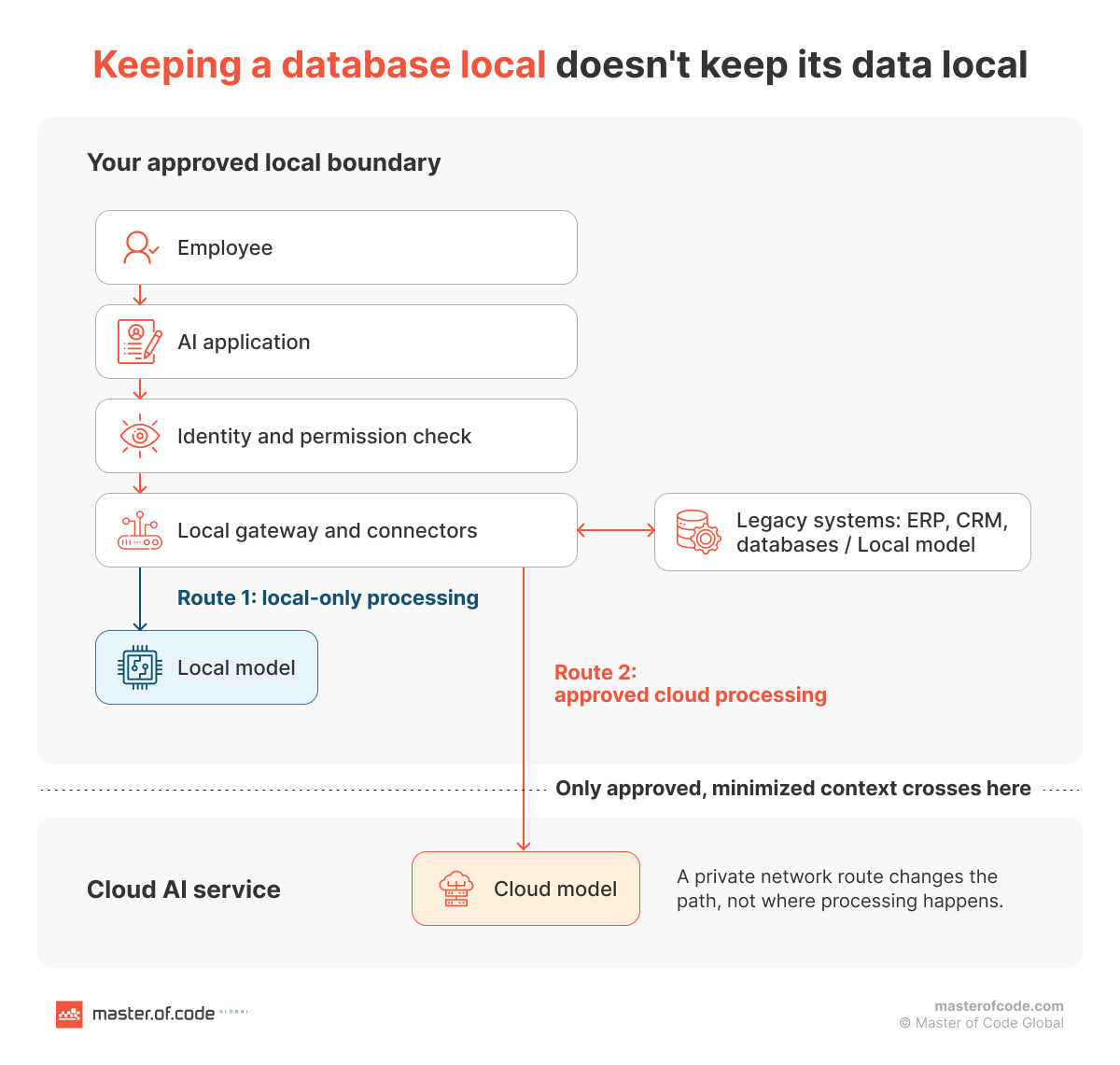
The detail most teams miss: an on-premise database or vector index does not keep information local if retrieved text goes to a cloud model. Amazon Bedrock’s RetrieveAndGenerate API, for example, sends retrieved results to the model for processing in the cloud.
Connectors should authenticate, respect user permissions, limit queries, gate writes, and restrict logging. For systems without usable APIs, use a controlled adapter or approved export. Building such connectors for ERP, CRM, and internal databases is the core of AI integration services. Our guide to AI data preparation covers permissions and content cleanup.
Two more cautions: AWS PrivateLink makes the route to Bedrock private, but processing still happens in the cloud. And redaction needs testing, since it can miss sensitive details.
How Do Model Choice and Vendor Lock-In Affect Your Options?
Model choice and hosting choice are separate decisions, and lock-in can come from either.
How Should You Compare Self-Hosted Models With Proprietary APIs?
Compare candidates on your own representative tasks: quality, context length, language support, response time, customization, licensing, and operating cost. Public leaderboards rarely reflect your documents.
Models with downloadable weights can run on-premise or on cloud GPUs, but that does not make them open source. The Open Source AI Definition also expects code and detailed training-data information under open terms. Many so-called open-source models carry custom licenses that limit commercial use, so check each model’s terms.
A proprietary API may offer capabilities you need today. A self-hosted model gives more control over serving and version changes. Neither guarantees better quality or lower cost. Once you choose, LLM integration services connect the model to your application, tools, and data.
How Do You Keep a Practical Exit Path?
Plan the exit before you sign:
- Keep data and original documents in portable formats you control.
- Put a model adapter layer between your application and any single provider.
- Version prompts and configuration alongside your code.
- Maintain a regression evaluation set to test any replacement model.
- Document dependencies and negotiate contract terms for data export and exit.
OpenAI-compatible serving, such as vLLM’s API server, can make integrations easier to swap, but compatible interfaces do not guarantee the same model behavior or tool calling, so test any migration. Vendor lock-in also comes from serving software, GPU platforms, model licenses, and reliance on one support partner. Our guide on how to avoid AI vendor lock-in goes deeper.
What Should You Ask an AI Implementation Partner Before You Decide?
Ask the partner to prove workload fit and operating readiness before you commit to infrastructure:
- What representative workloads and acceptance criteria will you test?
- What data leaves our environment, where is it processed, and what is retained?
- What is the total cost of ownership (TCO) at three and five years, at low, expected, and peak demand?
- What quality, response time, concurrency, and availability can the proposed system meet?
- Who owns patching, evaluations, monitoring, incidents, and after-hours recovery?
- How will it connect to our legacy systems while preserving existing permissions?
- What would switching the model, hosting environment, or partner require?
Ask for evidence rather than slides: a benchmark report, a data-flow diagram, a cost model, and a responsibility agreement. Then pilot the biggest uncertainties before buying production infrastructure. Our guide on how to implement AI in business shows how this fits a staged rollout.
Master of Code Global publishes its security practices and information security management evidence in its AI Trust Center. A partner’s certification supports your compliance review but does not make every deployed workload compliant.
How Should You Make the Final Deployment Decision?
- Define the workload and its data requirements.
- Test models that can meet them.
- Compare complete costs at expected and peak demand.
- Confirm who operates and recovers the system.
- Choose the environment, workload by workload.
That sequence turns on-premise AI vs cloud AI from a debate into a measured decision. Master of Code Global’s AI consulting team can assess your options, validate the workload, and plan integration and production operation.