


An internal assistant gets a question about parental leave. It answers from last year’s policy PDF. It cites nothing. Then it quotes an HR file the employee was never allowed to open. The demo went well. Production did not.
Retrieval-augmented generation (RAG) works by grounding an LLM’s answer in passages retrieved from your documents at question time. In a RAG LLM architecture, the model answers from those passages, not from what it memorized in training. An enterprise RAG architecture adds everything a demo skips: many sources, permissions, evaluation, and cost per query.
Skip those parts, and three things break. Answers go wrong. Hallucinations can’t be traced to a source. Data leaks across permission boundaries. Often, the cause sits in the architecture around the model, and a few early decisions fix it.
This guide walks through those decisions:
- which sources to connect first
- how permissions carry over and get revoked
- what to do with scans and tables
- hybrid search
- an eval set from real questions
- cost per query
- Copilot vs. a custom build
Table of Contents
Key Takeaways
- Connect one well-kept source first. Our SharePoint-based assistant cut policy search time by 85%.
- Sync access lists into the index. A nightly sync leaves up to a day of exposure.
- Use hybrid search for part numbers and case IDs.
- Rerank 10 passages down to 4, and input tokens drop by about half.
- Build evals from real questions. Users rated 93% of that assistant’s answers accurate.
Enterprise RAG Architecture Diagram: Two Pipelines and the Decisions Behind Them
Every enterprise RAG system runs two pipelines. The data ingestion pipeline keeps the index current, and the query path answers each question. Each numbered box maps to a row in the table below.
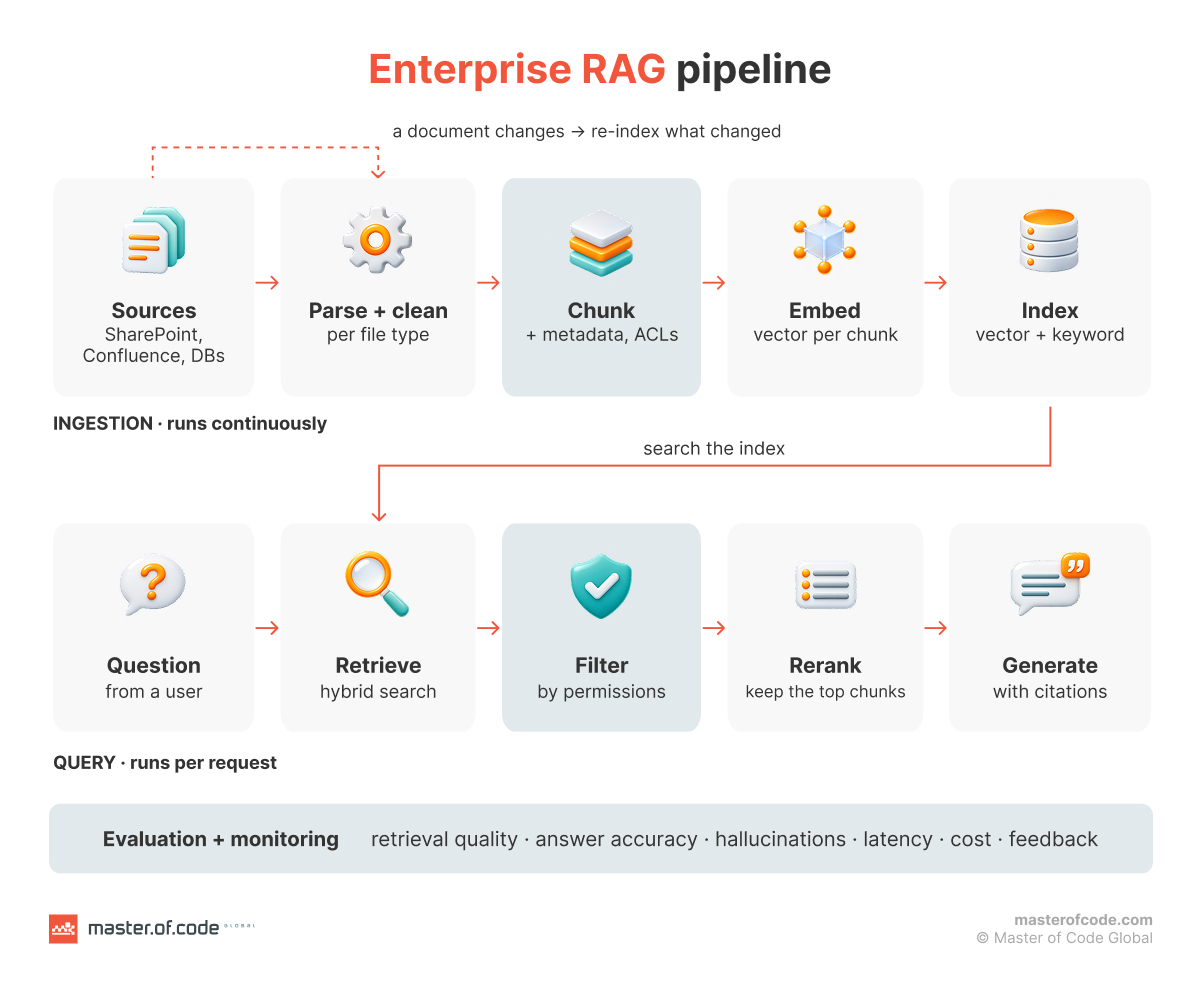
| Component | Decision | Section |
|---|---|---|
| 1. Connectors and sync | Which sources come first, and how to catch changes and deletions | Sources |
| 2. Access lists and permission filter | How permissions carry over, and how fast revocation applies | Permissions |
| 3. Parsing, chunking, and metadata | What to do with scans, tables, and messy files | Messy files |
| 4. Embeddings, vector database, keyword index, and reranker | Hybrid or vector-only search, and how many passages reach the model | Hybrid search |
| 5. Orchestration | Basic, advanced, agentic, or Graph RAG | Patterns |
| 6. LLM, prompt, and logs | What else can leak, and what to log | Leaks and audit |
| 7. Evaluation and monitoring | How to build and run an eval set | Eval set |
| 8. Infrastructure | Cost per query and scaling | Cost |
| 9. Platform | Microsoft Copilot or a custom build | Copilot vs. custom |
This stack doesn’t take months to stand up. Our Microsoft-native knowledge assistant went from planning to launch in 4 weeks with a team of six.
Which Sources Should You Connect First?
Connect the source that answers the most frequent questions and has a clear owner. That’s usually a policy or procedure library, not the whole intranet. A well-kept source gives you clean answers and a fair first test.
In Microsoft-based companies, SharePoint is often the first source. Our Microsoft-native assistant is one example. It connects to the client’s SharePoint libraries and document repositories. That’s where its policy documents, procedure manuals, and compliance guidelines live. The results: 85% less time spent searching for policy information and 42% fewer procedure-related internal tickets. From there, SharePoint RAG can grow to Confluence, shared drives, and databases.
Each new source needs three things before you connect it:
- An owner who fixes wrong or outdated content.
- Change detection. Re-index only what changed. Delete the old chunks, embed the new text, and write the new chunks.
- Delete handling. A retired policy must leave the index quickly, or it keeps answering questions.
Pick sources by question volume, not by data volume. For more on choosing knowledge sources, see our guide to generative AI for knowledge management.
How Do Permissions Carry Over, and How Fast Can You Revoke Them?
Permissions carry over when every chunk keeps its source document’s access list, and every search filters by the user’s identity. That’s RAG access control at retrieval time. A document the user can’t open never reaches the model, so the model can’t leak it.
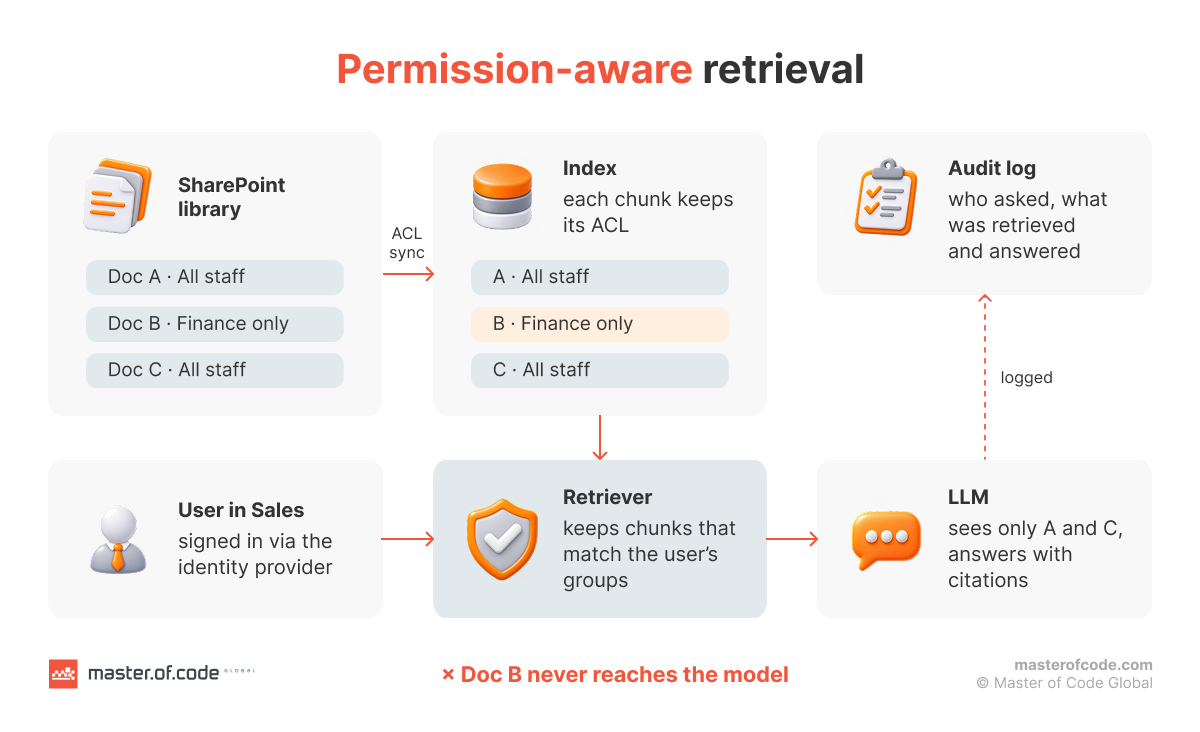
Three rules make it work:
- Sync access lists with the text. A connector that copies content but drops permissions creates a leak on day one.
- Search as the user. Don’t run queries through a service account that sees everything.
- Filter before ranking. Metadata filtering on groups, region, or role narrows the search before the model sees anything.
Revocation is the harder half. Someone leaves a team, or a file moves to a restricted folder. How long can the old access list live in your index? Set that window on purpose. A nightly sync leaves up to a day of exposure. Change notifications from the source, such as SharePoint permission webhooks in Microsoft Graph, let you re-sync as soon as access changes. For the most sensitive content, check permissions against the source at query time.
Our Healthcare FAQ assistant shows the filtering side. It serves 70,000+ employees in four states. We split its knowledge base by state and by role (supervisor vs. non-supervisor). Each employee gets the policy that applies to them.
What Do You Do With Scans, Tables, and Messy Files?
Fix parsing before you tune prompts or models. If a scan comes through as noise, or a table loses its rows, no retriever can find the answer.
Handle each file type on purpose:
- Scans: run OCR, then check quality on a sample. Flag low-confidence pages instead of indexing them.
- Tables: keep each table whole, or split it by rows and repeat the header. Store it as text the model can read, such as Markdown.
- Long documents: use structure-aware chunking. Split by headings and sections, so each chunk holds one idea.
- Duplicates and old versions: drop them or tag them, so drafts don’t outrank the final policy.
Then tag each chunk with its source, date, version, document type, owner, and access list. Pick an embedding model that fits your domain and languages. If you switch models later, you’ll re-create all embeddings, so treat that as a planned cost.
Our internal Legal Advisor tool takes PDF and DOCX files in batches of up to 20. It extracts the text before the model sees it.
Clean input starts with good AI data preparation.
Do You Need Hybrid Search, or Is Vector Search Enough?
Hybrid search is the safer default when questions contain IDs, codes, or names. Vector-only is enough for paraphrase-heavy FAQs. Semantic search finds the same meaning in other words. But it can miss exact strings such as part numbers, case IDs, and policy codes. Harvey, a legal AI company, makes the same point. Purely dense embeddings “might struggle with rare terms such as case identifiers and named entities.”
Hybrid search runs both searches in parallel. The vector database returns passages with similar meaning. The keyword index returns exact matches. A merge step combines the two lists. The retrieval augmented generation diagram below shows the full path.
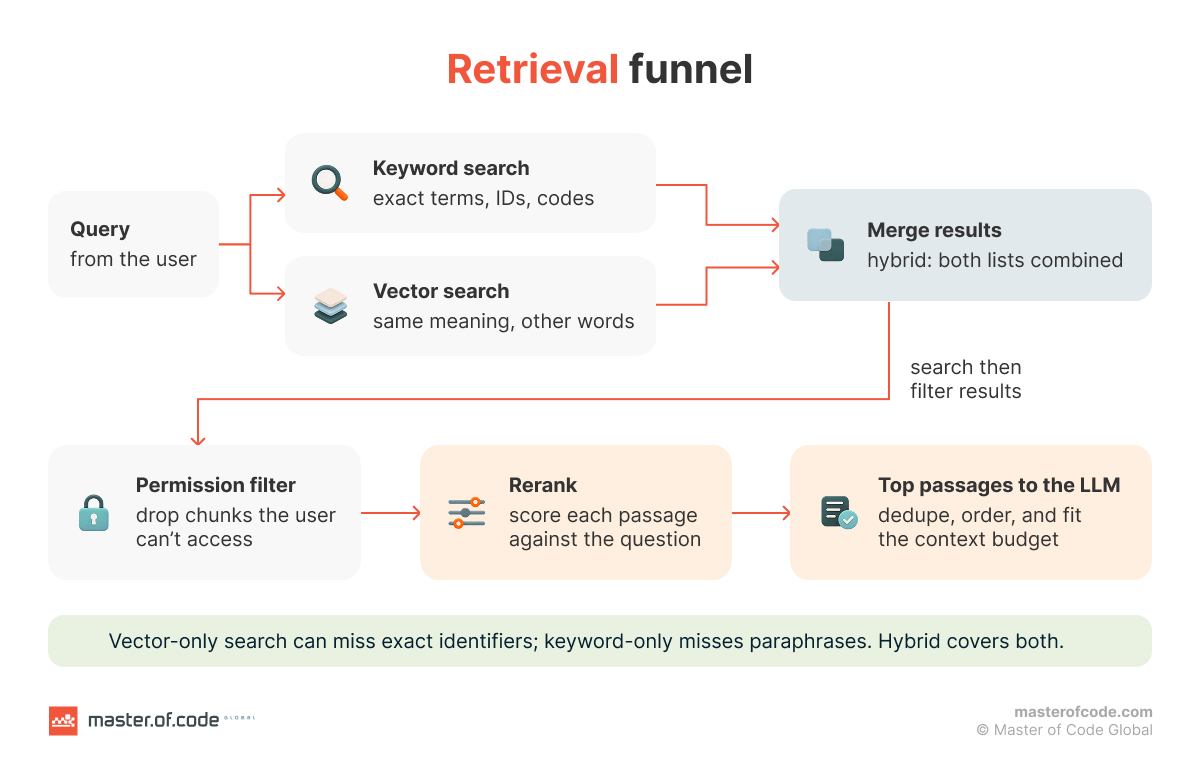
Two more steps decide what the model reads:
- Reranking: a second model scores each passage against the question and keeps the best few.
- Context optimization: remove duplicates, put the strongest passages first, and fit the context budget. Extra passages add noise and cost.
Our aviation parts assistant shows why exact lookup matters. Part-number searches go to a dedicated inventory tool. Free-text questions go to a separate FAQ assistant.
Enterprise RAG Architecture Patterns: Do You Need Agentic or Graph RAG?
You probably don’t need agentic or Graph RAG on day one. Start with advanced RAG, and move up only when your eval set shows a gap. The RAG architecture diagram below compares the options.
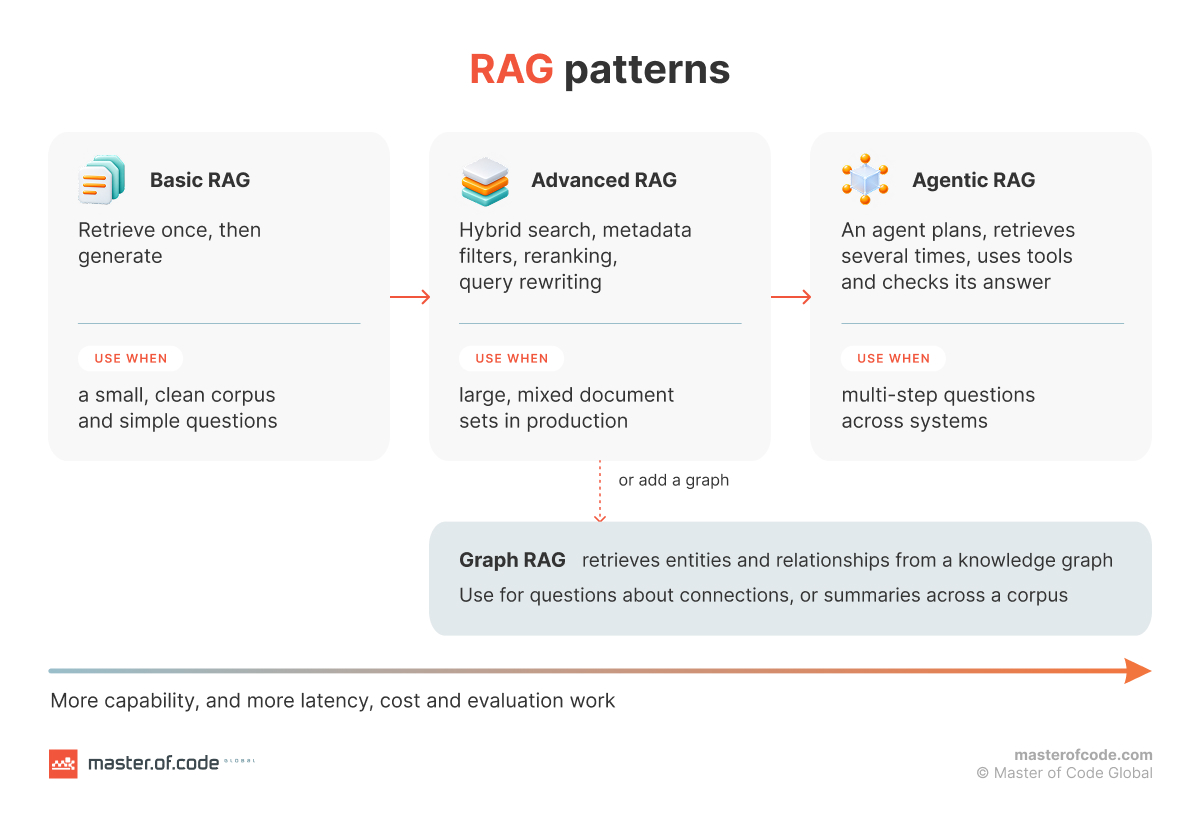
- Basic RAG retrieves once, then generates. It fits a small, clean corpus and simple questions.
- Advanced RAG adds hybrid search, metadata filters, reranking, and query rewriting. It fits large, mixed document sets.
- Agentic RAG lets an agent plan, retrieve several times, call tools, and check its answer. It fits multi-step questions across systems.
Each step up adds latency, cost, and evaluation work.
When Graph RAG makes sense. Use it when questions ask how entities connect, or need a summary of a whole corpus. Microsoft Research tested this in its GraphRAG paper (Edge et al., 2024). Plain RAG “fails on global questions directed at an entire text corpus.” The graph has a cost. An LLM must extract it, and it needs updates as documents change.
Our internal MCP solution for a global technology company shows the agentic side. One chat gives employees access to 85 enterprise tools, and the AI picks the right tool for each request.
What Else Can Leak? Prompt Injection, Personal Data, and Audit Logs
Beyond permissions, an enterprise RAG architecture can leak in three more ways.
- Prompt injection. OWASP lists it first in its Top 10 for LLM Applications (LLM01:2025). OWASP says indirect prompt injections “occur when an LLM accepts input from external sources, such as websites or files.” A retrieved file can carry hidden instructions. Treat retrieved text as data, never as commands, and limit the tools the model can call.
- Personal data. Remove it before text leaves your environment. Our Legal Advisor tool replaces names, companies, emails, and other identifiers with tokens before the model sees the document. The token map stays in memory only.
- Missing audit logs. Traceability means every answer cites its source passages. Log who asked, what was retrieved, and what was answered. Legal Advisor logs every upload, deletion, and settings change, with a timestamp and the user behind it.
Set retention rules for logs and uploads. Check regional data residency rules early, since they decide where the index and the model can run. For the full threat list, see our guide to LLM security.
How Do You Build an Eval Set From Real Questions?
Build it from questions users already ask. Pull them from support tickets, search logs, and chat history. Then ask domain experts to mark the passage that answers each one. You’ll have to build it yourself. Harvey notes that “straightforward ground-truth evaluation sets do not exist publicly” for specialized tasks like legal work.
A useful set covers:
- frequent questions, weighted by volume
- questions with exact IDs or codes
- questions with no answer in the corpus, where “I don’t know” is correct
- permission tests: the same question from users with different access
Score two things separately:
- Retrieval: Did the right passage come back? Track recall and precision.
- Answers: Is the answer correct? Does every claim trace to a cited passage? Flag the rest as hallucinations.
Re-run the set on every change to the model, prompt, chunking, or index. In production, track latency, cost per query, the “no answer” rate, user ratings, and escalations.
Our Microsoft-native assistant went through end-to-end tests in staging and production, and its responses were refined over several iterations. Users rated 93% of its answers accurate and helpful. For the rest of the launch checklist, see our guide on moving from AI pilot to production.
What Does One Query Cost in an Enterprise RAG Architecture?
One query costs the sum of five steps. You embed the question, search the index, and rerank the candidates. Then the LLM reads the context and writes the answer. The LLM call is usually the largest part, and context size drives it.
Here’s simple token math. Say each query sends 10 passages of 300 tokens plus a 500-token prompt. That’s about 3,500 input tokens. Rerank down to 4 passages, and input drops to about 1,700 tokens. That roughly halves the biggest line item.
The main bottlenecks, and their fixes:
- Embedding and reranking calls: batch embeddings at ingestion, and use a small reranker.
- Oversized context: lower the number of passages after reranking.
- Slow metadata filters: index the fields you filter on.
- LLM generation time: route simple questions to a smaller model, and cache frequent answers per permission scope.
To scale to large collections and many users, split the index across several vector database instances. Distribute ingestion. Separate the read path from the write path, so re-indexing doesn’t slow down queries.
Total cost of ownership adds fixed items. Plan for re-embedding runs, index hosting, connectors and permission sync, evaluation effort, and staff time. Our guide to LLM cost optimization covers the model side. Before you scale, run a technical audit of your AI platform to find the real bottleneck.
Microsoft Copilot or a Custom RAG Build?
Choose Microsoft 365 Copilot when your content lives in Microsoft 365 and its built-in answers are good enough. Choose a custom build when you need control over retrieval, models, or where data runs.
Copilot is a managed RAG service. It grounds answers in your data through Microsoft Graph. Per Microsoft, it “only surfaces organizational data to which individual users have at least view permissions.” Connectors bring in some third-party sources. The trade-off is control. You can’t change how it chunks or ranks content, and licensing is per user. A custom build gives you every choice in this article, but you own the maintenance.
Deployment is the second choice:
| Option | Fits when | Trade-off |
|---|---|---|
| Cloud | You want to start fast with managed models and vector stores. | Data leaves your environment, so check residency rules and vendor terms. |
| On-prem or private cloud | Data can’t leave your environment. | You run, secure, and update the stack yourself. |
| Hybrid | Some sources are sensitive, and the rest are not. | You secure and monitor two environments. |
Our Microsoft-native assistant shows a middle path. It runs on Power Automate’s built-in AI, entirely inside the client’s Microsoft ecosystem. Master of Code Global is platform-agnostic, so the choice should follow the stack you already run. For the decision itself, see build vs. buy AI solutions. For fully custom systems, see our custom LLM development services.
Conclusion
The choice of LLM matters less than a few early decisions in your enterprise RAG architecture. Connect one well-kept source first. Carry permissions into the index and set a revocation window. Fix parsing before prompts. Use hybrid search when questions contain IDs. Build an eval set from real questions, and price every query. Add agents or a graph only when the eval set shows a gap.