



An organization can have dozens of useful AI ideas and still struggle to choose what to build first. An AI use case prioritization framework gives teams a shared way to make that choice. A support assistant, an invoice tool, and a forecasting system may all promise value. Yet each depends on different data, integrations, and changes to daily work. Budgets, engineering time, and team attention are limited.
This guide gives you a practical method. You define each idea as a workflow and screen out blocked candidates. Then you score the rest on impact and feasibility. Next, you test the economics and pick a pilot with clear success criteria. You also get a worked example and a template to copy.
Not sure where you stand? Our free AI maturity assessment will show it.
Table of Contents
Key Takeaways
- Define the workflow, owner, baseline, and expected outcome before you score anything.
- Screen for legal, data-access, security, safety, and ownership blockers first. A big benefit can’t offset them.
- Compare viable ideas with the same criteria and weights, agreed in advance.
- Separate freed-up capacity from cash savings, and count ongoing costs.
- Pick a pilot that tests your riskiest assumptions. Then update priorities as evidence comes in.
What an AI Prioritization Framework Should Help You Decide
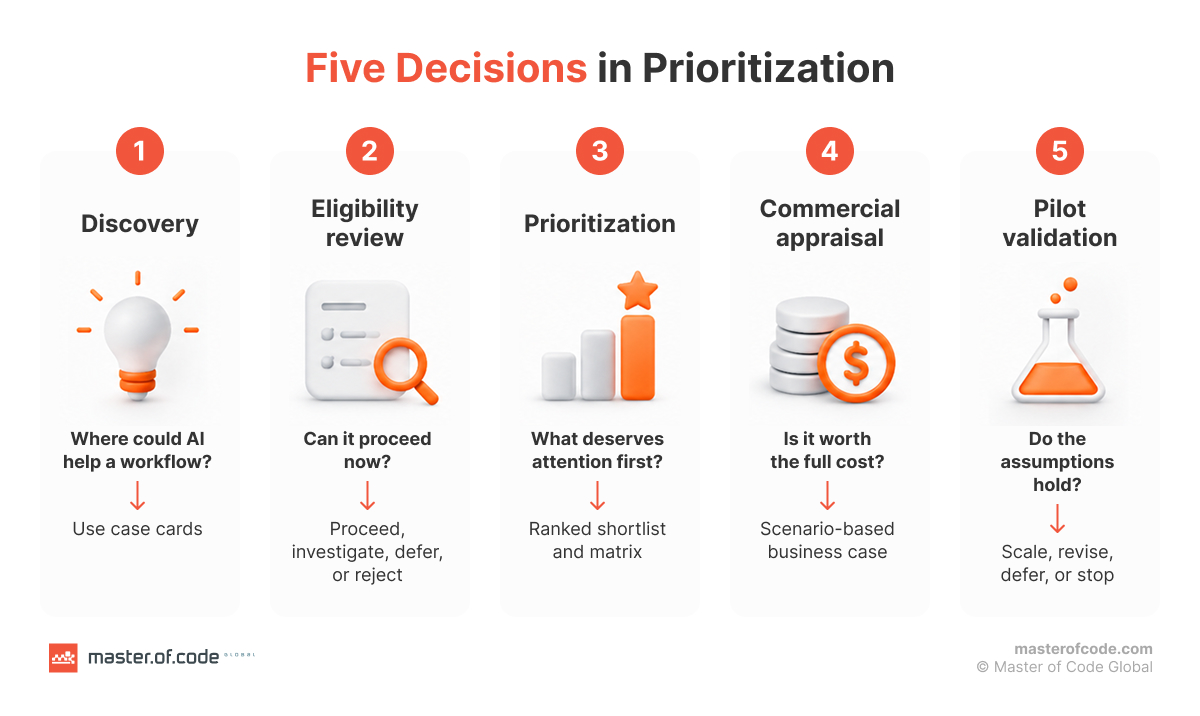
Prioritization is one step in a longer decision. Each step answers a different question. Mix them up, and you get confident scores built on guesses.
Distinguish Discovery, Prioritization, and Validation
| Activity | Question | Output |
|---|---|---|
| Discovery | Where is there a workflow problem AI might address? | Comparable use case cards |
| Eligibility review | Can this proceed under current constraints? | Proceed, investigate, defer, or reject |
| Prioritization | Which viable opportunities deserve attention first? | Ranked shortlist and matrix |
| Commercial appraisal | Is the projected benefit worth the full cost? | Scenario-based business case |
| Pilot validation | Do the key assumptions hold in a controlled setting? | Scale, revise, defer, or stop |
Know What the Score Cannot Do
A score helps a group compare options. It also has limits:
- It can’t prove that a use is legal or that a model will behave reliably.
- It can’t replace a technical assessment, budget approval, or user research.
- It can’t turn an unsupported assumption into evidence.
- It can’t show when a lower-ranked enabling project has to come first.
Microsoft’s business envisioning guidance for software vendors makes a similar point. It asks teams to weigh business value, user demand, and buildability together. This article adapts that principle. It doesn’t reproduce Microsoft’s scoring method.
Step 1. Define Comparable AI Use Cases
The inputs need to be comparable before the scores can be. “Use AI in finance” is too broad to score. “Extract invoice fields and suggest accounting codes for AP review before posting” is a use case. It names a task, a user, and a control point.
Write a Workflow-Level Use Case Card
Frame each idea in one sentence:
For [user or team], improve [workflow] by applying AI to [bounded task], so that [measurable outcome] improves against [baseline], while [owner] stays responsible for [decision or action].
Then fill in the minimum fields:
| Field | What to capture |
|---|---|
| Problem and current workflow | Trigger, task, handoffs, exceptions, and current pain |
| Users and owner | Who uses it and who owns the business outcome |
| Proposed AI role | Assist, recommend, extract, predict, or take a bounded action |
| Baseline and value hypothesis | Current volume, time, quality, cost, and expected change |
| Data and systems | Sources, permissions, freshness, integrations, and dependencies |
| Human oversight | Who reviews, approves, or handles exceptions |
| Evidence and unknowns | What is measured, estimated, or still untested |
Check Whether AI Is the Right Intervention
Some problems don’t need AI. Before you score, compare the options:
- Process redesign or a standard software feature.
- Rule-based automation, if the task has stable rules and little ambiguity.
- An AI product you can buy.
- A custom build.
Our guide to build vs buy AI solutions covers that trade-off in detail. Also, compare like with like. A full enterprise platform and a narrow assistant are different proposals. State whether you are scoring a pilot or a production rollout.
AWS gives similar advice in its generative AI workload assessment guidance. It tells teams to “identify specific business problems” and to “develop specific, measurable goals for each use case.” It also says to involve key stakeholders from the beginning. The guide targets architects who work on generative AI. Still, these basics hold for most AI projects.
Step 2. Apply Go/No-Go Checks Before Scoring
Some ideas shouldn’t reach the scoring table yet. Go/no-go criteria catch them early. Treat this step as a first-pass risk assessment, not a full legal review. Run it before anyone debates weights.
Separate Blockers From Fixable Gaps
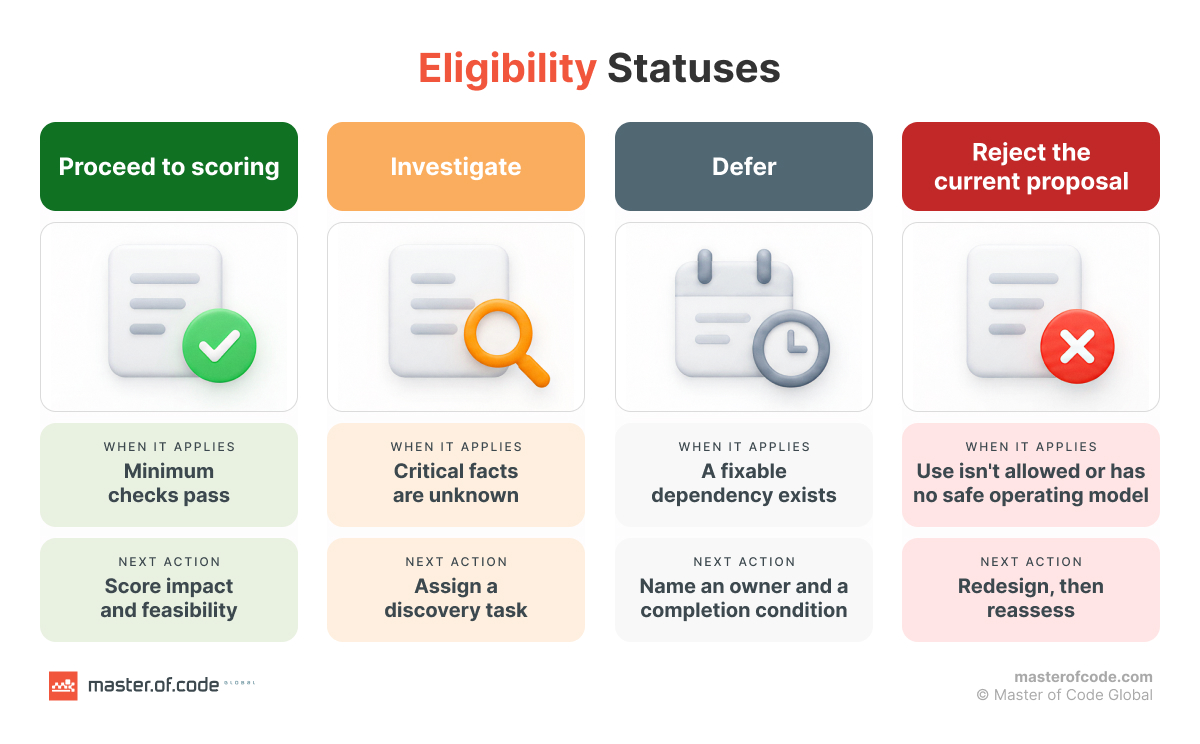
Give each candidate one of four statuses:
- Proceed to scoring: The minimum checks pass.
- Investigate: Critical facts are unknown. Assign a discovery task before ranking.
- Defer: A fixable dependency exists. Name an owner and a completion condition.
- Reject the current proposal: The intended use isn’t allowed or has no safe operating model. A redesigned version can come back.
Use a Short Eligibility Checklist
| Gate | Evidence to request | If it fails |
|---|---|---|
| Outcome ownership | Named owner with authority to change the process | Assign an owner or defer |
| Permitted data use | Documented rights and approval for the planned processing | Investigate, narrow the scope, or reject |
| Data access | Representative data under approved permissions | Investigate access or create a data task |
| Operating boundary | Clear scope, exception path, human role, and control over actions | Redesign or defer |
| Security and residual risk | Threat review, controls, and a named risk owner | Fix first; don’t score past a blocker |
| Measurable evaluation | A baseline or a plan to collect one, plus testable success criteria | Set up measurement before pilot approval |
| Delivery accountability | Sponsor, resources, and a named operating owner | Investigate or defer |
These are screening checks, not a legal checklist. Privacy laws include the GDPR in the EU and the CCPA in California. Sector rules matter too, such as HIPAA for US healthcare data or financial-services requirements. AI-specific rules, such as the EU AI Act, may also apply. Confirm with legal counsel which rules cover each use case before it passes the gate.
Account for Reliability and the Cost of an Error
A draft reply that an employee reviews is low-stakes. A system that approves claims on its own is not. Check these points:
- Groundedness and unsupported outputs.
- False approvals and missed exceptions.
- Tool and integration errors.
- Escalation paths and reversibility.
- The cost of being wrong.
The acceptable error rate depends on the workflow and its impact. The voluntary NIST AI Risk Management Framework supports this context-based review. Its Playbook suggests actions under Govern, Map, Measure, and Manage. NIST doesn’t prescribe these gates or certify a deployment.
Once an idea clears the gates, score how valuable and deliverable it is.
Step 3. Define Scoring Criteria and the Evidence Behind Them
Score each eligible idea on two axes: impact and feasibility. Assess cost later, in the commercial review. Record risk separately. Unresolved, unacceptable risk stays a gate.
Score Business Impact
Impact asks how much business value the workflow change could create. Use four criteria:
| Criterion | Question | Evidence |
|---|---|---|
| Outcome potential | How much could cost, quality, speed, or revenue improve per task? | Baseline, volumes, and benefit range |
| Strategic fit | Does this advance a funded priority? | Stated goal and sponsor |
| Reach | How widely and often will people use it? | Users and transactions |
| Urgency | How much does an earlier benefit matter? | Deadlines and benefit ramp |
Strategic fit measures strategic alignment with goals that already have a budget and a sponsor. Urgency captures time-to-value. A deadline can make a result more important. It doesn’t make delivery easier.
Watch for double counting. Score outcome potential per task and reach as volume. If your benefit estimate already covers total annual value, drop the reach weight.
Score Delivery Feasibility
Feasibility asks whether you can deliver. It covers technical feasibility, data, and the people side.
| Criterion | Question | Evidence |
|---|---|---|
| Data quality and access | Is usable, representative, current data available? | Samples, quality findings, coverage, and permissions |
| Integration and dependencies | Can it connect to the needed systems? | Interface tests, access, and dependency owners |
| Model-task fit | Can the AI meet the workflow’s quality and reliability needs? | Evaluation set and error analysis |
| Organizational readiness | Will people use it, and will the process support it? | User interviews, sponsor support, training, and review capacity |
| Delivery capacity | Can the team build, support, and fund it? | Staff, support owner, and budget |
Data readiness often decides feasibility. An idea can look strong and still lack clean records or access rights. Our guide to AI data preparation explains what usable data looks like.
Organizational readiness also covers change management. Count the training users need. Count the workflow changes too, such as new handoffs, approvals, and exception paths. Score review capacity here. Someone has to check the AI output at the expected volume without slowing the work.
Strong company-wide maturity doesn’t guarantee data or an owner for one workflow.
Anchor the Scale and Record Uncertainty
Use a 1–5 scale with anchors for each criterion. A 2 sits between 1 and 3. A 4 sits between 3 and 5.
| Criterion | 1: Weak | 3: Moderate | 5: Strong |
|---|---|---|---|
| Outcome potential | Limited improvement | Material improvement in a bounded workflow | Large improvement with a credible path |
| Data quality and access | Major quality or coverage gaps | Usable sample with known prep work | Representative, accessible, maintained data |
| Integration | Fragile interfaces, major dependencies | Known work with credible access | Proven interfaces, few dependencies |
| Organizational readiness | Hard workflow change | Engaged owner and users; rollout work remains | Strong fit and support |
A score of 1 doesn’t mean the idea is allowed. Eligibility comes first. Leave a criterion unscored until the evidence exists. Unknown is not the same as low.
Add a confidence label to each score: high, medium, or low, with an evidence note. It isn’t a probability, so don’t multiply it into the score.
Microsoft’s business plan guidance for AI agents uses a similar 1–5 scale for business impact, buildability, and user desirability. Our two-axis weights are illustrative.
Step 4. Build a Weighted Impact vs. Feasibility Matrix
An AI use case scoring model turns criterion scores into two numbers you can plot. Agree on the rules before you score.
Agree on Weights Before Scoring Individual Ideas
The weights below are illustrative starting points. Calibrate them to your goals and constraints.
| Impact criterion | Weight within impact |
|---|---|
| Outcome potential | 40% |
| Strategic fit | 25% |
| Reach | 20% |
| Urgency | 15% |
| Total | 100% |
| Feasibility criterion | Weight within feasibility |
|---|---|
| Data quality and access | 30% |
| Integration and dependencies | 25% |
| Model-task fit | 20% |
| Organizational readiness | 15% |
| Delivery capacity | 10% |
| Total | 100% |
Follow these four rules:
- Use the same weights for every candidate in a decision round.
- Confirm the scope and time horizon you are comparing.
- Don’t change weights after you see scores to favor a project.
- Simplify the rubric if your evidence can’t support nine criteria.
Calculate the Scores Transparently
Impact score: I = Σ(impact criterion score × weight)
Feasibility score: F = Σ(feasibility criterion score × weight)
Optional priority score: P = 0.60 × I + 0.40 × F
All scores stay on the 1–5 scale. Weights are fractions, and each axis sums to 1. The 60/40 blend is illustrative. No study validates it. Keep I and F visible even if you use P. A single number hides very different delivery profiles.
Use the Matrix to Guide Decisions
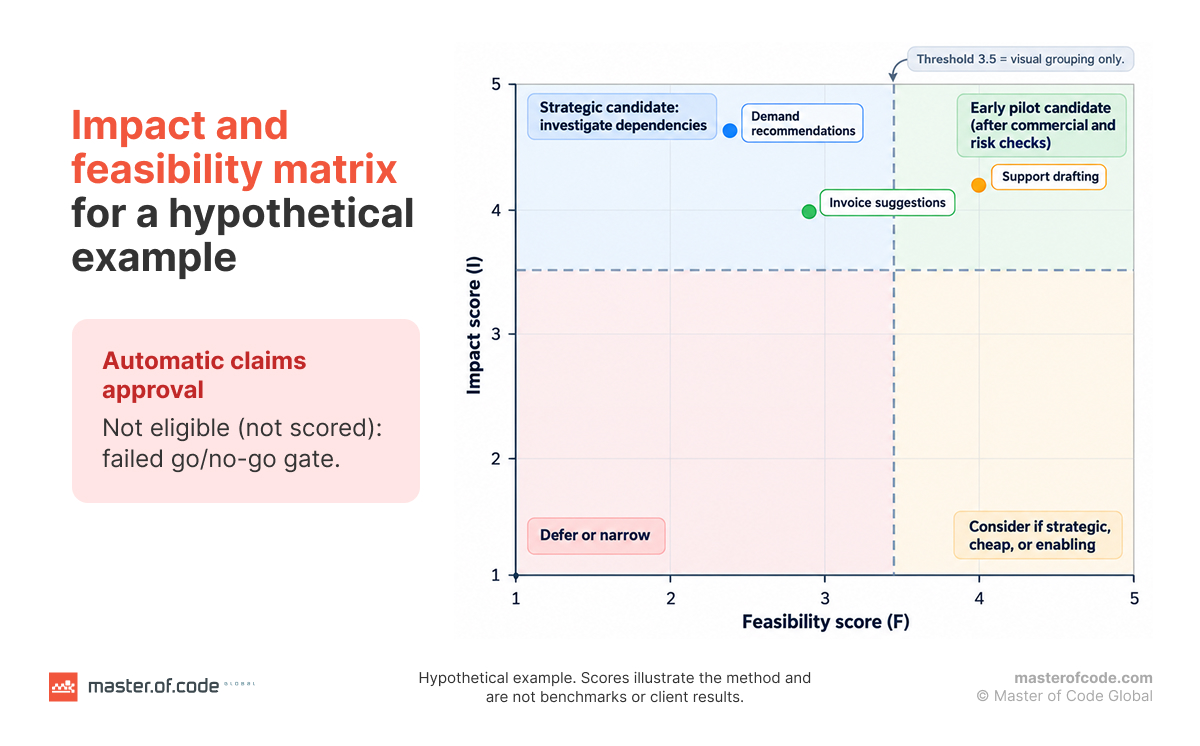
Plot each candidate on an AI use case prioritization matrix. Feasibility goes on the horizontal axis, and impact goes on the vertical axis. The impact vs. feasibility view shows trade-offs that a single rank hides.
| Score | Lower feasibility | Higher feasibility |
|---|---|---|
| Higher impact | Strategic candidate: investigate dependencies and enabling work | Early pilot candidate, after commercial and risk checks |
| Lower impact | Defer or narrow the proposal | Consider only if it is strategic, cheap, or enabling |
In the example below, “higher” means a score of 3.5 or more. It is a visual grouping, not a funding rule.
Test Sensitivity Instead of Defending Decimal Places
Change the blend from 60/40 to 40/60. Check whether the leader changes. Look closely at close calls, weak evidence, and rankings that flip with the weights. A score of 4.12 is a discussion aid, not a precise measurement.
Use the weighted scoring model to structure the discussion. If the final portfolio differs from the numeric order, record why.
Worked Example. Compare Four AI Opportunities
Hypothetical example for a mid-market business. The scores illustrate the method. They are not benchmarks or client results.
State the Candidates and Scope
- Support response drafting: The AI suggests replies based on your help content. An employee reviews each one.
- Invoice extraction and coding suggestions: The AI extracts fields and suggests accounting codes before AP approval. ERP posting stays controlled.
- Demand forecasting recommendations: The AI helps planners assess demand. Planners keep ordering decisions.
- Automatic claims approval: A proposed end-to-end decision flow. It has no documented review, escalation, or approved control design.
The first three pass the minimum checks in this scenario. Candidate four doesn’t, so it gets no priority score.
Show the Underlying Scores
Impact scores use the impact weights above:
| Use case | Outcome | Strategy | Reach | Urgency | I |
|---|---|---|---|---|---|
| Support drafting | 4 | 4 | 5 | 4 | 4.20 |
| Invoice suggestions | 4 | 4 | 4 | 4 | 4.00 |
| Demand recommendations | 5 | 5 | 4 | 4 | 4.65 |
Feasibility scores use the feasibility weights above:
| Use case | Data | Integration | Model fit | Readiness | Capacity | F |
|---|---|---|---|---|---|---|
| Support drafting | 4 | 4 | 4 | 4 | 4 | 4.00 |
| Invoice suggestions | 3 | 2 | 4 | 3 | 3 | 2.95 |
| Demand recommendations | 2 | 2 | 3 | 2 | 2 | 2.20 |
Explain the Ranking and Next Action
| Use case | I | F | P at 60/40 | P at 40/60 | Example decision |
|---|---|---|---|---|---|
| Support drafting | 4.20 | 4.00 | 4.12 | 4.08 | Strong first-pilot candidate |
| Invoice suggestions | 4.00 | 2.95 | 3.58 | 3.37 | Resolve ERP access and review workload |
| Demand recommendations | 4.65 | 2.20 | 3.67 | 3.18 | Strategic workstream with data and integration prerequisites |
| Automatic claims approval | Not scored | Not scored | Not scored | Not scored | Redesign controls and get the needed review before scoring |
What the example shows:
- Demand recommendations outrank invoice suggestions at 60/40. At 40/60, the order flips.
- Support drafting leads under both blends. That supports investigating it first. It doesn’t authorize a build.
- The highest-impact idea isn’t always the first pilot.
- A failed gate isn’t a risk penalty that a bigger benefit can offset.
- Scores alone hide uncertainty. Add short evidence notes. Here, support has an observed workflow and sample data. Invoices lack ERP write access. Forecasting has incomplete history and little planner input.
These results reflect this scenario’s evidence, not the use case type in general.
Real-World Reference: Zipify Agent Assist
Our own work shows how a support-drafting use case can play out in production. Master of Code Global built Agent Assist for Zipify. The assistant sits inside Intercom. It searches past conversations, the help center, and the knowledge base. Then it suggests replies that agents send. The case study reports these results since launch:
- 65% faster response time.
- 2x faster time to close tickets.
- 30% lower operating costs.
- 24% higher customer satisfaction.
“Agent Assist is one of the smartest investments we’ve made to support our team,” says Ezra Firestone, Founder of Zipify.
Zipify didn’t use this article’s scoring model. The case shows the type of bounded, human-reviewed workflow that tends to score well on feasibility.
Estimate ROI and Total Cost Before Running a Pilot
A top score doesn’t prove that an investment pays off. Build the business case next.
Build a Benefit Hypothesis From the Baseline
Separate four kinds of benefit:
- Cash savings, such as less overtime or lower outsourcing spend.
- Capacity released, which needs a credible plan for the freed time.
- Revenue gains, valued as incremental contribution rather than total sales.
- Risk reduction, which needs explicit assumptions and is hard to price.
Our AI ROI guide explains why returns often take longer than teams expect. For capacity, use this formula:
Annual capacity benefit = annual task volume × eligible share × minutes saved per task ÷ 60 × adoption rate × realization factor × loaded hourly cost
Eligible share is the portion of tasks AI can handle. Adoption is how often people use it on them. Realization is how much saved time becomes real value. Don’t discount the same thing twice.
Include the Full Delivery and Operating Costs
| One-time costs | Ongoing costs |
|---|---|
| Discovery and workflow design | Model, API, or compute usage |
| Data preparation | Hosting and storage |
| Integration and access controls | Monitoring, evaluation, and support |
| Development and evaluation | Human review and exception handling |
| Security review and deployment | Data maintenance and changes |
| Training and rollout | Model and prompt updates, plus user support |
Add licensing, transition, and exit costs where they apply. A pilot’s cost is not the production solution’s total cost of ownership.
Show an Example That Doesn’t Justify Itself Automatically
Here is the hypothetical support-drafting case:
| Input | Assumption |
|---|---|
| Annual tasks | 60,000 |
| Eligible share | 50% |
| Minutes saved per used task | 4 |
| Adoption among eligible tasks | 80% |
| Realization of saved time | 70% |
| Loaded hourly cost | $35 |
| One-time setup | $30,000 |
| Annual operating cost, including review | $25,000 |
The math:
- Realizable time: 60,000 × 0.50 × 4 ÷ 60 × 0.80 × 0.70 = 1,120 hours a year.
- Capacity value: 1,120 × $35 = $39,200 a year.
- First-year cost: $30,000 + $25,000 = $55,000.
- First-year ROI: ($39,200 − $55,000) ÷ $55,000 = −28.7%.
- Steady annual net value: $39,200 − $25,000 = $14,200.
- Simple payback: $30,000 ÷ $14,200 = about 2.1 years (25.4 months).
Payback assumes the modeled 80% adoption from day one, with no ramp-up, discounting, or extra costs. Capacity value isn’t cash savings. It becomes cash only if you cut spend, such as overtime or outsourcing.
Run conservative, base, and optimistic cases. Here, even 100% adoption gives $49,000 in year one, below the $55,000 cost. From year two, the idea covers its running cost once adoption passes about 51%. A leading score can still have a weak first-year case. Let the pilot test these assumptions.
Balance Quick Wins With Strategic AI Initiatives
A ranked list isn’t a plan. Turn the shortlist into an enterprise AI roadmap that sequences the work.
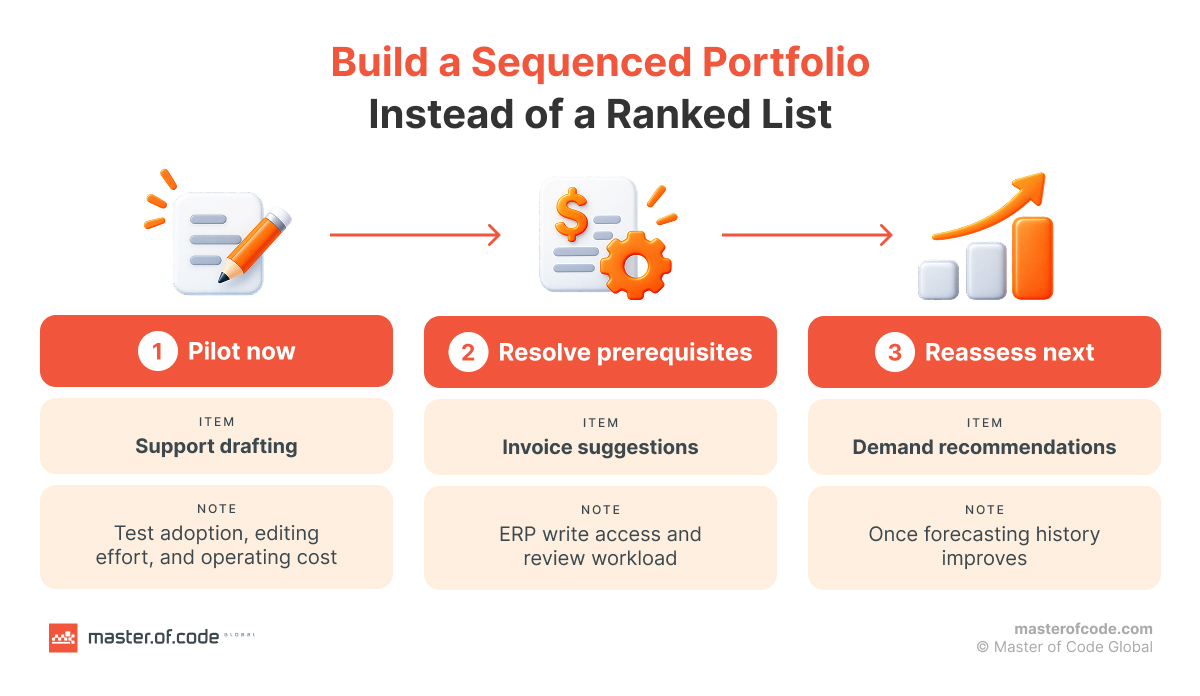
Build a Sequenced Portfolio Instead of a Ranked List
Plan three types of work:
- A focused opportunity that can produce evidence soon. It has credible value and manageable delivery and adoption work. A polished demo doesn’t qualify.
- A strategic opportunity with larger potential and real dependencies.
- Enabling work, such as a connector, dataset, permission model, or measurement process.
| Pilot now | Resolve prerequisites | Reassess next |
|---|---|---|
| Support drafting | ERP write access and review workload for invoice suggestions | Demand recommendations, once forecasting history improves |
Make Dependencies and Scarce Resources Visible
- An enabling project may have modest value alone. Yet it can open the way for several use cases.
- Integration, specialist review, training, and support capacity can limit how many pilots run at once.
- For each dependency, show the owner, the completion condition, and the next decision date.
- Skip fixed allocations such as 70/20/10. They don’t reflect your constraints.
- Reassess when data, economics, strategy, or controls change.
Choose the First Pilot and Define Success Before Starting
Select a Pilot That Tests Important Uncertainty
A good first pilot has:
- A useful business outcome and a committed owner.
- Approved, representative data. Check data readiness instead of assuming it.
- A bounded workflow with a manageable exception path.
- Engaged users.
- An evaluation design that could disprove the benefit hypothesis.
- A plausible path to production.
In the example, support drafting is a reasonable first experiment. Its first-year economics make adoption, editing effort, and operating cost the key questions. A scoped AI pilot can test them with real users before a full build.
AWS warns against treating a proof of concept as a demo. It should test value, data, technical viability, and risk. That guidance targets generative AI, so adapt it for forecasting models.
Establish a Baseline and a Pilot Decision Contract
Measure the current workflow before the pilot starts. Then agree on what success means. Our AI impact measurement framework covers baselines and attribution in detail.
| Dimension | Baseline or test measure | Acceptance logic |
|---|---|---|
| Efficiency | Handling time, including edits and reviews | Compare with the current workflow |
| Quality | Factual correctness, completeness, and employee correction rate | Use a representative, independently reviewed sample |
| Reliability | Unsupported outputs, missed exceptions, and tool failures | Set workflow-specific tolerances |
| Adoption | Actual use among eligible users and tasks | Measure use, not training attendance |
| Economics | Cost per completed task and realized time benefit | Include human review and operating cost |
| Controls | Unauthorized access or actions, and escalation behavior | Define scenario-based requirements |
| Operations | Latency, availability, and support readiness | Test in realistic conditions |
Compare against a control group or another fair benchmark. A before-and-after change can mislead if the task mix or staffing changed.
Define Scale, Revise, or Stop Criteria
- Scale: The pilot meets its benefit, quality, adoption, control, and operating targets.
- Revise: A bounded fix has a credible path to a better result.
- Stop or defer: A key assumption fails, or the operating model stays unacceptable.
If the pilot passes, plan the handover early. Our guide on moving from AI pilot to production covers ownership, monitoring, and scaling.
Keep Prioritization Consistent Across Departments
Agree on the Rules Before Reviewing Proposals
- Share the same use case card, scoring criteria, scale, weights, decision horizon, and evidence rules.
- Ask business, technology and data, finance, security, and affected users to review their own dimensions.
- Have reviewers score on their own first. Then reconcile big differences.
- Ask for the evidence behind a score instead of averaging disagreement away.
- Record who approves, who advises, and who can block within their remit.
The AWS assessment guidance also recommends engaging stakeholders early and creating a cross-functional steering committee. The independent scoring and decision log here are our own recommendations.
Keep a Decision Log and Refresh It
Record these items for each candidate:
- Score, confidence, evidence date, and open assumptions.
- Gate status and needed fixes.
- Final decision and its reasoning.
- Any override of the numeric ranking.
- Owner, next action, and reassessment trigger.
Apply the same evidence rules to an optimistic savings estimate, an executive’s favorite project, and an impressive demo. Version your weights between decision rounds. A shared process improves consistency. It won’t remove judgment or all bias.
AI Use Case Prioritization Framework Template
Copy the two tables below into a document or spreadsheet.
Copy the Use Case Card and Scoring Row
| Use case card | Entry |
|---|---|
| Use case and department | [Name] |
| Workflow, users, and owner | [Task, users, and accountable owner] |
| AI role and human boundary | [Assist, recommend, or act; approval needed] |
| Baseline and outcome hypothesis | [Measured baseline and expected improvement] |
| Data and integrations | [Sources, permissions, endpoints, and dependencies] |
| Gate status | [Proceed, investigate, defer, or reject current proposal] |
| Evidence and confidence | [Measured, estimated, or unknown; source and date] |
| Cost and benefit scenario | [Setup, annual operating cost, and benefit range] |
| Decision and next action | [Pilot, enabler, defer, or stop; owner and review date] |
| Scoring row | Entry |
|---|---|
| Use case | [Name] |
| Gate | [Status] |
| I and F | [1–5 each] |
| P | [Formula and blend used] |
| Confidence | [Label and evidence note] |
| Residual risk review | [Owner and status] |
| Dependency | [Work needed first] |
| Decision | [Next action] |
How to Use It
- Complete the card and apply the eligibility checks.
- Score each criterion with the rubric.
- Calculate I, F, and optional P for eligible candidates only.
- Review the matrix, uncertainty, costs, and dependencies.
- Choose the next action and record the reasoning.
In a spreadsheet, keep separate areas for cards, weights, scoring, and the decision log. Unknowns and failed gates should never produce an automatic rank.
From Shortlist to First Pilot
The sequence is simple: define, screen, score, compare, validate, and revise the roadmap. The goal is a defensible investment decision and a pilot that produces evidence. A scoring exercise isn’t finished until each idea has an owner and a next action.
If your teams have competing AI proposals and no shared decision process, talk to our consultants about your shortlist. In a four-week AI Compass Sprint, you get a use case priority matrix, a business case for each top opportunity, a 3-wave roadmap, and a 90-day activation plan. Get in touch.