



The board wants to know why every competitor ships AI and you don’t. The roadmap is full through next year. The codebase is ten years old, and nobody wants to touch the billing module. Everyone assumes AI means a rewrite.
It usually doesn’t. Most teams can add AI to existing SaaS products as a separate layer. But the risks are real. You can ship a gimmick nobody uses. Or you can break the product customers already pay for.
The pressure isn’t imaginary. McKinsey’s State of AI in 2026 survey found that nearly nine in ten respondents report regular AI use in at least one business function. Yet only 44% say AI is scaling across their enterprise, up from 38% a year earlier.
This guide shows how to do it without a rebuild. You’ll see how to pick the first feature and plug it in as a separate layer. Then we cover tenant data, budget, pricing, and rollout. Want help with your own product? Master of Code Global’s generative AI integration team can add AI to it without a rebuild.
Table of Contents
Key Takeaways
- Build AI as a separate layer. Our Zipify Assistant shipped this way in about 2.5 months, and 38% of engaged merchants came back for more than 3 conversations (Master of Code Global, Zipify case).
- Validate demand first with a fake-door button, a concierge version, and a small paid beta.
- Keep tenants apart with four rules. Rule one: take the tenant ID from the session, never from the prompt.
- Budget from a fixed scope. Our AI Pilot delivers a working Proof of Value in 30 days on a fixed budget (Master of Code Global, AI Pilot).
- Roll out behind a feature flag with three gates: baseline, test set, and repeat use within budget.
Which AI Features Should You Add First?
Add the feature that fixes a real user problem and moves a product metric you already track. Don’t start from a competitor’s launch. Jetbase puts it plainly: if AI features don’t improve at least one product metric, reconsider them.
Run a three-question test. Asyncdot suggests three questions for any candidate use case:
- Do users repeat a manual task the product could take over?
- Do users ask questions the product can’t answer today?
- Would they pay more to have it done?
If none gets a clear yes, fix the core product first.
Look for candidates in your own data. Three places usually hold them:
- support tickets that start with “how do I…”
- in-app searches that return no results
- features with low adoption that users say are hard to set up
Tie each candidate to one metric. Search should cut time to find a record. Generation should cut time to a first draft. Triage should cut time to route. An assistant should lift feature adoption. An agent should raise the number of tasks completed without support.
Read your churn data before you pick. Gigacatalyst draws a useful line. If customers leave over price or a competitor, AI won’t fix it. If they leave over low usage or poor workflow fit, it might. Look at exit surveys and usage logs for the accounts that churned last quarter.
AI or plain automation? Some workflows don’t need AI at all. Clear rules and structured inputs call for traditional automation. It’s cheaper, faster, and easier to test. Messy text, judgment calls, and natural-language questions call for AI.
Compare two support tasks. Routing a ticket by its “plan” field is a rule. Summarizing a 40-message support thread is an AI job. Many features mix both. The AI reads a messy email and pulls out the fields. Then plain rules decide where the request goes. Keep the AI part as small as the problem allows. Our guide to AI workflow automation shows where the line falls.
The Feature Menu
Here are the common options, from lightest to heaviest:
- Search over your product’s data. Users ask in plain words and get the right record or document.
- Content generation. The product drafts emails, descriptions, reports, or replies.
- Categorization and triage. It tags, prioritizes, and routes incoming items.
- An in-app AI assistant. It answers questions and guides users through features.
- AI agents that take actions. They change settings, create records, or run workflows for the user.
Gigacatalyst frames a similar ladder: extraction, then conversation, then custom apps generated from plain-English requests.
Each step up needs more data access, more testing, and more trust from users. Start low on the ladder. Climb when usage shows the need.
What to skip. Asyncdot lists three features that rarely pay off:
- generic “Ask AI” buttons, because users can already open ChatGPT
- AI-generated analytics without a clear question behind them
- copilots for tasks that take 30 seconds by hand
To rank the candidates that pass, use our AI use case prioritization framework.
How to Validate Demand and Willingness to Pay Before You Build
Test demand with real customers before you commit engineering time. Run the cheapest tests first:
- Customer interviews on the target workflow. Ask how users do it today and what it costs them.
- A fake-door button in the product. Count how many users click “Try AI summary” before the feature exists. Show a short “coming soon” note and offer a waitlist, so nobody feels tricked. Set the target click rate before you launch the test.
- A concierge version. A person does the task behind the scenes, so you learn what a good result looks like. You’ll also see the edge cases the AI will have to handle.
- A small paid beta with a few design partners. Pick accounts from your core segment, with different data sizes.
Ask for money, not compliments. During the beta, ask for a price or a written commitment. “This is cool” isn’t demand. A signed add-on order is.
Set an exit bar before the beta starts. Jetbase offers one rule of thumb: the core function works for 10+ beta users, with a 70–80% success rate in real conditions. Treat that as Jetbase’s benchmark, not a law. Your bar depends on what a wrong answer costs your users.
A good partner runs these numbers with you and says no when they don’t add up. At Master of Code Global, we’ve turned clients away after Discovery when the numbers didn’t justify the build. When they do, an AI MVP development sprint puts the first version in front of users.
How to Integrate AI Without Rebuilding the Core Product
In most cases, you can add AI as a separate layer next to the core product. Asyncdot calls a full rebuild “almost never necessary.” Teams that add AI to existing SaaS products choose from three paths:
- Bolt-on: the default. The AI runs beside the product and talks to it through APIs.
- Partial rebuild: only when the data layer can’t serve the feature, for example when key data sits in unstructured blobs.
- Full rebuild: rare, and usually driven by other problems.
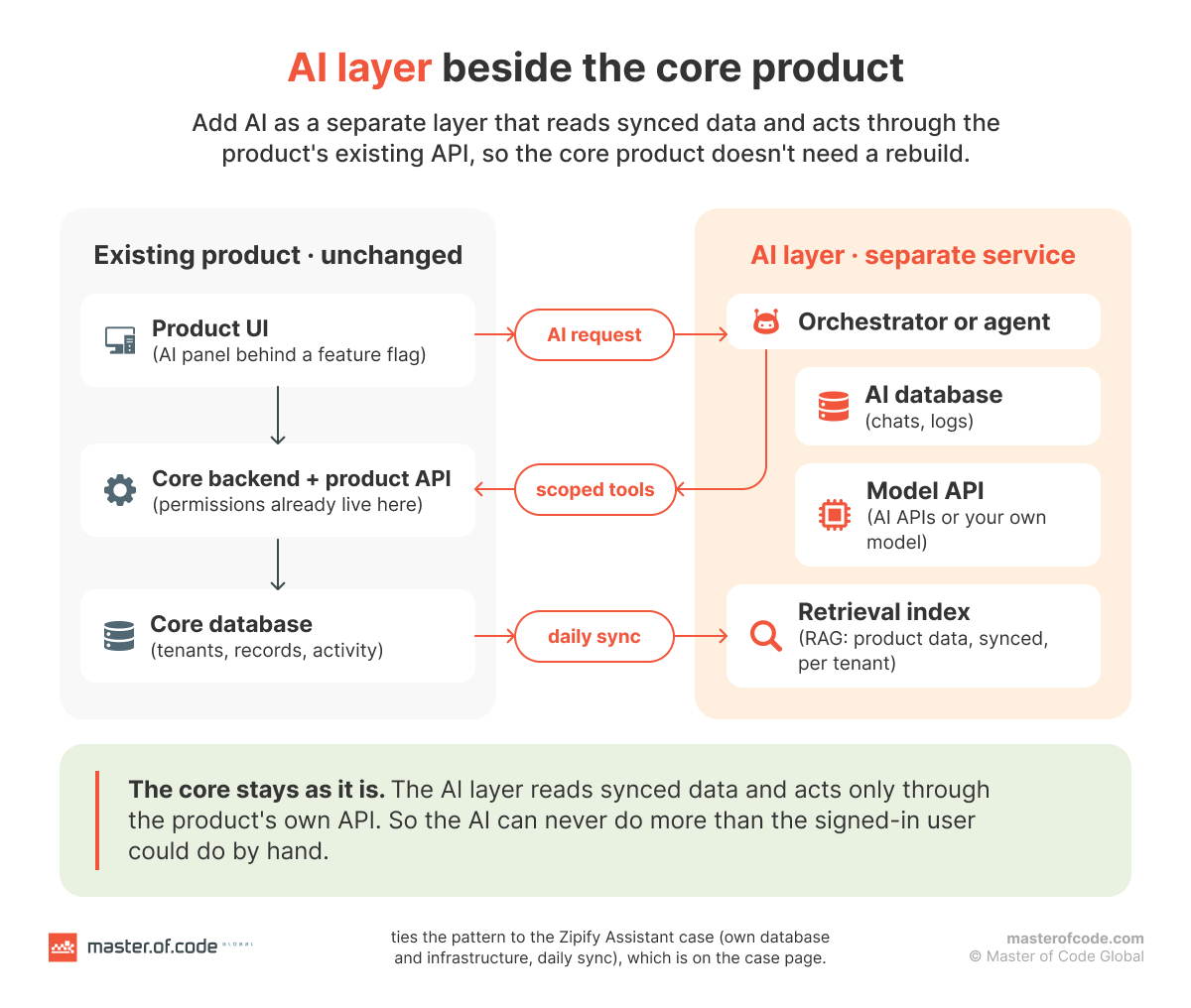
The pattern, step by step:
- The AI runs as its own service, with its own database for chats and logs.
- It reads product data through a sync job or events.
- It acts only through the product’s existing API, scoped to the signed-in user’s permissions.
- The UI shows it behind a feature flag.
Here’s how it looks for a triage feature. A user creates a ticket. The product emits a “ticket created” event. The AI service reads the ticket, picks a category, and writes the tag back through the product’s API. The core app never calls the model directly.
This keeps AI integration in SaaS low-risk. The AI can never do more than the user could do by hand. And you can switch it off without touching the core.
Our AI Assistant for Zipify follows this pattern. Zipify’s apps serve 18,000+ Shopify brands. Its flagship, OneClickUpsell, is a decade-old upsell app. We built the assistant as a standalone module on its own database and infrastructure, fully separate from the core app. A daily sync feeds it store statistics, funnel performance, and health signals.
Connecting to databases, APIs, and workflows. Four connection types cover most needs:
- Read-only replicas or a sync job for retrieval, so AI queries never slow the production database.
- Webhooks and events for freshness, so the AI sees changes without polling.
- Your product’s API exposed as tools, so the AI acts under the same rules as the UI.
- Background jobs for anything slow, such as bulk summaries or report generation.
If your core has no clean API, build a thin one for the AI to call. Start with the few endpoints the feature needs, and add more as new features arrive. It still costs far less than a rewrite. Turn the feature on per tenant with its flag, so you control who sees it. Our AI integration services team handles this kind of wiring.
How to Handle Latency, Scalability, and Reliability
Treat every model call as slow, metered, and sometimes failing, and design around that. A database query returns in milliseconds. A model call can take seconds, and providers have outages. These patterns help:
- Stream responses so users see text as it’s generated.
- Move long jobs to background queues and notify users when they finish.
- Set timeouts with a non-AI fallback, such as standard search or a help link.
- Cache repeat answers to common questions.
- Rate-limit per tenant so one heavy customer doesn’t slow everyone else.
- Keep a second model or provider ready as a fallback.
- Run AI workloads apart from the core app. Jetbase recommends separating AI workloads from core application logic for scale and cost. It also means a model outage can’t take the product down.
Set a latency budget per feature. Inline suggestions must feel instant, so use a small, fast model. A chat answer can take a few seconds if it streams. A report can run in the background for minutes.
Plan for provider limits. Model APIs cap tokens and requests per minute. Those caps, not your servers, often set your first scaling ceiling. Load test with realistic prompts, and request higher limits before launch.
Good AI integration in SaaS keeps scaling and cost together. AI load grows with usage, and so does the bill. Most patterns above also cut cost, which the cost section covers below.
AI APIs, Ready-Made Tools, or Custom Models?
Start with AI APIs for most features. Move to custom models only when cost at scale, data control, or accuracy on your domain demands it. Jetbase gives the same advice: validate demand with an API-based MVP before you train custom AI.
| Criterion | Third-party AI APIs | Ready-made embeddable tools | Custom models |
|---|---|---|---|
| Speed to ship | Days to weeks | Fastest | Months |
| Upfront cost | Low | Low to medium | High |
| Control | Prompts, retrieval, and tools are yours | Low: the vendor decides | Full |
| Cost at scale | Grows with every request | License fees | Lower per request at high volume |
| Lock-in | Medium | High | Low on vendors, high on your team’s skills |
Ready-made tools promise speed. Gigacatalyst, which sells one, estimates about two weeks to embed its product, versus 6–12 months to build the same thing in-house. Treat that as a vendor claim.
Custom models vs APIs: the real triggers. Three situations justify a custom or self-hosted model:
- Cost per request at high volume. A narrow task runs millions of times a month.
- Data that can’t leave your environment for contract or regulatory reasons.
- Narrow tasks where a small model is enough, such as classification or extraction.
If none applies, an API is the faster path.
Add a thin model gateway. Route every model call through one internal service. It holds prompts, logs requests per tenant, and hides which provider you use. Then you can test a new model on your test set and switch with a config change, not a code change.
Master of Code Global is platform-agnostic, with hands-on experience across 15+ platforms. So the choice should follow your stack and your unit economics. Our comparison of custom vs off-the-shelf AI solutions goes deeper.
RAG, Fine-Tuning, or AI Agents?
Use RAG when answers depend on the customer’s data, an agent when the feature must act, and fine-tuning only when prompts and RAG fall short.
- RAG fits when answers depend on the customer’s own data. The system retrieves the tenant’s records or documents, then answers from them.
- AI agents fit when the feature must take actions across steps or tools.
- Fine-tuning fits when prompts can’t reach a set style or a narrow skill.
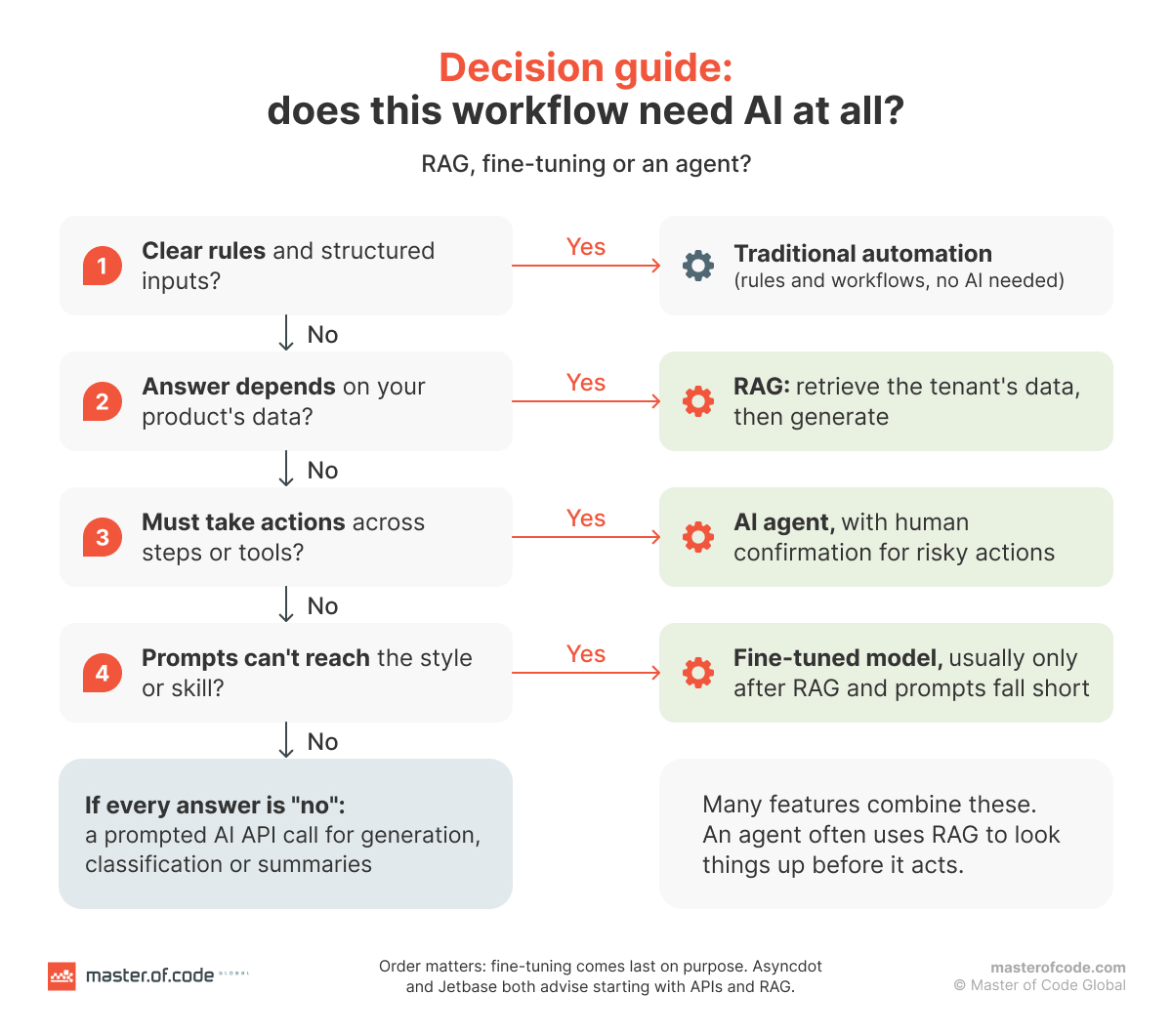
Fine-tuning goes last. Asyncdot advises skipping it in most cases. It takes weeks to get right and needs ongoing maintenance. Try prompts and RAG first. Fine-tune only when you have clean examples and a gap that prompts can’t close. Typical cases are a strict output format, or a domain vocabulary the base model keeps getting wrong.
RAG in a SaaS product has its own rules. Index each tenant’s data separately. Keep the index fresh with the sync or events from the integration section. Make answers point to the records they came from, so users can check them.
When to Add an AI Agent to SaaS
Add an agent when users want the product to do the work for them. Asyncdot lists what an agent needs: tools, memory, permissions scoped to the user, and a confirmation step before sensitive actions. Without those, an agent is a liability. Start with read-only actions, such as looking up data or drafting changes. Add write actions one at a time, each with a confirmation step. Log every action the agent takes.
The Zipify Assistant runs four agents:
- an orchestrator that reads each merchant request and routes it
- a data agent that handles the numbers
- a strategist agent that shapes recommendations
- a database agent that runs queries
Combinations are normal. An agent often uses RAG to look things up before it acts. For help designing one, see our AI agent development services.
What Usually Goes Wrong Technically
The same six problems come up again and again:
- Messy or inconsistent data formats that confuse retrieval.
- Permissions that don’t carry into AI tools, so the AI sees more than the user should.
- Non-deterministic outputs that break snapshot tests.
- Hallucinations in customer-facing answers.
- Model updates from the provider that change behavior overnight.
- Legacy code with no clean API for the AI to call.
Two of them need specific habits. For non-deterministic outputs, test properties instead of exact strings. Check that an answer cites a valid record, stays under a word limit, or uses the right format. For model updates, pin the model version. Re-run your test set before you move to a new one.
Three fixes cover the rest. First, build an evaluation test set before launch, from real user questions with known answers. Second, add monitoring that traces each request across services and agents. The Zipify team traced how requests moved between its four agents. Third, tune prompts on real conversations. Zipify used prompt tuning to cut hallucinations and tested each agent on its own features.
Data Privacy, Tenant Isolation, and Compliance
One shared AI layer serves every customer, so every step must check which tenant is asking. Generic AI guides often skip this risk. A prompt from tenant A must never pull tenant B’s data.
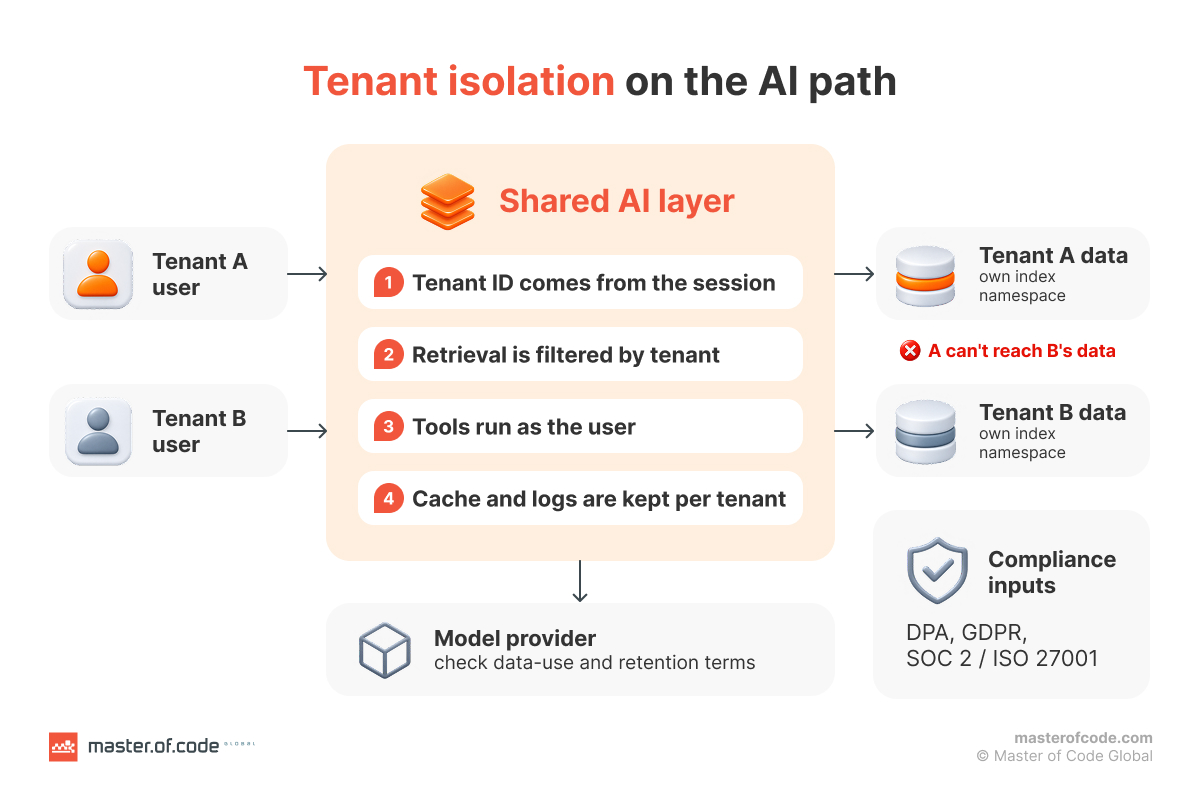
Multi-tenant isolation comes down to four rules:
- Take the tenant ID from the session. Never take it from the prompt or the model’s output. A user can type any company name into a chat box.
- Filter retrieval by tenant. Use separate index namespaces or a mandatory tenant filter on every query.
- Run tools as the user. Call the product’s API with the signed-in user’s token, so existing permissions apply.
- Keep caches and logs per tenant. A cached answer for one customer must never reach another.
Test these rules on purpose. Add cross-tenant questions to your test set and confirm they fail.
Watch for prompt injection. Retrieved records and documents can carry hidden instructions. Treat retrieved text as data, never as commands. Limit the tools the AI can call to what the feature needs.
Handle deletions. When a customer deletes a record or closes an account, remove it from the index, the caches, and the AI’s logs too.
Privacy. Take three steps before launch:
- Check the model provider’s data-use and retention terms. Confirm whether it stores prompts and whether it trains on them.
- Sign a data processing agreement (DPA) with the provider.
- Send the model only the personal data the task needs. Mask or drop the rest.
Compliance. If you serve EU customers, GDPR applies to the personal data you send to the model. Enterprise buyers will also ask about SOC 2 and ISO 27001. SymphonyAI’s buyer FAQ names both as certifications to look for in AI SaaS. Some enterprise customers will also ask to opt out of AI features, or to keep processing in their region. Plan for both with tenant-level settings. Check with your legal team and auditors before you claim any specific requirement. Rules vary by industry and region.
How Much Does It Cost to Add AI to an Existing SaaS Product?
To add AI to existing SaaS products, plan on weeks to a few months for a first feature. The budget follows scope, data, and usage, and a fixed-scope pilot lets you set it on day one. Two reference points from our own work:
- The Zipify Assistant went from kickoff to a released product in about 2.5 months. It’s a four-agent assistant built as a separate layer.
- Our AI Pilot delivers a working Proof of Value in 30 days on a fixed budget. Cost and deadline are set on day one. The solution is tested with real users against KPIs agreed upfront.
| Project | What was delivered | Timeline |
|---|---|---|
| AI Pilot | A working Proof of Value, tested with real users against agreed KPIs | 30 days, fixed budget |
| Zipify Assistant | A released four-agent assistant on its own database and infrastructure | About 2.5 months from kickoff to release |
| AI Lead Recovery for Shopify | A voice and SMS assistant connected through the Shopify API | Results reported after 5 months of real-world testing |
Source: Master of Code Global portfolio.
For a dollar range, third-party estimates help. Asyncdot, a development agency, estimates $5K–$50K to build one feature, plus $50–$2K a month in API costs. Its per-feature estimates:
| Feature | Build cost | Monthly API cost | Timeline |
|---|---|---|---|
| Intelligent search (RAG) | $8K–$15K | $100–$300 | 2–3 weeks |
| Content generation | $5K–$12K | $50–$200 | 1–2 weeks |
| Categorization and triage | $5K–$10K | $50–$150 | 1–2 weeks |
| Chatbot assistant | $10K–$25K | $200–$500 | 2–4 weeks |
| AI agent (complex workflows) | $20K–$50K | $500–$2K | 4–8 weeks |
Source: Asyncdot’s own estimates.
What moves your number. Five items drive most of the spread between quotes:
- how clean and reachable your data is
- how many systems the feature must connect to
- whether it only reads data or also takes actions
- how much evaluation and testing the risk level demands
- security and compliance reviews for enterprise customers
Why estimates disagree. Asyncdot’s own page gives two ranges for a chatbot: $5K–$20K in its intro and $10K–$25K in its feature section. Jetbase lists line items that add up to six figures, but they cover building a whole AI SaaS product, not adding one feature. Scope explains most of the gap. Data readiness explains much of the rest.
Usage drives the monthly bill. Size API spend from real usage. The Zipify Assistant logged 7,558 exchanges across 1,749 conversations, about 4.3 exchanges per conversation. A simple model:
For comparison, Asyncdot estimates $50–$200 a month in LLM API fees for 100 active users, and $500–$3,000 for 10,000. Treat these as Asyncdot’s estimates.
Controlling AI costs. Six habits keep the bill predictable:
- Route easy requests to smaller models.
- Cache repeat answers.
- Trim prompts and retrieved context.
- Set per-tenant quotas.
- Show users a usage meter.
- Review cost per AI interaction every month.
Most AI APIs charge per token, so every trimmed prompt saves money on every call. Our guide to LLM cost optimization covers more tactics.
Want a scoped estimate for your first AI feature? Talk to Master of Code Global. We’ll size it with you before anyone writes code.
How to Price AI Features Without Losing Margin
Price AI so revenue grows with usage, because cost grows with usage. A flat fee works until your heaviest users run up the API bill. Here are four models:
| Model | When it fits | Risk |
|---|---|---|
| Bundle into higher tiers | AI is part of the core value, and usage is predictable | Heavy users on a fixed price eat your margin |
| Paid add-on | The feature serves a clear segment that values it | Low adoption if users can’t try it first |
| Usage-based credits | Usage varies widely across accounts | Users ration usage and never see the full value |
| Outcome-based pricing | The outcome is measurable, such as a resolved ticket or a recovered order | Disputes over what the AI actually caused |
Set the price from your cost. Say one AI interaction costs you $0.02 in API fees, and you want an 80% gross margin on it. Then each interaction must bring in at least $0.10. Run that math for your heaviest 10% of accounts, not the average.
Margin guardrails. Whatever model you pick:
- Set fair-use limits per plan.
- Add quotas, with a clear message when users hit them.
- Track cost per AI interaction against revenue per account every month.
Make usage visible. A usage meter and clear plan limits prevent surprise bills and support tickets. Free trial credits let users see value before they pay.
Pricing for AI features changes often. If you benchmark against other products, check their current pricing pages first.
How to Roll Out AI Features Step by Step
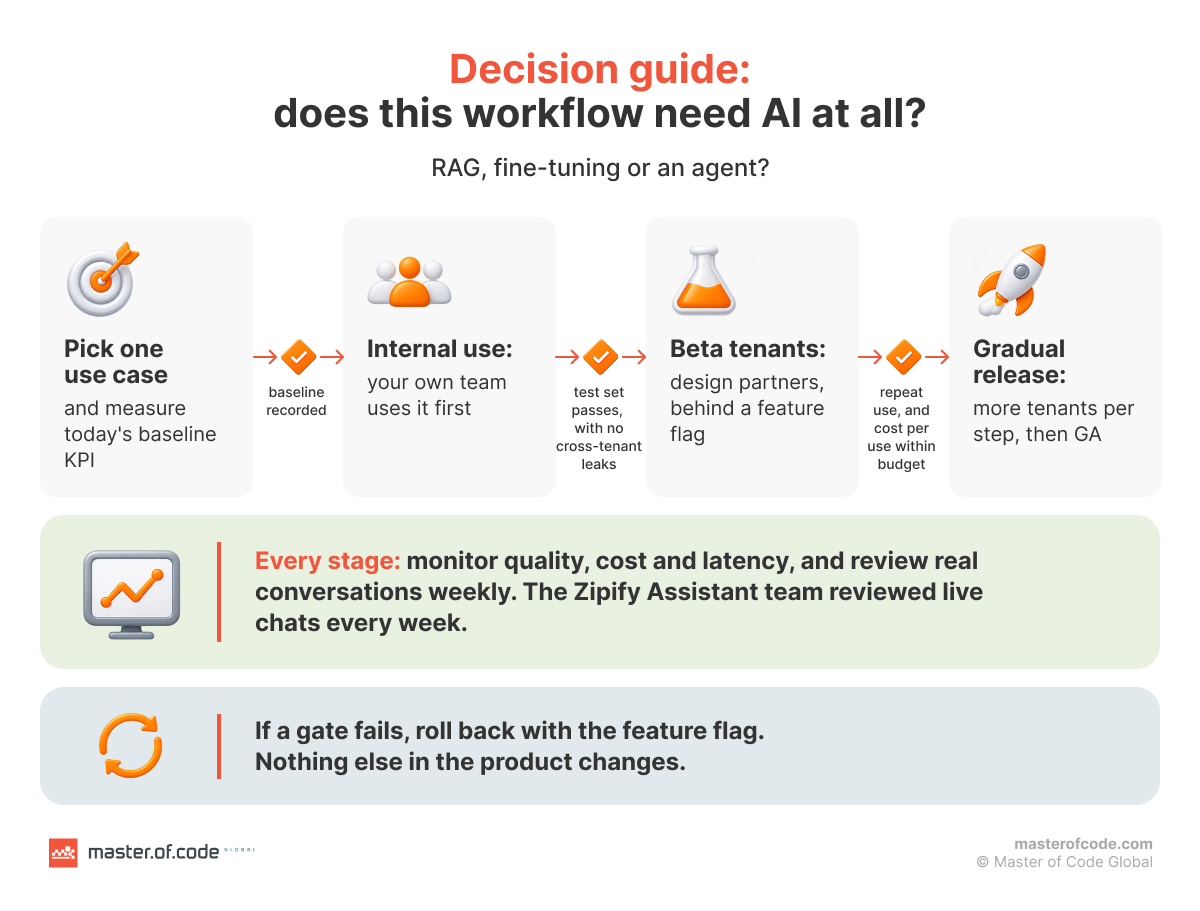
Roll out in four stages, with a gate before each next stage:
- Pick one use case and record today’s baseline, such as ticket handling time or feature adoption.
- Internal use. Your own team uses the feature first.
- Beta tenants. A few design partners get it behind a feature flag.
- Gradual release. Add more tenants per step, then go to general availability.
What each stage is for:
- Internal use finds the obvious failures. Log every request and answer.
- Beta tenants test real data. Pick three to five accounts with different data sizes and use patterns.
- Gradual release tests scale and cost. Raise the share of tenants in steps, and watch the cost per use at each step.
The gates:
- Before internal use: the baseline is recorded.
- Before beta: the test set passes, with no cross-tenant leaks.
- Before wider release: users come back, and cost per use stays within budget.
Monitor at every stage. Track quality, cost, and latency. Review real conversations every week. The Zipify team reviewed live chats weekly. Repeated “build it for me” requests about funnels put funnel creation on the product roadmap. The team also plans to widen the agents’ data access “only in isolated, closely monitored stages.”
Rollback. If a gate fails, switch the feature off with the flag. Nothing else in the product changes.
Tell users what’s AI. Label AI-generated content, add a feedback button to every answer, and mention the feature in release notes. Feedback buttons also give you test cases for free.
For the broader process, see our guide on how to implement AI in business. Want to test your first feature fast? Start with our AI Pilot: a working Proof of Value in 30 days, tested with real users against KPIs agreed upfront.
How to Measure Success and ROI of AI Features
Measure adoption, repeat use, time saved, and the business metric you picked at the start, all against the baseline. Track five layers:
- Adoption: the share of active accounts that use the feature.
- Engagement: repeat use. In the Zipify Assistant, 38% of engaged merchants returned for more than 3 conversations.
- Outcome: task time, support tickets, conversion, or upsell.
- Business: retention, churn, and expansion revenue.
- Economics: cost per AI interaction vs. the revenue it supports.
The ROI formula:
Total cost includes the build, API fees, and maintenance. Here’s an example. A feature saves $120,000 a year in support time and costs $80,000 a year in total. Its ROI is ($120,000 − $80,000) ÷ $80,000 = 50%.
Use the rollout as your control group. During gradual release, some tenants have the feature and some don’t. Compare the same metric across both groups over the same weeks. That’s a cleaner read than before-and-after numbers alone.
Our numbers at the outcome layer. Zipify Agent Assist, an assistant we built inside Zipify’s support tool, shows what this looks like. Since launch, response time is 65% faster and operating costs are 30% lower.
Don’t stop at adoption. A feature that users try once and drop costs money without moving retention. Our guide on how to measure AI ROI covers the full method.
How We Added AI to Existing Products
All three projects added AI to products and teams that were already live. None of them needed a rebuild of the core product.
AI Assistant for Zipify. OneClickUpsell, launched about ten years ago, is the flagship of a Zipify app suite used by 18,000+ Shopify brands. Merchants rarely discovered its new features and kept setups from years before. We built a standalone AI assistant module with four agents, on its own database and infrastructure, fed by a daily sync. It took about 2.5 months from kickoff to release. The results so far:
- 617 merchants have started conversations.
- 1,749 conversations have been logged.
- 38% of engaged merchants returned for more than 3 conversations.
Zipify Agent Assist. Zipify’s support agents handled many repetitive questions that still needed context-specific answers. We built an assistant inside Intercom, the tool the team already used. It searches help articles, past chats, and the knowledge base at once. When an agent resolves a new question, it drafts a help article for review. Since launch:
- 65% faster response time
- 2x faster time to close tickets
- 30% lower operating costs
- 24% higher customer satisfaction
AI Lead Recovery for Shopify. Abandoned carts cost Shopify merchants sales. We built a voice and SMS assistant connected through the Shopify API. It calls shoppers within 30 minutes of abandonment. It sends a checkout link only after the shopper agrees. After 5 months of real-world testing:
- 121,491 abandoned checkouts processed
- 6,754 calls answered
- $28,000+ in revenue
- a ~15% expected recovery rate
Planning something similar? See our AI assistant development services.
FAQs
How long does it take to add an AI feature?
A fixed-scope pilot like our AI Pilot gets a working first version in 30 days. Our four-agent Zipify Assistant took about 2.5 months from kickoff to release. Asyncdot estimates 1–8 weeks per feature.
Which AI model should we start with?
Start with a hosted model through an API. It’s the fastest way to learn what users need. Once you have real traffic, test smaller models on your own data to cut cost and latency.
Conclusion
You can add AI to existing SaaS products without a rewrite. Four habits make it work:
- Start from one use case with a measured baseline.
- Build AI as a separate layer that acts through your own API.
- Keep tenants apart at every step.
- Release it gradually, behind a feature flag.
That’s how the Zipify Assistant reached merchants in about 2.5 months without changes to the core app.
Ready to plan your first AI feature? Contact Master of Code Global, and we’ll help you plan and build it.