



AI can write code, investigate vulnerabilities, and turn security reports into remediation tasks. But who checks its findings, decides which risks matter, and verifies that a fix actually works? These questions sit at the center of AI SDLC security.
We asked Anhelina Biliak, Application Security Leader at Master of Code Global, how security controls need to adapt when AI becomes part of software delivery. She also shares the team’s practical workflows for automated threat modeling, dependency alert triage, AI-assisted code analysis, and vulnerability remediation, including where engineers review the results and retain responsibility.
Read on for the controls to put in place and a closer look at how our AppSec team applies them. To review security gaps in your own AI development workflows, get in touch for an AI security consultation.
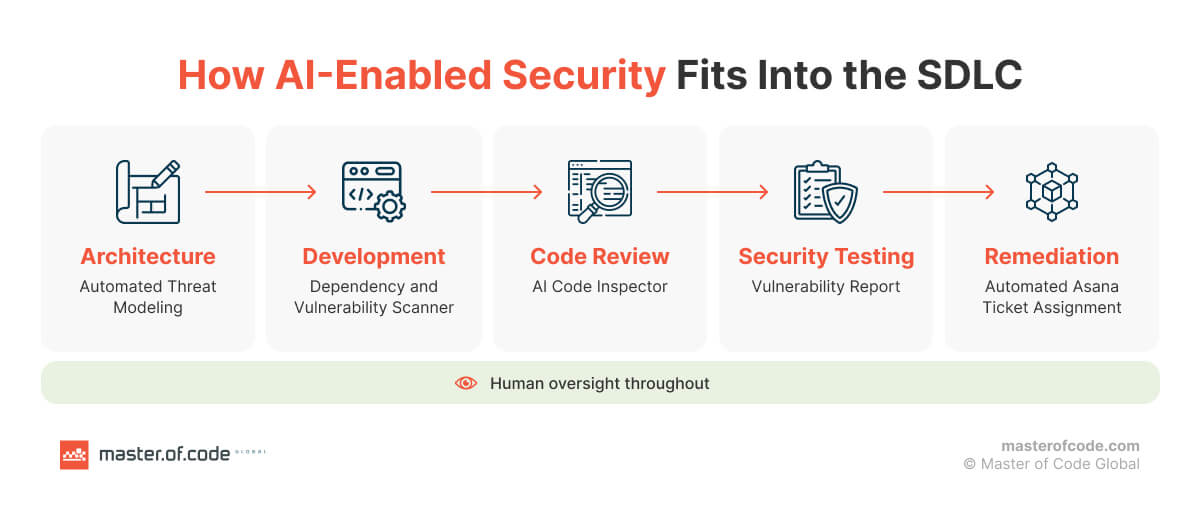
Table of Contents
Key Takeaways
- AI SDLC security covers both tools used during development and AI components in the application, including their data access, permissions, dependencies, and runtime behavior.
- Generated code requires security review and testing. Model outputs and agent actions must remain subject to application-level authorization and validation.
- Master of Code Global uses AI for threat modeling, dependency alert triage, code analysis, and remediation tracking. Engineers validate findings and verify fixes.
- Dependency triage identifies potentially vulnerable usage patterns, not confirmed exploitability. Negative AI verdicts change priority without removing alerts from the update process.
- Remediation tickets have owners and severity-based deadlines. Findings close only after security retesting, while accepted risks are recorded separately.
AI SDLC Security Explained by an Application Security Lead
Tetiana: Let’s start with the basics. What is AI SDLC security?
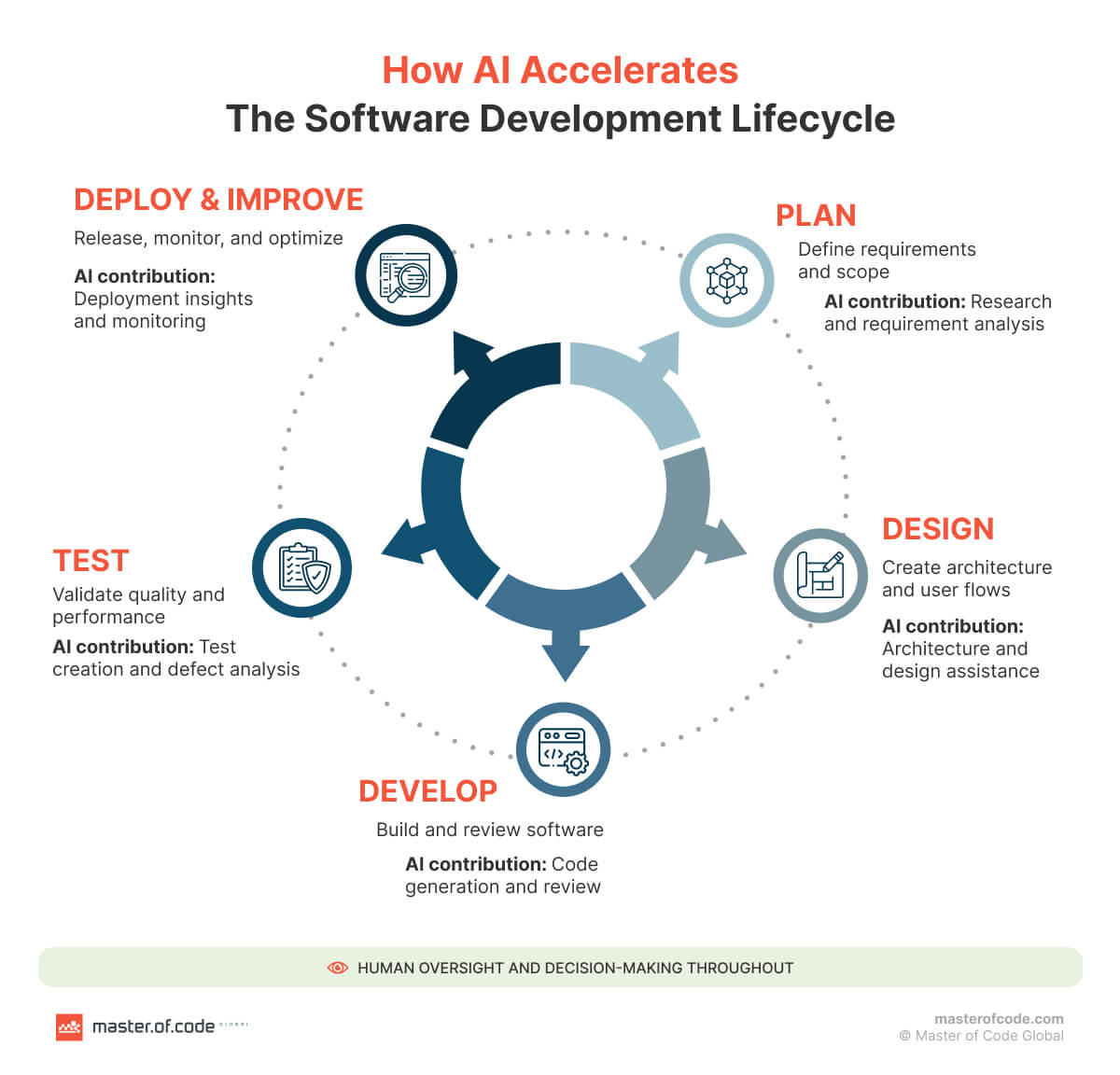
Anhelina: It’s the set of security controls applied across planning, development, testing, deployment, and monitoring when AI is used to produce software or included in the application.
The familiar application security controls still apply: authentication, authorization, secrets management, dependency scanning, and code review. But we also need to account for AI-specific risks:
- sensitive data exposed through model inputs,
- insecure generated code,
- prompt injection, and
- excessive agent permissions.
In an AI SDLC, these controls become documented requirements, automated checks, and approval gates. Engineers validate findings, review exceptions, and verify remediation before closing security issues.
Tetiana: How does security change in an AI-driven SDLC?
Anhelina: We need to look at more than the application itself. The scope expands to include the AI tools used during development and any AI components in the application. Security reviews need to establish what repository content reaches a model, how the provider handles that data, and which files, commands, and network resources a coding agent can access.
Generated changes require the same security checks as human-written changes, including dependency scanning, static analysis, and code review. This applies to application code, CI/CD workflows, and infrastructure configurations.
For AI-enabled applications, testing also needs to cover untrusted model inputs, output validation, and authorization for tool calls. Changes to models, prompts, retrieval sources, or agent permissions can require renewed security testing even when application code stays unchanged.
Tetiana: What new security risks does AI introduce across the SDLC?
Anhelina: That depends on how AI is used and what it can access. I’d group AI limitations into five areas:
- Generated code: insecure authentication or authorization logic, missing input validation, and unsafe dependency choices. Hallucinations in LLMs can also produce references to nonexistent packages or APIs. Attackers exploit this through slopsquatting: they publish malicious packages under names that models commonly invent, so a developer who installs a suggested dependency without checking it may pull attacker-controlled code into the project.
- Coding agents: malicious instructions in repository files or tool responses can influence an agent’s actions. With excessive permissions, it could expose secrets, modify files, or execute unauthorized commands.
- Models and data: sensitive information can enter prompts, logs, or retrieval context. Poisoned data or compromised model artifacts can also affect system behavior.
- AI software supply chain: third-party models, packages, datasets, and connected tools introduce dependencies whose origin, integrity, and access need verification.
- Application outputs: model-generated content can cause injection vulnerabilities if passed to SQL queries, shell commands, or other interpreters without validation.
The point I’d emphasize for LLM security is this: model output is untrusted data. It cannot establish authorization or replace application-level security checks.
Tetiana: Could you walk us through security controls needed at each AI SDLC phase?
Anhelina: Sure. I’d start with what each phase needs to establish and how we verify it. The requirements depend on the application’s data, exposure, and the permissions granted to AI tools.
| Phase | Security controls |
|---|---|
| Plan | Classify sensitive data, define security requirements, assess model providers, and map data flows and trust boundaries. Specify permitted agent actions. |
| Develop | Apply secure coding standards, protect secrets, restrict agent permissions, and review generated changes. Run static analysis and dependency scans. |
| Test | Verify authentication and authorization, investigate findings, and test misuse scenarios. For AI components, include prompt injection, data disclosure, unsafe outputs, and unauthorized tool calls. |
| Deploy | Verify artifact integrity and configuration. Restrict CI/CD credentials, require release approvals, and deploy only builds that pass the defined security gates. |
| Monitor | Log security-relevant events, monitor access and tool execution, triage new vulnerabilities, and maintain incident response procedures. Reassess controls after significant changes. |
What matters is that a passing scan is only one piece of evidence. Release decisions also need to account for unresolved findings, accepted risks, and whether required mitigations have been verified.
Have an AI use case to validate before committing to full development? Explore our AI pilot to assess feasibility, security requirements, and business value within a defined scope.
Tetiana: How do you secure AI-generated code before production?
Anhelina: I’d treat it as an untrusted contribution. Review its behavior against the specification and security requirements before merging it.
We need several complementary checks here:
- Static analysis to detect insecure constructs and trace potentially unsafe data flows.
- Dependency and secret scanning to identify vulnerable packages and exposed credentials.
- Code review to examine authorization, input validation, error handling, and business logic.
- Security testing to verify behavior under malicious inputs, unauthorized requests, and failure conditions.
In our own work, Semgrep and SonarQube provide baseline coverage, and we use Claude Code to examine logic those tools can’t express in rules, such as authorization across several components.
Take a generated endpoint, for example. It may validate the request format but fail to check whether the authenticated user owns the requested record. That requires an authorization test, not just a successful functional test.
Those required checks need to be enforced through protected branches and release gates. Findings need remediation or documented risk acceptance, with security fixes verified through retesting.
Tetiana: How do you automate security policy enforcement and quality gates in an AI SDLC?
Anhelina: The first step is making the policy testable. Translate policies into checks that run at pull request, build, and deployment stages. Examples include secret detection, dependency rules, static analysis, and infrastructure configuration checks.
Then you need clear rules for which findings block progression, who can approve exceptions, and what evidence is required. Protect the checks themselves from unauthorized modification. For mandatory controls, a failed or unavailable check should block progression until resolved. AI agent evaluation should include tests for prohibited actions and permission boundaries. A clean model verdict should not automatically clear a security gate.
In our dependency triage, for example, a negative model verdict only lowers an alert’s priority. The alert stays in the regular update process until it’s resolved.
Tetiana: How does threat modeling change when AI is involved?
Anhelina: The basic method stays the same, but there are more components and access paths to examine: prompts, retrieved documents, model providers, agent tools, and execution environments. We need to understand where untrusted content enters the system and which trust boundaries it crosses.
For coding agents, assess whether repository content can influence commands or expose secrets. For AI-enabled applications, examine prompt injection, data disclosure, and unauthorized tool use. Update the threat model when architecture, data access, or agent capabilities change. In our AI in the SDLC approach, AI assists with analysis while engineers validate threats and mitigations.
Tetiana: What about CI/CD pipelines and the AI software supply chain? How do you secure those?
Anhelina: Protect workflow definitions and restrict who or what can modify them. Give build jobs minimal permissions, isolate untrusted code, and use short-lived deployment credentials where supported. Pin third-party actions to reviewed commit hashes and verify build provenance before launch.
For the AI supply chain, we need to know what we’re bringing into the system. Track the origin and version of models, datasets, packages, and connected tools. Review changes to these dependencies alongside application changes. A successful build does not establish that its inputs or resulting artifacts are trustworthy.
Tetiana: What role do governance, human oversight, and accountability play in AI SDLC security?
Anhelina: Governance establishes the rules: approved tools, permitted data use, access boundaries, and decision owners. Human oversight provides review at points where an incorrect decision could expose data, change permissions, or release vulnerable software.
But someone also needs to own each decision. Assign responsibility for reviewing generated changes, validating findings, approving exceptions, and verifying fixes. Record those decisions so they can be traced later. A human-in-the-loop approach gives reviewers an opportunity to challenge AI outputs.
For example, on our team, a developer can mark a remediation ticket as complete, but only a successful security retest moves it to Done.
Tetiana: Looking specifically at coding agents and autonomous agents, what additional risks do they introduce?
Anhelina: The additional risk is that agents can act. They read files, execute commands, modify code, and call external services using the permissions available to them. Prompt injection in repository files, retrieved documents, or tool responses can redirect these actions toward secret disclosure, unauthorized changes, or data exfiltration.
Agents can also introduce unreviewed dependencies or alter CI/CD configurations. A mistaken action may affect several systems before it is detected. Unregistered tools create additional shadow AI agent risks, including unknown access privileges and activity outside established review processes.
Before giving an agent access to production systems, validate its workflow, permissions, and failure scenarios through an agentic AI PoC.
Tetiana: What does runtime security look like for AI-enabled applications?
Anhelina: At that point, we’re protecting the application as it handles real requests. Enforce authorization before retrieving data or executing tools, validate tool arguments, and treat model output as untrusted input to downstream systems.
Apply rate limits, resource limits, and security logging. Monitor rejected access attempts, unusual tool calls, and potential data disclosure. One distinction is important here: guardrails can help detect prompt attacks, but they do not replace access controls. These protections should be designed into LLM integrations, including failure handling when a security check is unavailable.
Tetiana: What security standards and frameworks apply to an AI SDLC?
Anhelina: NIST SSDF is a useful starting point for secure software development practices. SP 800-218A supplements it with practices specific to AI model development; I wouldn’t describe it simply as a checklist for coding assistants.
OWASP ASVS provides application security verification requirements, while AISVS addresses AI-specific requirements. The OWASP API Security Top 10 and Top 10 for LLM Applications help identify relevant risk categories.
The important part is choosing requirements that fit the system’s architecture and exposure, then mapping them to tests and evidence. Using a framework does not establish compliance by itself.
Tetiana: To wrap up, what practices would you recommend to a team building a secure AI-driven SDLC?
Anhelina: I’d start with documented security requirements and approved tools. Restrict the data and permissions available to models and agents. Review generated changes, enforce security checks, and test application behavior under misuse.
Then make sure you can follow a finding through to resolution: who owns it, what decision was made, and whether the fix was verified. Reassess security after significant changes to code, models, prompts, or integrations.
When moving from AI pilot to production, verify that controls cover production data, permissions, and operating conditions. And keep measuring remediation time, overdue findings, and recurring weaknesses. That tells you where the process needs improvement.
Where does your organization stand with AI adoption? Take our free AI maturity assessment to evaluate readiness across seven dimensions. Answer 15 questions in under 10 minutes and receive your maturity score and capability summary by email.
How Master of Code Global Applies AI in Application Security
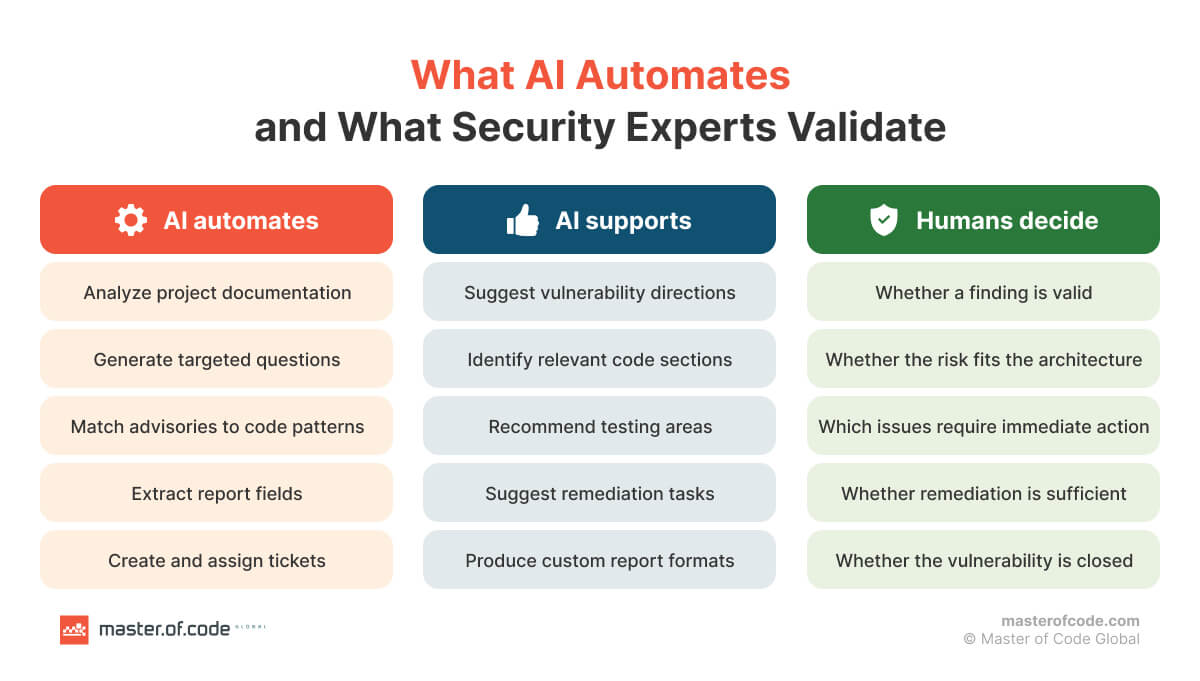
Anhelina also shared how these principles are implemented inside Master of Code Global. The AppSec team uses AI to support design reviews, dependency triage, code analysis, and remediation tracking. Engineers validate findings, determine priorities, and verify fixes.
Our AI Trust Center provides further information about our security practices.
All AI tools described below run under enterprise agreements, with access scoped to the repositories and projects they need.
Automated Threat Modeling Before Implementation
Our AppSec team treats design-stage security as the highest-leverage point in the SDLC. Trust boundary placement, authentication and authorization, secrets handling, and inter-service communication form the foundation of the system. Correcting a flawed choice in production can require refactoring multiple components, migrating data, or re-architecting integrations.
Historically, threat modeling was manual. An engineer interviewed developers about components, data flows, storage, dependencies, entry points, and access controls. Coverage depended on the reviewer’s experience, and the output often remained unstructured notes that were difficult to trace later.
To address this, the team built an internal Claude-based tool and integrated it into FlowForge as a mandatory pipeline step. It runs after project documentation is approved and before the first code is written. Significant documentation changes trigger another run. Project materials are processed through the team’s enterprise account.
The inputs include architecture descriptions, component and infrastructure schemas, user flows, and a data flow diagram showing processes, data stores, external entities, flows, and trust boundaries. The data flow diagram is the unit of analysis.
Questions are drawn primarily from OWASP ASVS, supplemented by the OWASP API Security Top 10, Top 10 for LLM Applications, related guides, and the team’s internal question set. The architecture determines which questions apply.
The tool pre-populates answers supported by the documentation. Unresolved context gaps drive the first round of developer questions. A second, narrower round targets edge cases and implicit assumptions, such as whether an internal API is reachable outside its intended trust boundary.
The result is a STRIDE-based threat model. Each threat is tied to affected components and data flows, assigned an approximate severity, and accompanied by proposed mitigations. The report is attached to the corresponding Asana task.
AppSec validates the findings, removes false positives, adjusts severity, and turns the report into an action plan. The model accelerates analysis; a person owns the final assessment.
Dependabot Alert Triage Based on Actual Package Usage
Dependabot continuously raises Common Vulnerabilities and Exposures (CVEs) across our repositories. Each alert identifies a vulnerable package version in the dependency tree, but that alone does not establish exposure. Many vulnerabilities require specific conditions: a particular API receiving untrusted input, a non-default configuration, or a specific component being used.
Checking those conditions manually for every alert across every project was not feasible at our scale. The team built a tool that adds a contextual check on top of Dependabot.
Each daily run picks up alerts raised since the previous scan. For each CVE, an LLM takes the advisory description from the GitHub Advisory Database and examines the repository in two steps:
- Locates where the affected package is used.
- Checks whether the vulnerable pattern described in the advisory is present.
The analysis also covers dependencies, since the vulnerable pattern may appear in their code. The question is not “Is the package installed?” but “Does this project use the package in the way the vulnerability requires?”
Detecting that pattern is an indicator, not proof of exploitability. The tool does not confirm that attacker-controlled input reaches the code or that it is externally reachable. A positive result requires immediate human review.
Each alert receives a single verdict rather than being re-evaluated daily. Positive results go to the solution leads’ chat, naming the project and CVE. An engineer confirms exposure and determines the next action. If the finding is a false positive, it is marked in the chat and moved to the lowest priority.
Negative verdicts do not remove CVEs from the process. Those alerts remain in Dependabot and follow the regular dependency update process at normal priority. This design also limits the impact of prompt injection. Advisory descriptions and dependency code are third-party content, so the tool treats them as untrusted input.
If such content manipulated the model’s verdict, the worst outcome would be a change in an alert’s priority or an unnecessary review. A model verdict can never close an alert or remove it from the update process, which is the same principle described above: a clean model verdict should not automatically clear a security gate.
A GitHub Actions workflow runs the daily scan. Results pass to n8n, which processes them and sends the notifications.
AI-Assisted Code Analysis and Payload Development
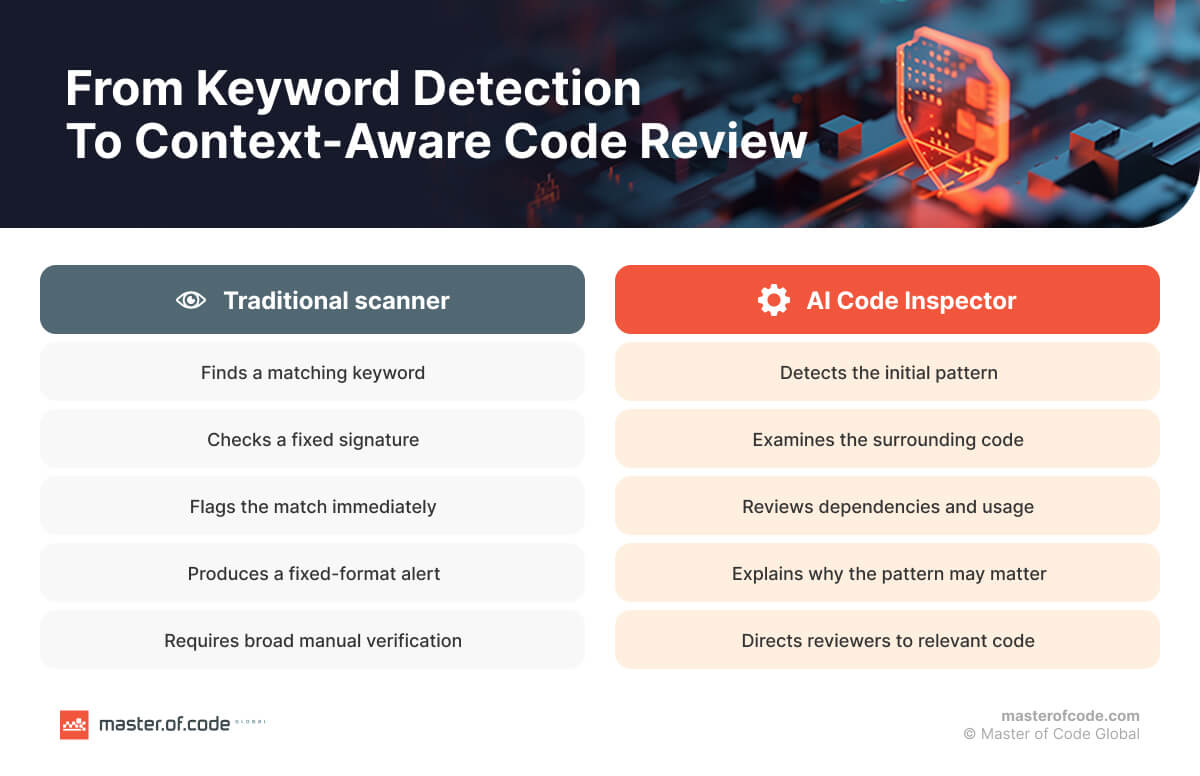
Classic static analysis tools such as Semgrep and SonarQube remain part of our workflow. They provide repeatable checks for known vulnerability classes, including dataflow analysis. Their coverage depends on supported languages, configured rules, and analysis capabilities.
To extend that coverage, the team uses Claude Code alongside these tools. It works directly in the repository to examine how data moves through the application, what validation or sanitization occurs, and how components and dependencies interact. The team can direct the analysis toward specific concerns, such as broken authorization logic, insecure business logic, or vulnerabilities involving several components.
On the dynamic testing side, the team uses Claude Code together with Burp to develop implementation-specific payloads during penetration tests. Standard payload lists may not account for an application’s filtering, encoding, or custom validation. With relevant code and observed behavior as context, Claude Code helps craft payloads tailored to that implementation. These are then tested and iterated on in Burp against the running application.
In both cases, the model accelerates and extends the analysis, but an engineer validates every finding before it enters a report.
Automated Vulnerability Tickets and Verified Remediation
Once penetration testing is complete, the security team delivers a vulnerability report to developers. Turning that report into assigned tickets used to be entirely manual. After handover, the team also lacked reliable visibility into which findings were being fixed and which had stalled.
The team automated this process with Asana AI. Each project has a main security task, with the pentest report attached. From that report, Asana AI extracts each finding’s name, description, CVSS score, and severity. It creates a ticket, assigns it to the project’s solution lead or team, and sets a deadline using our internal remediation SLAs.
| Severity | Remediation deadline |
|---|---|
| Critical | 48 hours |
| High | 7 days |
| Medium | 90 days |
| Low | 180 days |
Deadlines run from the report’s delivery date. Severity determines the deadline; the CVSS score is included for reference. Ticket access is restricted to the project team.
The security engineer reviews the generated tickets to confirm that findings were extracted correctly, particularly their severity. This replaces manual entry with verification and gives the team visibility into ownership, due dates, and overdue work.
A developer marking a ticket complete does not close the finding. It moves to the To Review column, where a security engineer retests the fix. Only a successful retest moves it to Done.
If the vulnerability remains, the ticket is reopened, and the developer receives a retest report with updated recommendations. This accounts for partial fixes and changes that introduce another vulnerability.
Formally accepted risks move to the Rejected column. They remain separate from verified fixes, so Done means the vulnerability has been fixed and confirmed by security.
What Comes Next: Testing Checklists and a Security Wiki
The team is developing a structured testing checklist derived from validated threat models. Each identified threat will map to specific test cases and areas for verification, connecting design-stage findings to pre-release testing.
A project-level Application Security Wiki is also planned. It would bring together threat models, pentest and retest reports, triage results, and remediation records. The goal is to trace which threats were tested, which vulnerabilities were fixed, and which risks were accepted without reconstructing the history across tasks and chat threads.
What These Workflows Changed for Our AppSec Team
The common thread across these tools is that they move security work earlier and remove the manual steps that used to slow it down.
The biggest shift is at the design stage. With the manual questionnaire, developers had to wait for a round of questions from the security team, and then for our conclusions, before they knew what to change. Now the threat modeling tool asks the questions and delivers findings and recommendations directly, so developers can validate and address issues themselves without waiting on us. Because the tool runs as soon as the architecture is defined, these fixes happen at the point where they’re cheapest. Architectural issues are corrected before they compound into the rest of the system, and some design flaws that would otherwise have become critical vulnerabilities are closed before implementation really gets underway.
Later in the lifecycle, the impact is mostly about time and coverage. Ticket assignment used to be entirely manual; now it takes a couple of minutes of verification instead of manual data entry, and every finding has an owner and a deadline from the moment the report is delivered. Dependency triage is a clearer case: matching CVEs against actual usage in each project wasn’t slow before, it simply wasn’t done, because the time cost at our scale made it impractical. Now it runs daily across all repositories, and developers only receive alerts for vulnerabilities that apply to their code.
Code analysis has become more flexible as well. Traditional scanners flagged fixed signatures in a fixed format, and every finding still needed full manual verification. With Claude Code, the team can direct the analysis toward specific concerns and request custom report formats suited to the task, whether that’s a focused review of an authorization flow or a summary prepared for developers. Classic tools still provide baseline coverage, but the analysis is no longer limited to what their rules can express.
Across all of this, engineers spend less time on data entry, manual matching, and chasing status, and more on the work that actually requires security expertise: validating findings, testing, and advising teams on how to build more securely.
Security Findings Need Verified Resolution
AI SDLC security depends on controls that remain effective from design through production. AI can accelerate threat analysis, dependency triage, and remediation tracking. Engineers still need to validate findings, assess exposure, and confirm that fixes work.
At Master of Code Global, these workflows connect security findings to review, ownership, deadlines, and retesting. The next step is stronger traceability between design-stage threats and the tests that verify their mitigations.
If your team is introducing AI into software delivery, get in touch for a consultation to review your controls, identify gaps, and prioritize improvements.