


Text messaging has a trust problem. In 2025, Americans reported a record $15.9 billion lost to fraud, and a text message was the most common way scammers made first contact, according to the FTC. The channel customers check most often is now the one they treat with the most suspicion.
For brands, that suspicion has a price. Every update that looks like phishing, and every link that drops a buyer onto a browser and a login screen, leaks revenue that should have closed.
Apple Messages for Business (AMB) changes what that thread can do. With Business Invitations, a brand can start the conversation once the customer agrees. A verified identity shows who is writing before the customer shares a thing. And a complete purchase, from first question to payment, happens without leaving Messages. In the US and Canada, where iOS leads mobile usage, that is no niche. Here is what the channel makes possible, and what it takes to get it right. We have taken AMB programs through Apple’s review without a single rejection, and if you are planning a launch, our AMB consultants can help you scope the first release.
Table of Contents
Key Takeaways
- Trust is now a conversion feature. A verified name and logo do work no headline can.
- Business Invitations change the starting point. With consent, a brand no longer waits for the customer to write first.
- The checkout a customer never leaves is the one they finish. Product choice, sign-in, and payment all live in one thread.
- The relationship outlives the receipt. A Wallet pass keeps your brand on the phone after the sale.
- Apple adds no per-message fee, but the experience still costs. MSP, implementation, and payment costs apply, and the real investment sits in design, integration, and Apple’s review.
- Invitations can close an activation gap. For an enterprise client where half of new registrants never transacted, we designed a proactive AMB message and the program cleared Apple’s review without a single rejection.
- A review-ready build saves weeks. An AI startup we advised passed Apple’s review on the first submission, where Apple expects most accounts to need one to three rounds.
AMB in Sixty Seconds: What It Is and What It Isn’t
AMB is a business channel inside the native Messages app on iPhone, iPad, and Mac. It looks like iMessage and runs on the same Apple servers, but it’s a separate channel for businesses. Each brand needs a registered business account and connects through an Apple-approved messaging service provider (MSP). Choosing that provider shapes what your first release can do. Our AMB consultants help brands make that call early.
Privacy is built in. The business never sees the customer’s phone number unless the customer chooses to share it; it receives an anonymous ID instead (Apple).
The audience is large where it counts. According to Statcounter, iOS accounted for 51.96% of mobile web usage in the US and 64.74% in Canada in October 2026. These are usage estimates, not customer counts, and the US share moves month to month. Before you build, check the device split in your own analytics.
Trust Before the Tap: Verified Identity vs. the Green Bubble
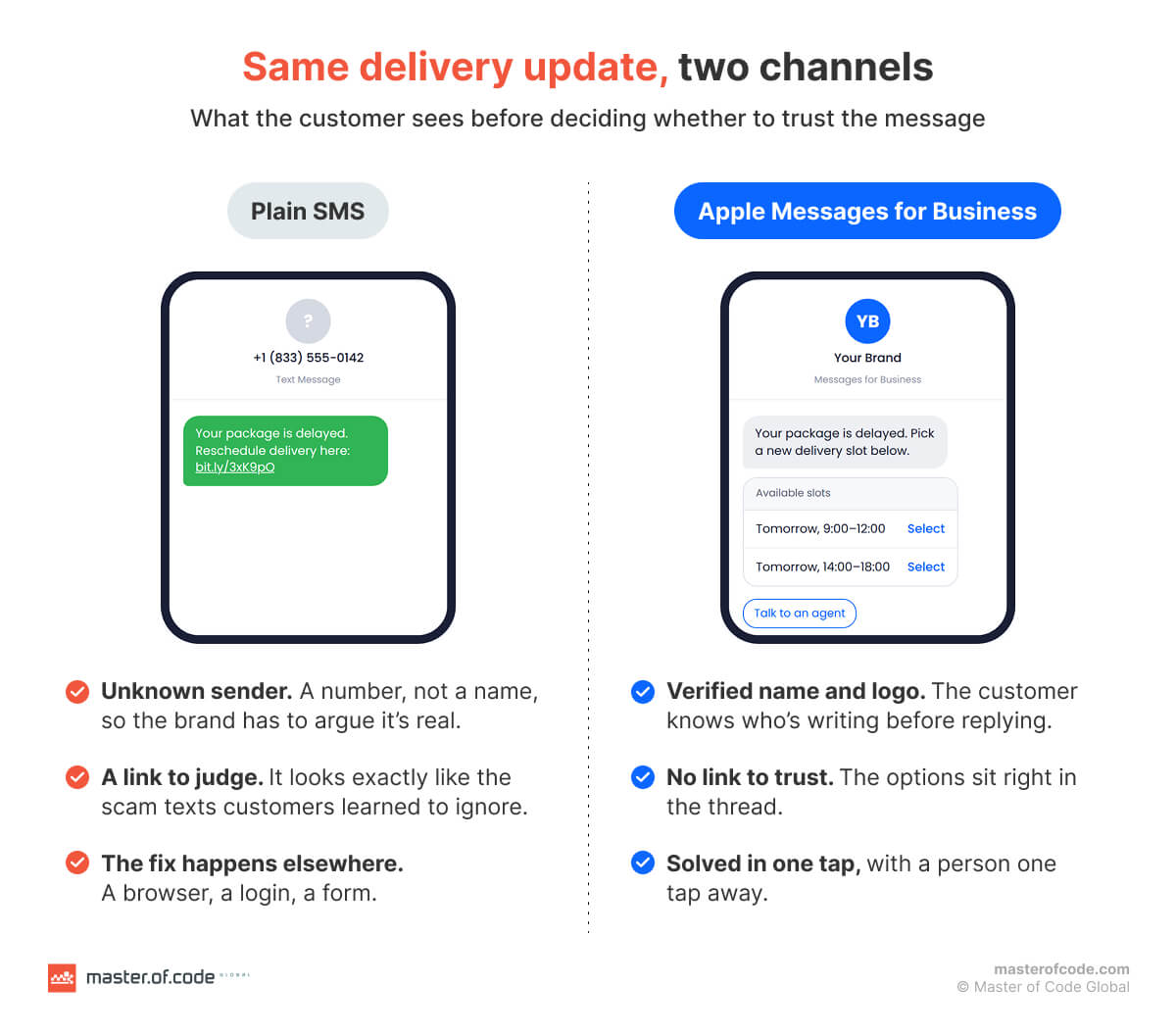
AMB shows your verified name, logo, and colors before the customer replies. A business SMS lands in the same green bubble as a scam text, and years of spam taught people a reflex: an unknown sender with a link is a threat until proven otherwise. That reflex now works against legitimate brands.
Customers want proof first. In a 22-market online survey of 11,056 adults run by Kantar for Meta in April–September 2025, 79.3% of consumers said they need proof of legitimacy before engaging with a business.
AMB supplies that proof before the first reply. The conversation shows your verified business name, logo, and brand colors, so customers know who is writing before they share an address or a card. Control stays with them: they can leave the conversation at any time.
Business Invitations: The Business Can Finally Start the Conversation
Business Invitations let a business start an AMB conversation with a customer who opted in. Apple first announced the feature in autumn 2025, and it is still rolling out: each business must request access, and Apple approves it.
That closes AMB’s oldest gap. For years, the business had to wait for the customer to make contact, and a channel you can’t open is a hard sell to a CFO.
The rules are strict. According to Apple’s Invitations documentation, invitations go only to customers who gave explicit opt-in, they use templates Apple controls, and unsolicited invitations and marketing campaigns are not allowed. There are two entry points: a web opt-in, and IVR deflection, where a caller on hold chooses to switch to messaging.
On the web, the consent flow runs in four steps:
- The customer agrees. On your website, they choose to continue the conversation in Messages.
- The business invites. An eligible business sends an invitation to that opted-in customer.
- The customer decides. They accept and the thread opens, or they decline.
- The purpose holds. Later messages stay within what the customer agreed to.
On the phone, the path is shorter: the caller opts in from the IVR menu, and the invitation replaces the hold queue.
A full basket or a stored phone number is not permission. Consent is earned first, then used only for what it covers.
Here’s an example from our work. For an enterprise client, half of the users who registered never completed their first transaction. We traced the gap and proposed a proactive message delivered through AMB. We owned the architecture direction, Apple registration, integration specs, and program governance. The client cleared Apple’s review without a single rejection.
Every Entry Point Starts a Different Conversation
Invitations are one door. AMB has several more, and each can open a different conversation.
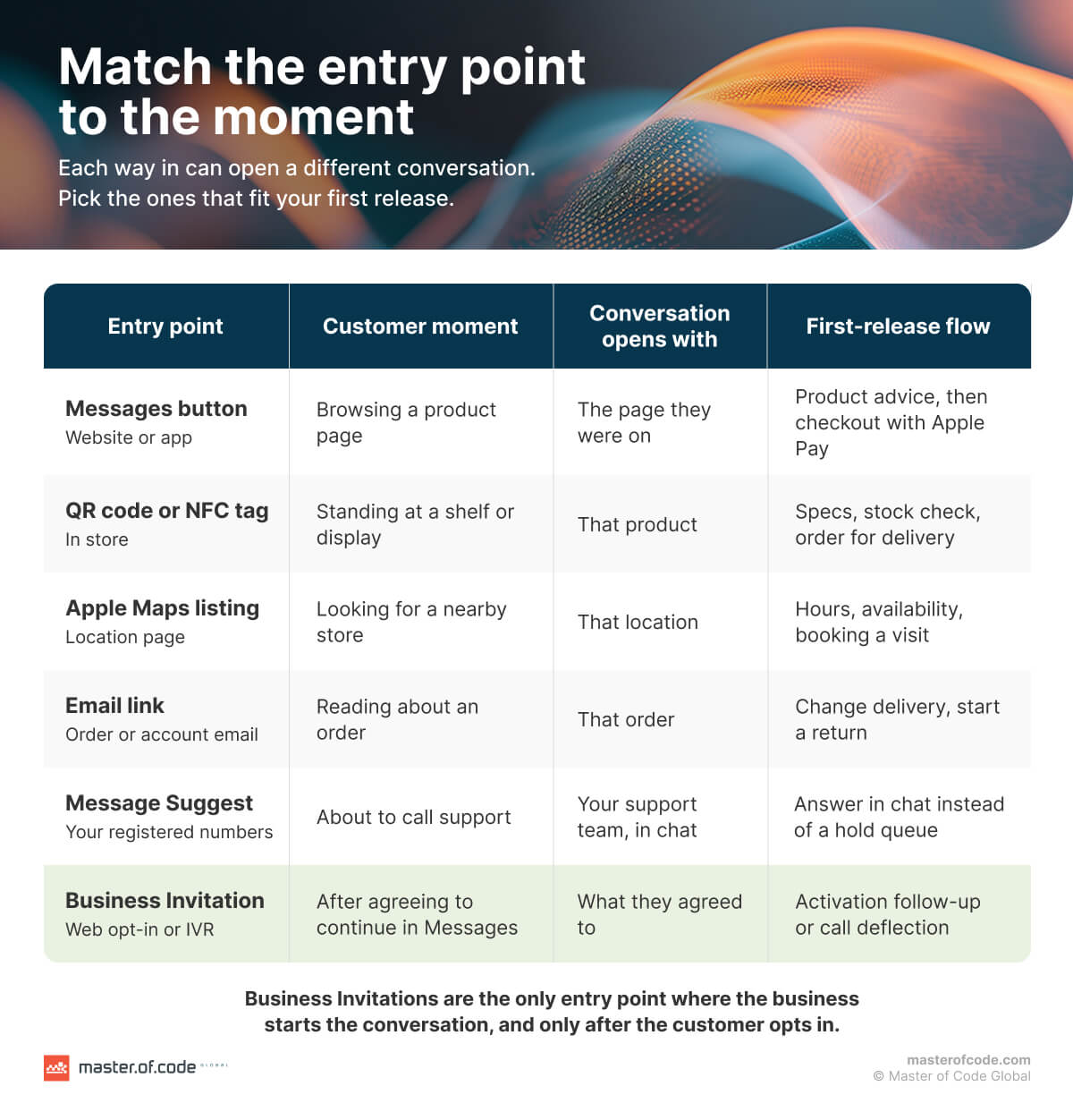
A customer can start from a Messages button on your website or app, a link in an email, a QR code or NFC tag in a store, your Apple Maps listing, or a Wallet pass. Your account can also appear in Siri Search, so finding your brand and starting a chat become one motion. Each entry point can carry its own context and trigger its own flow. A QR code on a showroom display opens with that product; an email link opens with the order it mentions.
Message Suggest covers the phone line. When a customer taps one of your registered numbers on an iPhone, they’re offered the option to message instead of calling. A hold queue becomes a conversation.
A Storefront Inside the Thread
In AMB, a customer can pick a product, sign in, and pay without leaving the conversation.
It starts with context. The conversation knows which page the customer came from, so they never have to explain what they were looking at.
Choices come in the right size. Quick replies handle simple decisions with one tap. List pickers show products with images and descriptions, time pickers offer delivery or appointment slots, and forms collect details in a few structured steps.
Sign-in happens in place. The customer authenticates through your own identity provider inside the conversation: no app switch, no password-reset detour. That detour is expensive. In a survey of 1,003 Americans by authentication provider Frontegg, 42% said they had abandoned a purchase because they had to reset a password to check out.
The customer reviews before paying. Items, price, and delivery details appear in the thread for a final check.
Apple Pay closes the sale with no redirect. Face ID or Touch ID completes the purchase in the conversation. In a Stripe test of 50+ payment methods, businesses that offered Apple Pay saw an average 22.3% increase in conversion. Results inside AMB will vary, but the friction it removes is the same.
AI does the advising. An AI agent asks the questions a good salesperson would and recommends what fits. When it isn’t sure, it hands the conversation to a person. Apple’s policies require live-agent access during business hours and rule out a bot-only setup, so the handoff belongs in the design from day one.
Example: Buying Coffee-Machine Filters Without Leaving Messages
The walkthrough below is illustrative. It shows how the pieces fit together in one retail journey.
- Enter with context. A customer on the product page for their coffee machine taps the Messages button. The conversation opens already knowing the machine model.
- Choose the right filter. The AI agent confirms the model and shows compatible filters in a list picker, with images and prices. If the order needs their account, sign-in appears right in the thread.
- Review and pay. The customer checks the order and pays with Apple Pay. If they cancel or the payment fails, the conversation offers a clear next step instead of a dead end. Apple tests all three paths (success, cancellation, and failure) during its review.
- Confirm and stay connected. An order confirmation arrives with delivery details. Where the experience includes them, the customer picks a delivery slot and adds a loyalty pass to Wallet.
Behind the conversation. None of this runs on scripts alone. The catalog, stock levels, ordering system, and payment processor must feed the thread with real data. If the agent can’t confirm a filter fits, it brings in a person rather than guessing.
The same pattern fits other journeys: comparing sofa fabrics, scanning a QR code in store, or continuing an invited follow-up after registration.
Wallet Passes After the Sale
A pass in Apple Wallet keeps your loyalty card or offer on the customer’s iPhone after the sale.
- Membership or promotion. The pass can carry a loyalty membership or a specific offer.
- Online and in store. Customers can use it when they buy online or show it at the counter.
- Notifications depend on setup. Whether a pass alerts the customer depends on how you configure it and on the customer’s own settings.
- A separate build. Wallet passes are a separate implementation from AMB messaging, so scope and budget them as their own workstream.
Reach and Real Costs
AMB works across carriers on supported devices and markets. It doesn’t reach Android, so keep another channel for those customers and give your iPhone customers an experience built for their device.
Apple adds no per-message fee. That doesn’t make the channel free. Budget for your MSP, the implementation, payment processing, and the team that staffs live-agent hours.
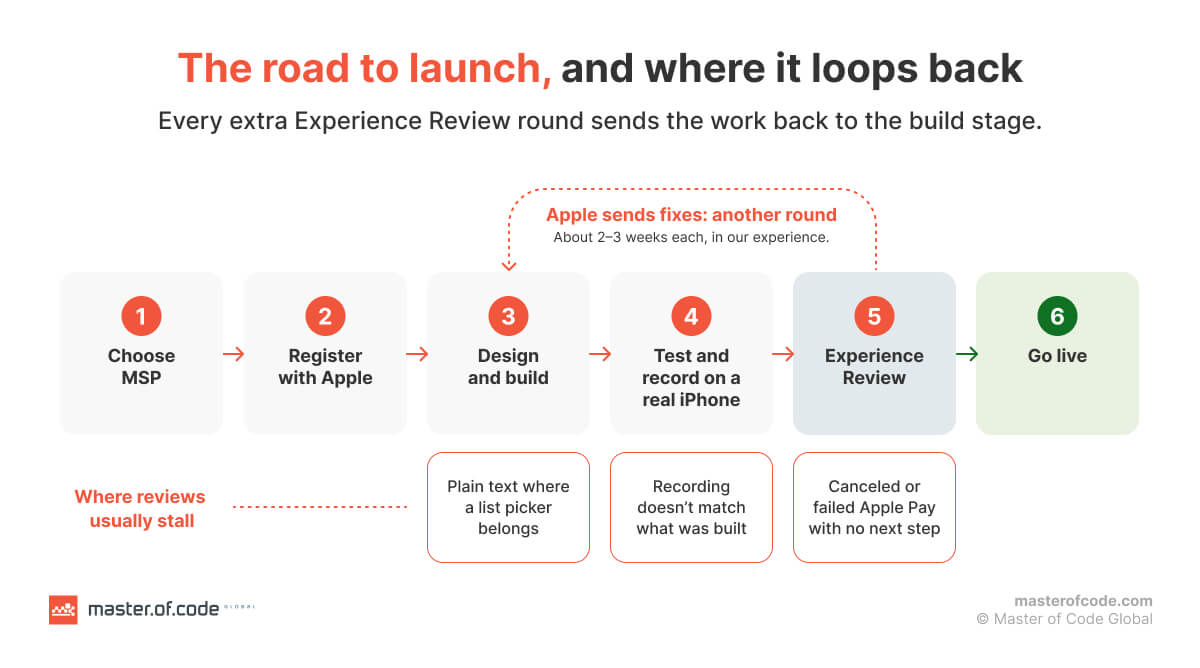
Time is a cost too. According to Apple, most accounts need one to three rounds of its Experience Review before launch, and complete, tested experiences typically need one to two. In our experience, each round takes two to three weeks, and Apple doesn’t commit to a timeline.
Those weeks can be saved. We advised an AI startup moving off a costly, fragile phone farm and delivered an AMB architecture built for compliance and scale. It passed Apple’s review on the first submission, where Apple’s own guidance expects even complete, tested experiences to take one to two rounds.
Template Chat vs. Engineered Experience
Most providers can switch AMB on. Far fewer turn it into revenue. Out of the box, brands tend to get plain-text flows, features enabled but half-used, and a bot that can’t see stock or orders. It can answer questions, but it can’t take an order.
An engineered experience is built around your business. It draws on your catalog and inventory, signs customers in through your identity provider, takes payment through your processor, and runs an AI agent grounded in your product data. Every failure path, from a declined card to an uncertain answer, is designed and tested before Apple sees it.
That matters because of what Apple actually reviews: what your customer will see, from the entry point and interactive features to the handoff to a person and out-of-hours behavior. You submit it as screen recordings from a real iPhone. From the Apple reviews our AMB team has run, three lessons stand out:
- Most Apple feedback isn’t about broken code. It’s plain text where a list picker should be, a canceled payment with no next step, or an assistant that won’t admit it’s an assistant.
- Most resubmissions come from a gap between what was built, what was tested, and what was recorded. We fix the scope first and hold every build, test, and recording to it.
- Apple Pay gets tested on every path. Reviewers check success, cancellation, and payment failure, which is why step 3 of the coffee-filter example needs a next step for each.
The difference shows up in the budget. A fixed-price proof of concept cuts potential development waste by 50–70% before the full build begins. And a submission built to pass the first time saves the weeks each extra review round would cost.
Why Brands Bring Us In Before They Build
Your MSP connects you to Apple. It usually won’t design your conversation flow, learn your product, or prepare your experience for review. That is the gap our Apple Messages for Business consulting team fills.
- First-submission approvals. Both AMB programs described above, the enterprise Invitations rollout and the AI startup’s migration, passed Apple’s review without a rejection.
- A review-ready process. We help you choose and configure the right MSP, audit your experience against 63 checks, and run program governance so the parts you control stay on schedule.
- Agentic ahead of the curve. We launched a fully agentic AI experience on Apple Messages two days before Apple showed similar capabilities in Siri at WWDC, with the live-agent path Apple requires in place.
- Credentials that hold up. ISO 27001 certification, zero staff turnover on active projects, and recognition as Infobip’s Technology Partner of the Year – Americas 2025.
Ready to Take Your Brand Live on Apple Messages?
AMB can now open the conversation, prove who you are, and close the sale in a single thread. Getting there takes the right provider, a careful design, and a submission Apple approves. Talk to our AMB consultants about what your first release should do.