


Artificial intelligence has moved from innovation programs into normal business planning. We bet you’ve had an impression that all competitors are connecting models to customer platforms, operational data, and internal workflows. Boards now expect progress, yet infrastructure often blocks delivery before budgets do. FactSet found that “AI” appeared in 68% of S&P 500 earnings calls during Q4 2025, the highest level recorded across the previous decade.
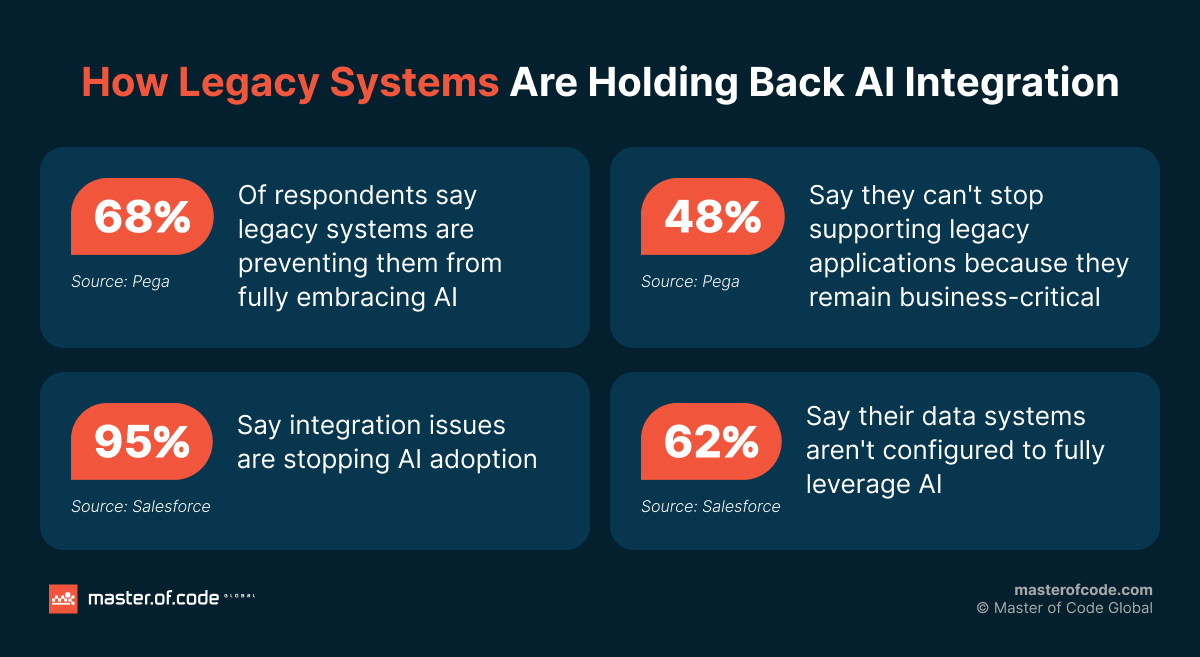
That pressure makes the question of how to prepare legacy systems for AI integration a practical task for the leadership. The answer is rarely a complete rebuild or an immediate model purchase. It starts with understanding business value, system dependencies, data limitations, risk, and realistic operating costs. Pega found that 68% of surveyed IT decision-makers said older applications prevented fuller adoption of technologies such as AI. Another 88% worried that accumulated technology debt weakened their ability to compete.

In this guide, you’ll find a step-by-step implementation framework for preparing legacy systems for the change. It explains what to assess, which connection methods fit different environments, and how to measure results. Feel like you’ll need a reliable partner to put this plan into action? Reach out to the Master of Code Global team to turn the framework into a practical, phased integration roadmap.
Table of Contents
Key Takeaways
- The seven-step guide covers business validation, system assessment, security, partner selection, integration methods, phased deployment, and performance measurement.
- AI integration adds a new operating layer, including data pipelines, permissions, monitoring, testing, and support.
- Data quality, system access, security, and workflow fit should be assessed before selecting a model.
- APIs, middleware, RPA, MCP, or orchestration should be chosen based on access, latency, risk, and long-term plans.
- Custom-coded integrations can slow delivery, increase maintenance, and concentrate critical knowledge among a few specialists.
- A narrow, read-only use case with human oversight is usually the safest starting point.
- Master of Code Global combines platform-agnostic architecture, secure delivery, data engineering, and phased implementation for complex legacy environments.
The Risks of Running Outdated, Legacy Systems
Companies rarely retain old applications because their leaders ignore innovation. More often, this outdated software still runs payroll, billing, fulfillment, claims, or customer records. Replacing it can interrupt revenue, trigger migration errors, or expose undocumented dependencies. Because of this, teams continue supporting systems that work well enough, even when every change becomes slower.
Pega’s 2025 research shows how understandable that choice is. 48% of respondents could not stop supporting older applications because they remained business-critical. Nearly half said their oldest application was 11–20 years old, while 16% still operated software aged 21–30 years. The issue is operational risk combined with sunk investment.
However, each aging legacy system creates constraints. And they compound over time. Data may sit in proprietary formats across disconnected databases. Batch updates can delay information by hours or days. Unsupported frameworks limit scalability, while scarce specialists make even routine changes expensive. These constraints become more visible when AI systems need reliable, timely information from several sources.
Siloed information is especially damaging because models need consistent context. Salesforce found that 81% of IT leaders said data silos hindered digital transformation. It also reported that 62% believed their data environments were not configured to use AI fully. Without connected records, models can produce partial recommendations based on incomplete customer, inventory, or transaction histories.
Old architecture also increases security exposure. Unsupported libraries may lack patches, identity models may use broad permissions, and audit logs may be incomplete. Model access makes these weaknesses more consequential.
Regulatory risk grows similarly. Fragmented retention, inconsistent consent, and manual controls make compliance harder to prove. Regulated organizations may need traceable source data and documented human review, which the underlying platform must support.
Finally, tightly coupled applications reduce change speed. A small interface update can affect reporting, billing, or downstream partners unexpectedly. This fragility encourages teams to postpone improvements, which creates more technical debt. McKinsey found that CIOs estimated such debt represented 20%–40% of their technology estate’s value. They also reported that 10%–20% of budgets intended for new products were redirected to debt-related work.
What Is AI Integration & What Does It Cost?
AI integration means connecting an intelligent model or application to existing data, software, workflows, and decision processes. The connection may support a narrow task, such as summarising service records. It may also coordinate several systems, such as reading a CRM, checking an ERP, generating a recommendation, and recording an approved action.
This is no longer only about future-proofing. It is about reaching operational parity with businesses already using intelligent automation. However, putting a model beside an existing application does not modernize the application itself. The organization still supports the old platform while adding model hosting, data pipelines, evaluation, monitoring, permissions, and incident response.
For 2026 budgeting, Master of Code Global estimates that a production-ready AI feature or integration commonly ranges from $60,000 to $180,000 and takes roughly two to four months. A proof of concept may range from $25,000 to $80,000, while complex agent platforms can exceed $500,000. These figures vary by data readiness, regulation, architecture, and the number of connected systems.
The initial build is only one part of total ownership. Recurring costs may include model inference, cloud infrastructure, vector storage, integration support, testing, retraining, and human review. Teams must also maintain connectors when source applications change. Security patches, vendor updates, and data schema changes can create unplanned work.
This is why adding AI to an old platform may increase maintenance rather than reduce it. The business gains new capabilities, but it also operates another production layer. Poorly planned connections can turn temporary workarounds into permanent dependencies. That outcome creates new technical debt while leaving the original burden untouched.
A realistic estimate should separate discovery, implementation, operation, and change. These groups cover architecture mapping, data work, interfaces, testing, deployment, monitoring, support, training, and workflow redesign.
Access depth also changes cost. A read-only assistant is safer and cheaper than an agent writing into core systems. Start with a bounded use case and a complete dependency map.
The Benefits of AI Integration for Companies
The strongest case for AI integration combines internal efficiency with external pressure. Shareholders increasingly expect companies to explain how AI supports growth, margin, and resilience. FactSet’s earnings-call analysis shows that AI has become a mainstream investor topic rather than a specialist technology discussion.
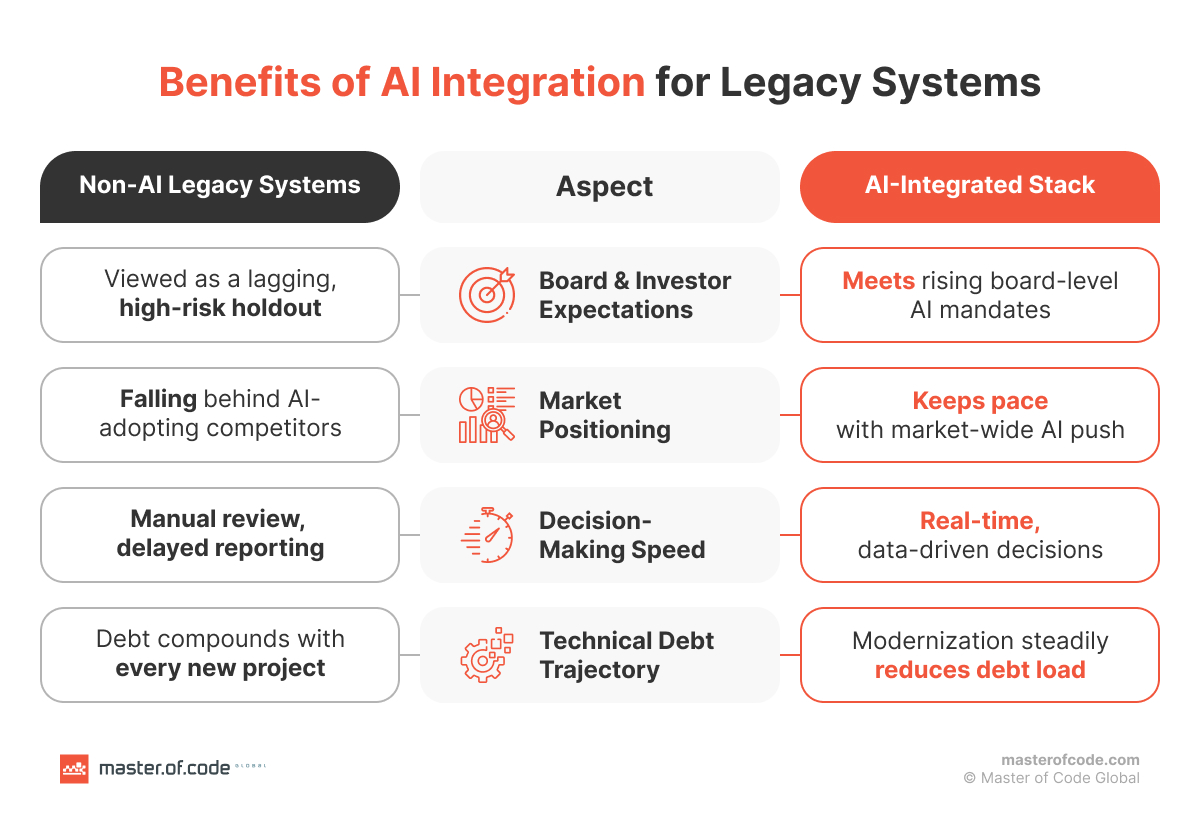
The pressure also comes directly from executive leadership. IBM’s 2026 study found that 80% of surveyed technology CxOs faced CEO-driven AI transformation mandates. Yet only 11% considered their organizations fully prepared for the expected scale of agent deployment. This gap makes infrastructure readiness a board-level execution issue.
Done correctly, connecting AI can improve speed without replacing dependable core applications. Employees can search fragmented records through natural language, summarise cases, detect anomalies, predict demand, or prepare recommendations. Customers can receive faster responses because teams spend less time switching between systems. Managers gain more consistent insight from information that previously required manual consolidation.
Integration can also protect revenue. Models can identify abandoned opportunities, duplicate charges, reconciliation gaps, unusual claims, or inventory risks earlier. For example, Master of Code Global built an Agentic AI-powered data discrepancy reconciliation tool that helps a US energy company detect and explain inconsistencies faster. In regulated settings, AI can support document review and decision preparation while humans retain approval. The value comes from placing intelligence inside real workflows, not from producing isolated demonstrations.
There are also strategic benefits. Organizations learn which data is reliable, which processes lack ownership, and where modern interfaces are missing. A well-scoped project can therefore create reusable foundations for later automation. It may expose priority modernization work more clearly than a broad transformation program.
However, benefits depend on measurable workflow change. A model that saves seconds but requires manual copying into another system may add little value. The integration must reduce total effort, improve decision quality, or create an outcome the business can observe. Otherwise, it remains a technical feature rather than an operating advantage.
A Guide to Integrating Legacy Systems with AI
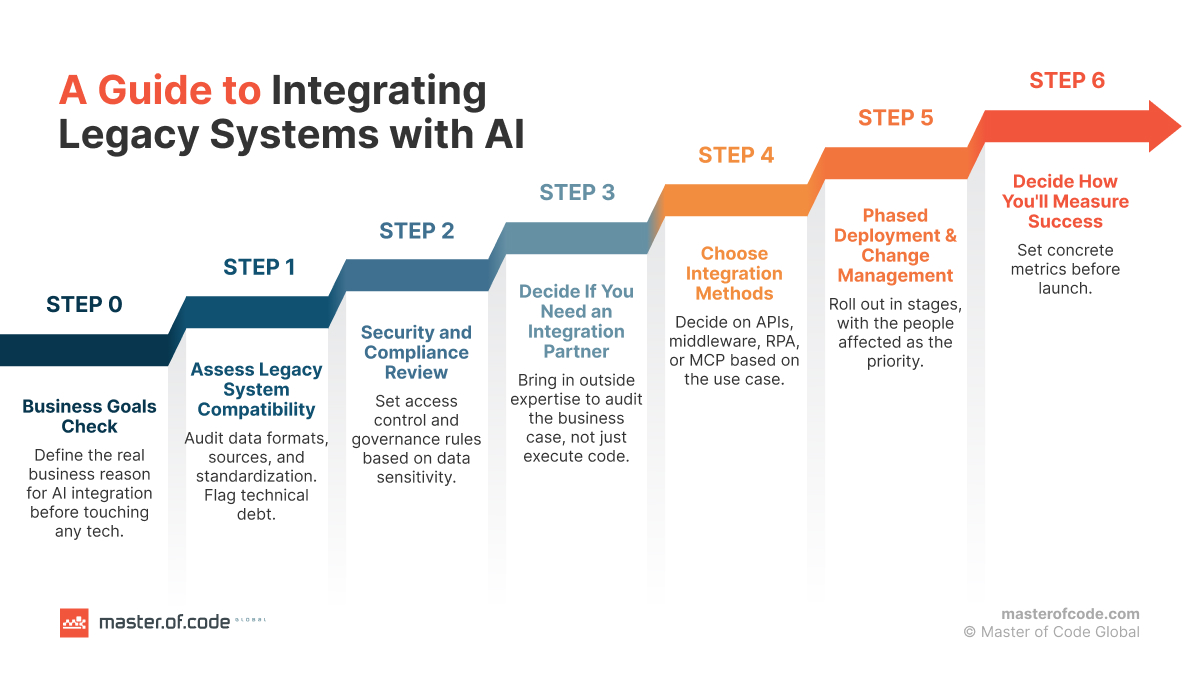
The following seven steps explain how to connect older platforms without assuming a full replacement. They move from business validation through architecture, deployment, and measurement. Each step should produce a clear decision before investment advances.
Step 0: Business Goals Check
Before integrating AI, define the business result that must change. “Our competitors are already using AI” may explain the urgency, but it does not provide enough direction for investment. A strong use case should connect a specific user and workflow with a measurable baseline and target outcome.
Map the current process and identify:
- The users involved in the workflow
- The systems and data sources they rely on
- The main delays, errors, and associated costs
- The result AI is expected to improve
- Whether rules, automation, search, or interface updates could solve the problem more simply
Potential goals may include reducing claim-review time, improving forecast accuracy, lowering support backlogs, or detecting reconciliation gaps earlier.
Connect the use case to an enterprise AI strategy, not an isolated experiment. Leadership should define priority, acceptable risk, budget limits, and decision authority. An enterprise AI roadmap can sequence the work against wider modernization priorities.
A useful starting question is simple: what decision becomes faster, better, or cheaper? If nobody can answer precisely, pause the project. An AI roadmap sprint can help turn broad ambition into prioritized use cases and measurable next steps.
Step 1: Assess Legacy System Compatibility
Begin with a structured readiness assessment covering architecture, information, workflows, and ownership. This is more than an IT inventory. It should determine whether the use case fits the business strategy and whether current systems can support it safely.
Map every relevant system, including:
- Applications
- Databases
- File stores
- Queues
- External services
- Shadow spreadsheets
- Manual data exports
For each one, document:
- Technology and version
- System owner
- Support status
- Dependencies
- Update frequency
- Available interface options
Shadow tools and manual exports should not be overlooked, as they often contain essential operational context.
Next, analyze data compatibility. Check whether records use shared identifiers, common formats, consistent units, and stable schemas. Identify whether information arrives in real time, scheduled batches, files, or manual uploads. Conflicting customer IDs or product codes will weaken model outputs.
Evaluate data quality through measurable tests. Look for missing fields, duplicates, stale records, contradictory values, and undocumented transformations. Compare sampled records with trusted business outcomes. An AI data preparation framework can structure collection, cleaning, labeling, validation, and secure access.
Review unsupported components, brittle interfaces, duplicated logic, and modules lacking automated tests. Decide which issues require repair before connection and which can remain isolated. Complete the step with an AI readiness scorecard covering business clarity, data usability, interfaces, resilience, governance, skills, and adoption.
Step 2: Security and Compliance Review
Classify information before models access it. Separate public, internal, confidential, personal, financial, medical, and regulated data. Define which sources the solution may read, what it may retain, and whether any information can leave the organization’s environment.
Risk varies by industry and use case. A retailer generating descriptions faces different constraints from a healthcare provider processing clinical notes. A lender recommending actions may need explainability, retention, fairness testing, and human approval. Controls should reflect impact, not company size.
Design access control around least privilege. Use dedicated service identities, limited scopes, short-lived credentials, and separate read and write permissions. High-impact actions should require explicit approval.
Establish data governance before deployment. Assign source owners, define retention, document lawful use, and specify who approves new connections. Governance should cover prompts, outputs, logs, feedback, training data, and deletion.
Choose recognized frameworks that fit the environment, including ISO 27001, SOC 2, HIPAA, GDPR, or NIST. AI security consulting can translate them into architecture and procedures.
Generative models also introduce prompt injection, data leakage, insecure tool use, and unreliable output. Review LLM security controls and LLM hallucinations before integration. The AI Trust Center outlines additional safeguards.
Finish with approved threat models, permission matrices, retention rules, audit requirements, and rollback procedures. Security decisions made early shape the architecture; added later, they usually require expensive redesign.
Step 3: Decide If You Need an Integration Partner
An internal team may be suitable when it understands the architecture, data engineering, models, MLOps, and regulations involved. It also needs the capacity to support the system after launch. Ownership matters more than where developers sit.
A partner becomes valuable when the organization needs an independent business-case review or lacks specialized delivery skills. External teams can challenge scope, reveal hidden dependencies, and compare designs with proven patterns. They can also provide temporary capacity before the use case is proven.
Evaluate partners based on production integration experience, not generic AI demonstrations. Review whether they can:
- Identify undocumented system dependencies
- Protect sensitive and regulated data
- Test fallback and rollback behaviour
- Support incidents after deployment
- Recommend platform-neutral architecture
- Transfer knowledge to internal teams
- Define clear post-launch ownership
Use this AI implementation partner guide for additional evaluation criteria.
A credible partner should recommend stopping or narrowing an initiative when necessary. Master of Code Global provides AI integration services and LLM integration services. An AI pilot can validate data, architecture, user value, and risk before wider rollout.
Step 4: Choose Integration Methods
There is no single architecture for connecting AI to older software. The right Integration patterns depend on interface availability, latency, transaction risk, and modernization plans. Most programs combine several methods.
APIs are usually best when applications expose documented services. They create defined contracts, support authentication, and simplify testing. Where no modern interface exists, teams can build a controlled wrapper around only the required functions.
Middleware can connect applications with different protocols, schemas, and update cycles. An integration layer transforms formats, routes messages, manages retries, and isolates the model from source-system changes. It works well when several applications must coordinate but replacement is impractical.
RPA can bridge software accessible only through user interfaces. It may offer a fast temporary route, but interface changes can break bots. Use it when no safer connection exists, then plan a more stable interface.
The Model Context Protocol (MCP) gives AI applications a standard way to discover and use tools or resources. It can reduce bespoke connector logic, but it does not replace permissions, validation, logging, or human approval.
For complex workflows, LLM orchestration can coordinate retrieval, models, tools, guardrails, and fallbacks. Teams planning gradual replacement can also apply the strangler fig pattern, building new services around selected functions and shifting traffic incrementally.
Choose methods using read-versus-write access, response time, failure impact, transaction volume, and expected lifespan. Temporary bridges should not become permanent architecture accidentally. Connection decisions should support the longer step-by-step legacy modernization roadmap for SMBs.
Step 5: Phased Deployment and Change Management
Start with one bounded workflow, a limited user group, and read-only access where possible. Run the new solution beside the current process before allowing automated actions. Compare outputs, collect errors, and document where humans disagree with the model.
Use clear release stages: sandbox, shadow mode, assisted use, controlled production, and scaled operation. Each stage needs entry criteria, acceptance thresholds, rollback procedures, and accountable owners. High-risk actions should remain human-approved until evidence supports greater autonomy.
This is also a people program. Explain what changes, what remains human-owned, and how feedback improves the system. Training should use real tasks rather than generic AI introductions.
Process owners must update procedures, escalation paths, and expectations. Do not measure usage alone; ask whether employees work faster, correct fewer errors, and trust recommendations appropriately.
A phased rollout reduces technical and organizational risk. It also provides evidence for investment decisions before the company scales AI into legacy systems. Successful change management turns the solution from an optional tool into a dependable part of operations.
Step 6: Decide How You Will Measure Success
Define baselines before deployment. Without a reliable “before” measurement, teams cannot separate AI impact from seasonal demand, staffing changes, or other improvements. Metrics should cover technology, workflow, economics, adoption, and risk.
Use a balanced set of indicators:
- System uptime and response latency after connection.
- Data-pipeline failure, retry, and reconciliation rates.
- Time-to-resolution for AI-assisted tasks.
- Employee adoption and repeated weekly usage.
- Cost per completed workflow or integration point.
- Accuracy, override, escalation, and exception rates.
- Observability coverage across models, tools, and data flows.
Add business measures such as recovered revenue, forecast error, claim time, or customer waiting. Track access violations, unsupported answers, and rollback events too.
Assign metric owners and review intervals before launch. Set thresholds for investigation, rollback, retraining, or scope changes. Continue measuring because data, users, and models change after deployment.
The Problem with Custom-Coded AI Integrations
Such integrations can make sense when workflows, regulations, or proprietary systems are genuinely unique. The problem appears when teams custom-code every connector, transformation, and monitoring function without reusable standards. Delivery slows, testing expands, and maintenance knowledge concentrates in a few people.
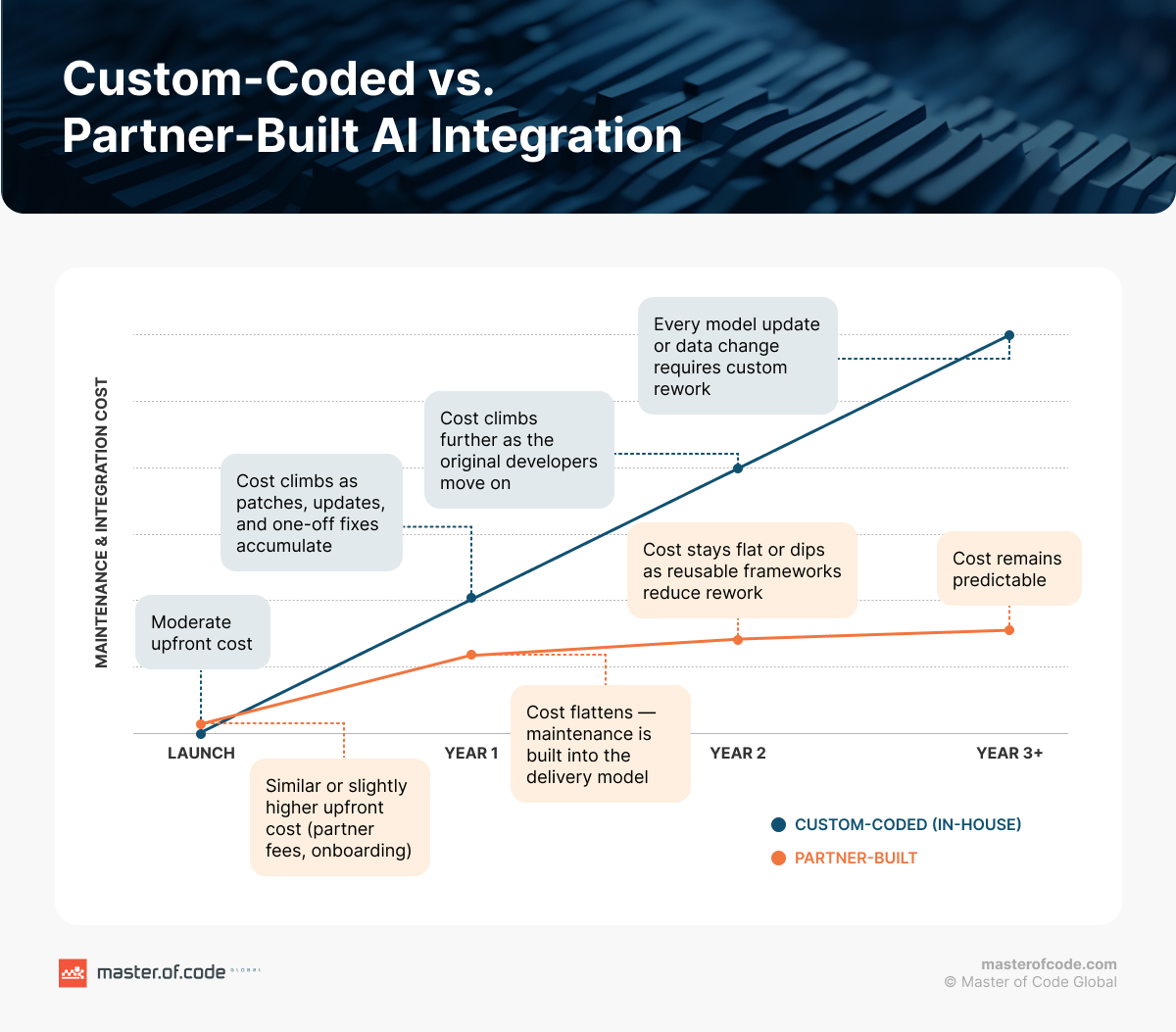
Internal teams may also be learning unfamiliar AI infrastructure while supporting business-critical applications. This increases context switching and can stretch release schedules. Custom work must then be updated whenever a vendor changes an interface, model, authentication method, or data schema.
A specialized firm can reuse proven architectural patterns, testing approaches, and delivery controls. That does not mean forcing a standard product onto every business. It means solving unique requirements with repeatable engineering practices. The distinction reduces avoidable maintenance while preserving necessary customization.
The best approach is often hybrid. Keep domain knowledge and long-term ownership internally, while external specialists support discovery, architecture, implementation, or risk review. Require documentation, automated tests, runbooks, and knowledge transfer from the beginning. This prevents the partner from becoming another permanent dependency.
Companies That Integrated Their Legacy Systems with AI
The following Master of Code Global projects show three different integration paths. Each began with existing systems or workflows that could not simply be replaced. The solutions focused on connected data, controlled deployment, and measurable operational outcomes.
Energy: Data Discrepancy Reconciliation
A US energy company relied on ticket and operational information that required time-consuming manual investigation. Master of Code Global built a standalone web application with an AI agent that visualized discrepancies and generated natural-language explanations. The project connected existing data sources while keeping the core operational environment stable.
The design addressed a common challenge: teams had data but lacked a fast way to understand inconsistencies. The agent helped users identify geofence mismatches and investigate records through a clearer interface. The result was substantially reduced reconciliation time and a scalable, secure foundation for future automation.
This approach avoided a full platform replacement. A separate intelligence layer delivered value around the existing workflow. It illustrates how read-focused analysis can prove useful before automation gains broader production authority.
You can read more about what we did for the company in the case study.
Financial Services: Agentic Revenue Engine
A North American lending company wanted AI, but first needed visibility across disconnected systems. An audit showed that advertising platforms, its CRM, and the core financial system held fragmented information. Master of Code Global integrated these sources through robust APIs into a unified analytics environment.
An embedded AI assistant then analyzed performance and surfaced optimization opportunities. Within six months, the company recorded a 35% increase in marketing return on investment and a 22% reduction in acquisition costs. Teams also saved more than 15 hours weekly, while recognizing high-performing initiatives 40% faster.
The important lesson is that the model was not the first deliverable. Data unification came first because reliable analysis required consistent information. The initial readiness assessment prevented the company from automating decisions on an incomplete foundation.
You can read more about what we did for the company in the case study.
Healthcare: Clinical Decision Support
A healthcare organization needed faster, more consistent clinical support without weakening privacy or regulatory controls. Existing workflows lacked real-time access to specialized knowledge. Master of Code Global designed a discovery and proof-of-concept program evaluating MedLM, GPT-4.5, and Gemini for clinical documentation and diagnostic assistance.
The architecture used retrieval-augmented generation to connect authoritative medical guidance with model responses. It also supported cloud deployment while preserving an on-premises option for institutions with stricter policies. The project established HIPAA-aligned data-flow controls and pathways for connecting diagnostic imaging systems.
The proof of concept tripled diagnostic decision speed while maintaining full HIPAA alignment. More importantly, the project treated compliance as an architecture requirement. It demonstrates why healthcare integration must combine workflow design, source validation, privacy controls, and clinician oversight.
Across all three projects, the integration method followed the business constraint. Energy needed faster discrepancy analysis, finance needed unified performance data, and healthcare needed governed clinical support. None began with a model selected in isolation.
You can read more about what we did for the company in the case study.
Why Choose Master of Code Global for AI Integration
We approach AI integration as an operational transformation, not simply a connector project. Before development begins, we can validate the business case, map your architecture, and assess data readiness. This helps us avoid building sophisticated AI on unreliable, inaccessible, or fragmented foundations.
Our team is platform-agnostic. We choose models, cloud services, and integration approaches based on your existing systems, regulatory constraints, and performance requirements rather than preferred vendors. Our Generative AI integration services cover architecture, data strategy, phased implementation, and continuous optimization.
We prefer measurable checkpoints and controlled rollouts over a single high-risk cutover. Depending on your readiness, we may recommend data preparation, workflow redesign, or a smaller pilot before committing to a broader implementation. Sometimes, the most valuable advice we can give is to narrow or pause an initiative until the foundations are ready.
We also understand what reliable enterprise delivery requires. Master of Code Global maintains an ISO 27001-certified environment and supports HIPAA- and SOC 2-aligned controls. Our experience covers energy reconciliation, financial analytics, healthcare decision support, and complex enterprise integrations.
When evaluating potential partners, use our guide on how to choose an AI development company. You can also compare providers in our overview of the top AI development companies.
FAQs
Why is it important to prepare legacy systems for AI integration?
Preparation reveals whether the planned use case has accessible information, stable interfaces, acceptable risk, and measurable business value. Without this work, models may rely on incomplete records, expose sensitive data, or disrupt critical workflows. Preparation also identifies which architecture limitations require repair and which can remain isolated.
It reduces the chance of spending heavily on a model that cannot operate reliably. Teams can sequence remediation, define permissions, and choose realistic connection methods before development. This creates a safer foundation for AI integration and later scaling.
Is it possible to integrate AI into legacy systems without changing the whole technical stack?
Yes. Many organizations add an intelligence layer around existing applications rather than replacing them. Controlled interfaces, integration platforms, data replicas, event streams, or RPA can provide access while the original software continues operating.
The best method depends on system stability and required actions.
How do you integrate generative AI into legacy systems?
Start with a narrow workflow and identify the approved information needed for each response. Build a governed retrieval layer, define permissions, and test output against trusted examples. Add guardrails, source citations, human review, and fallback behavior before production access.
For complex deployments, LLM orchestration coordinates models, retrieval, tools, and policies. LLM integration services can support architecture and implementation when internal teams lack specialized capacity.
What are the top vendors for AI integration?
The right vendor depends on your industry, architecture, regulation, and ownership model. Evaluate firms by relevant production work, platform neutrality, governance maturity, and their willingness to validate the business case. Avoid choosing solely through model partnerships or polished demonstrations.
Master of Code Global is a strong choice for custom enterprise environments because it combines audits, data engineering, AI development, phased delivery, and production support. The company’s work spans regulated healthcare, financial services, energy, retail, and customer operations. Its AI integration services focus on fitting intelligence into existing systems and workflows.
How do you know whether AI integration is working?
Use the metrics established before deployment. Track uptime, latency, pipeline errors, completion time, adoption, cost per workflow, accuracy, overrides, and risk events. Compare each measure with a reliable baseline and agreed threshold.
Then connect technical results to business outcomes. Faster responses matter only when they reduce labor, improve service, protect revenue, or strengthen decisions. Continue monitoring because changing data, users, and models can weaken performance after launch.
Conclusion
Whether AI delivers value in a legacy environment depends less on ambition than readiness. Companies need a clearly defined business problem, accessible and trustworthy data, controlled system access, appropriate governance, and employees prepared for new workflows.
The safest route is usually incremental. Assess the environment, resolve critical gaps, connect one bounded use case, and prove value through production metrics. Then expand only when reliability, adoption, and economics support the next stage. This approach protects business continuity while creating a practical path toward modernization.
Organizations that understand how to prepare legacy systems for AI integration can move faster because they know where risk actually sits. They do not confuse a model demo with an operational system. To turn these steps into an executable architecture and phased delivery plan, talk to Master of Code Global.