



Which manual processes are worth automating, and what results can your business realistically expect? To help you decide, we analyzed 39 selected automation examples, including six from Master of Code Global, and brought the workflows, reported results, and source links into one comparison.
Our mini-research examines what creates the demand for automation, what AI actually does, how systems connect, and where people remain involved. You can compare opportunities against your own operations and distinguish measured outcomes from product claims.
Use these findings and our practical guide to AI for manual process automation for mid-market businesses to choose your first workflow, assess the business case, and plan a pilot.
Need help identifying the right opportunity or putting it into practice? Get in touch to discuss your workflow with our team.

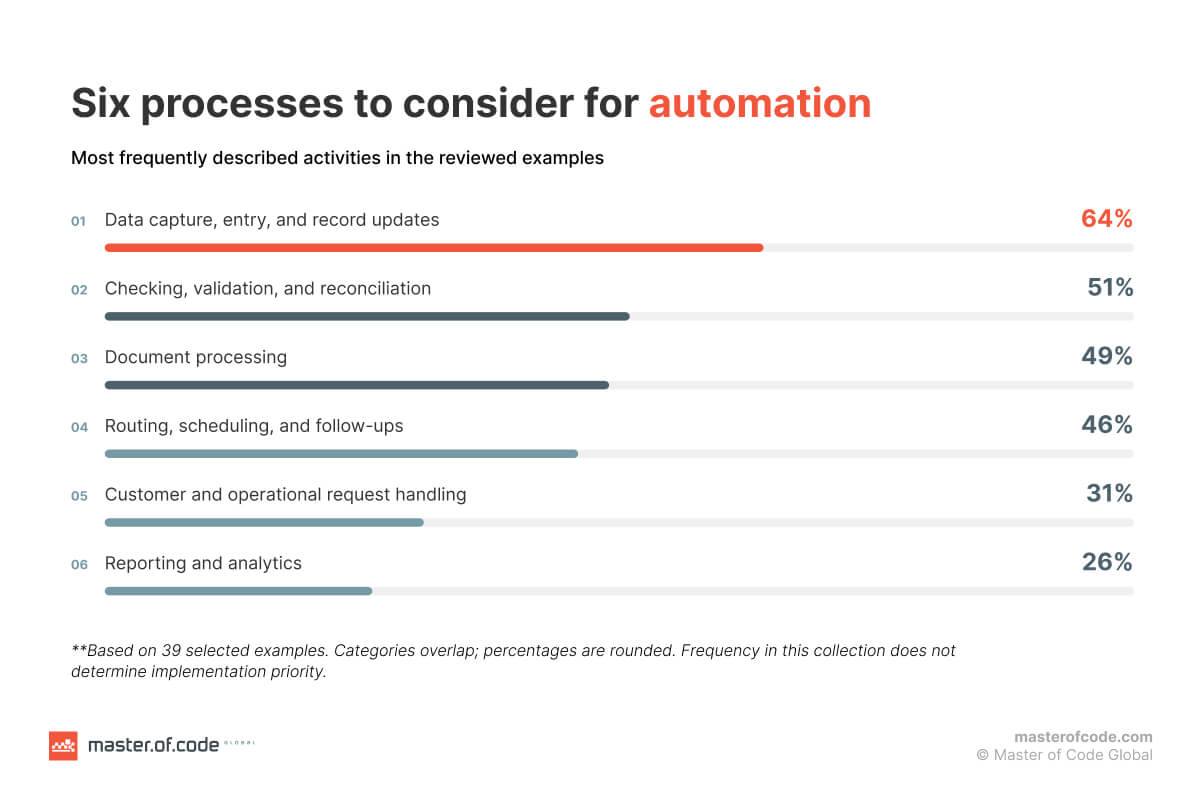
Table of Contents
Key Takeaways
- We analyzed 39 selected automation examples, examining business problems, workflows, AI’s role, and documented results.
- Data capture and record updates led the use cases, appearing in 64% of examples, followed by checking, validation, or reconciliation in 51% and document processing in 49%.
- Reported outcomes include faster processing, less manual work, and lower costs: SIP Manufacturing cut quote preparation time by more than 93%, Nuvocargo reduced workload by 75%, and Zipify reported 65% faster responses and 30% lower operating costs.
- Implementation requires the right combination of AI, rules, RPA, and integrations, supported by reliable data and clear human approval and exception-handling steps.
- Start with one measurable workflow. Then use a pilot to assess processing time, quality, manual effort, and total costs before expanding.
AI for Manual Process Automation: What 39 Examples Reveal
To understand business process automation in practice, we reviewed 39 examples, including six from Master of Code Global. We looked at the problems described, the work being automated, the role of AI, system connections, human involvement, and results.
| Business | What the automation does | Reported results |
|---|---|---|
| Master of Code Global’s internal legal advisor | Analyzes contracts against defined criteria and prepares reports for human validation. | AI analysis takes under 60 seconds; complete review is 2–4 times faster. More than 50 deals analyzed. |
| North American B2B provider of working capital and equipment financing solutions | Combines advertising, CRM, and lending data to generate marketing insights and reports. | More than 15 hours saved weekly; marketing ROMI increased by 35% within six months. |
| Zipify | Helps support agents find information, draft responses, and create knowledge articles. | Since launch: 65% faster responses, twice as fast ticket closure, and 30% lower operating costs. |
| Top-tier Conversational AI platform | Analyzes customer conversations and generates knowledge base articles from recurring questions. | 6,000 articles generated from 30,000 dialogues; work reduced from days to hours. |
| US-based energy company | Uses rules to detect discrepancies in water and oil readings, then uses AI to explain them for human resolution. | Minimized human mistakes in the reconciliation procedure; shorter manual data examination. |
| The energy and carbon management company | Converts natural-language questions into database queries and produces charts and reports. | Faster access to data and less reliance on technical staff. |
| Nsure.com | Reads insurance documents and emails, standardizes carrier data, and supports connected workflows. | 60% less manual processing time and 50% lower associated costs. |
| Dunaway | Helps engineers find answers in city regulations. | 90% less manual research time; 10,000-plus hours saved annually. |
| Avocados From Mexico | Automates purchase requests, approval routing, and ERP updates. | Purchase order processing fell from up to 15 minutes to under one minute. |
| Graebel | Extracts invoice data, creates ERP records, and routes documents and exceptions. | Processing success approached three-quarters, depending on the input; hundreds of thousands of document lines processed. |
| Poloplast | Combines forecasting, planning, and automated processing as part of a broader system transformation. | Data warehouse creation fell from 9–10 hours to 5–6 hours. The result reflects the combined transformation. |
| Tropex and Tara Exports | Classifies invoices, extracts information, and routes discrepancies. | More than 500 hours returned annually. |
| Allevia Radiology | Automates invoicing, payer checks, and receipting. | 98% of invoices handled automatically; the process fell from eight to ten hours to two; enhanced cash flow by $200,000 per month. |
| Cambridge Clothing | Transfers alteration orders from online forms through ERP and warehouse workflows. | Three-day turnaround, reported as 57% faster; 92% customer satisfaction. |
| Ascend Properties | Automates applications, onboarding, reminders, deposits, and scheduling. | Approximately 1,150 hours saved across 9,000 applications over two years. |
| SafeRide Health | Supports booking, address validation, ride assignment, and dispatch. | About one-quarter of bookings handled through IVR; approximately 95% of rides assigned using an algorithm. |
| Rockland Federal Credit Union | Automates post-closing loan quality checks based on operating procedures. | Review time fell from 20 to two minutes per file; $250,000 in annual savings reported. |
| Gimba | Standardizes manufacturer information and generates product catalog descriptions. | Product registration fell from 13 minutes to two minutes, an 84% reduction. |
| Granite Telecommunications | Extracts invoice data for review as part of a broader automation program. | More than $635,000 and 15,000 worker hours saved monthly across 80+ automations. |
| Pamarco | Codes invoices, carries out eligible close tasks, and produces scheduled reports. | Up to 40% of close tasks automated; approximately 95% success reported for freight invoice coding. |
| Freedom Forever | Categorizes permit-related emails, extracts details, and takes actions in connected systems. | Approximately 19,000 emails handled in the first production month; 71% fully processed without human intervention. |
| SIP Manufacturing | Drafts quotes for human approval, updates ERP records, and prompts follow-ups. | Quote preparation time fell by more than 93% to under two minutes; 70% of quotes delivered within one hour of a request. |
| FINN | Uses no-code workflows to automate business processes and connect third-party services, including email and databases. | Reduced time-consuming manual work without requiring backend engineering resources. |
| Arbor Realty Trust | Processes insurance documents and extracts relevant information. | Processing of critical documents fell from 20 minutes to 30 seconds; more than 25,000 pages processed. |
| CLS Holdings | Automates utility meter readings and sustainability-data reporting. | Automated meter reading covered 80% of main meters in managed assets. |
| Biagi Bros | Uses document imaging, electronic signatures, and automated document emails across logistics workflows. | Reduced paperwork and transaction delays reported; AI’s role in these administrative workflows is unclear. |
| Nuvocargo | Reads shipment-request emails, validates details, creates shipments, and flags exceptions. | 75% less manual work in shipment creation. |
| Huel | Automates reconciliation and close coordination as part of a finance transformation. | Two working days removed from the month-end close; 15% growth supported without additional finance staff. |
| TUP | Automated news summaries, email-based absence processing and calendar updates, home-office tracking, and meeting room bookings. | Reduced manual administrative work, streamlined workflows, and freed employees to focus on strategic and creative tasks. |
| ACM Services | Extracts invoice information and connects it with accounting workflows. | A week’s invoices processed in one day; earlier payment discounts reported. |
| EvoLogics | Extracts and checks document data for a searchable accounting, invoice, and supplier database. | 75% reduction in document-processing time. |
| UniPro members | Order management system designed to capture orders from voicemail, messages, and email and enter them into ERP systems. | No measured implementation results reported. |
| MidWest America Federal Credit Union | Connected lending system designed to reduce manual handoffs and navigation between systems. | No post-implementation results reported. |
| HomeLight | AI agent designed to coordinate escrow orders, documents, and closing tasks. | No post-implementation results reported. |
| Voltus | Integration designed to connect market signals with building controls for demand-response adjustments. | No measured implementation results reported. |
| genesisONE | AI-assisted scanning, document processing, and routing capabilities. | No measured outcome reported. |
| Vertikal | Tool for extracting insurance certificate information and evaluating compliance. | Product claims processing in seconds rather than days; no measured outcome reported. |
| Alma | Natural-language interactions, library analytics, and planned administrative capabilities. | No measured implementation results reported. |
| Centris and Forum credit unions | AI applications in lending and member acquisition. | The source reports over 30% growth in indirect lending at Centris and 70% higher loan-processing volume at Forum. |
**We reviewed examples from smaller businesses through to larger companies to give a broader view of automation opportunities relevant to mid-market teams. Sources include company reports, customer stories, industry publications, and product announcements, covering both established workflows and emerging applications. Percentages describe this selected collection, and individual examples may fall into several categories.
What creates the need for automation?
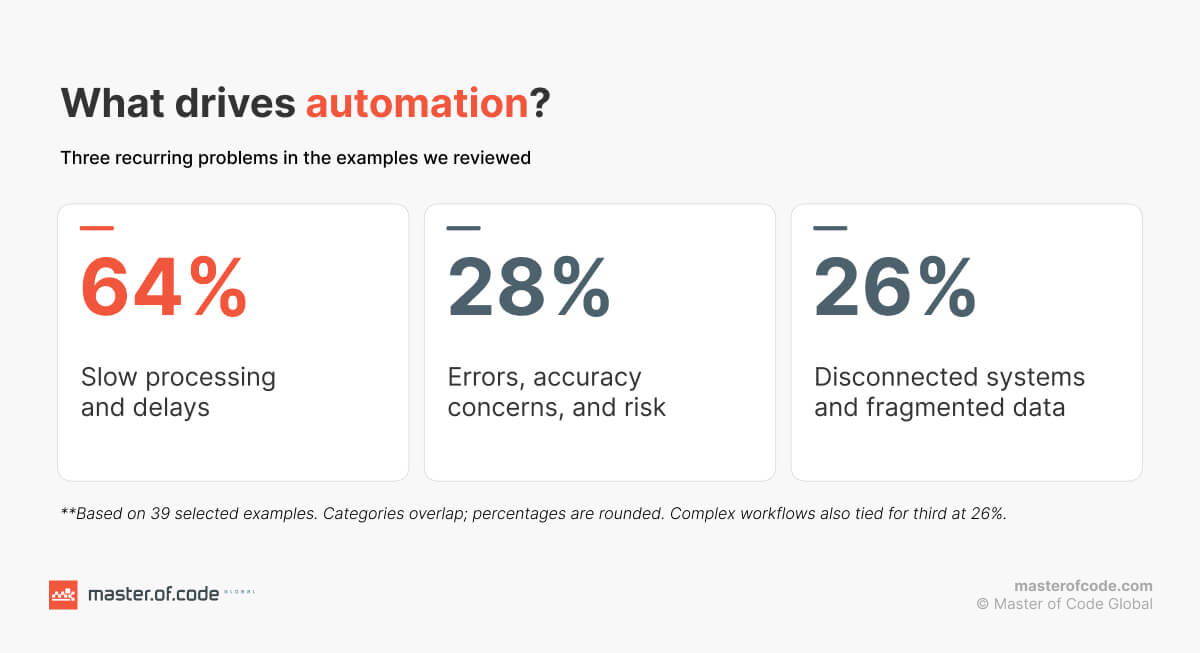
Slow processing, lengthy preparation, or delays appeared in 64% of the examples (25 of 39). Sources also described accuracy or risk concerns in 28% (11 of 39) and disconnected systems or fragmented data in 26% (10 of 39).
Which tasks are most often automated?
The most common category was data capture, entry, or record updates in 64% of examples (25 of 39). Checking, validation, or reconciliation appeared in 51% (20 of 39), document processing in 49% (19 of 39), and routing, scheduling, or follow-ups in 46% (18 of 39).
What does AI do within these workflows?
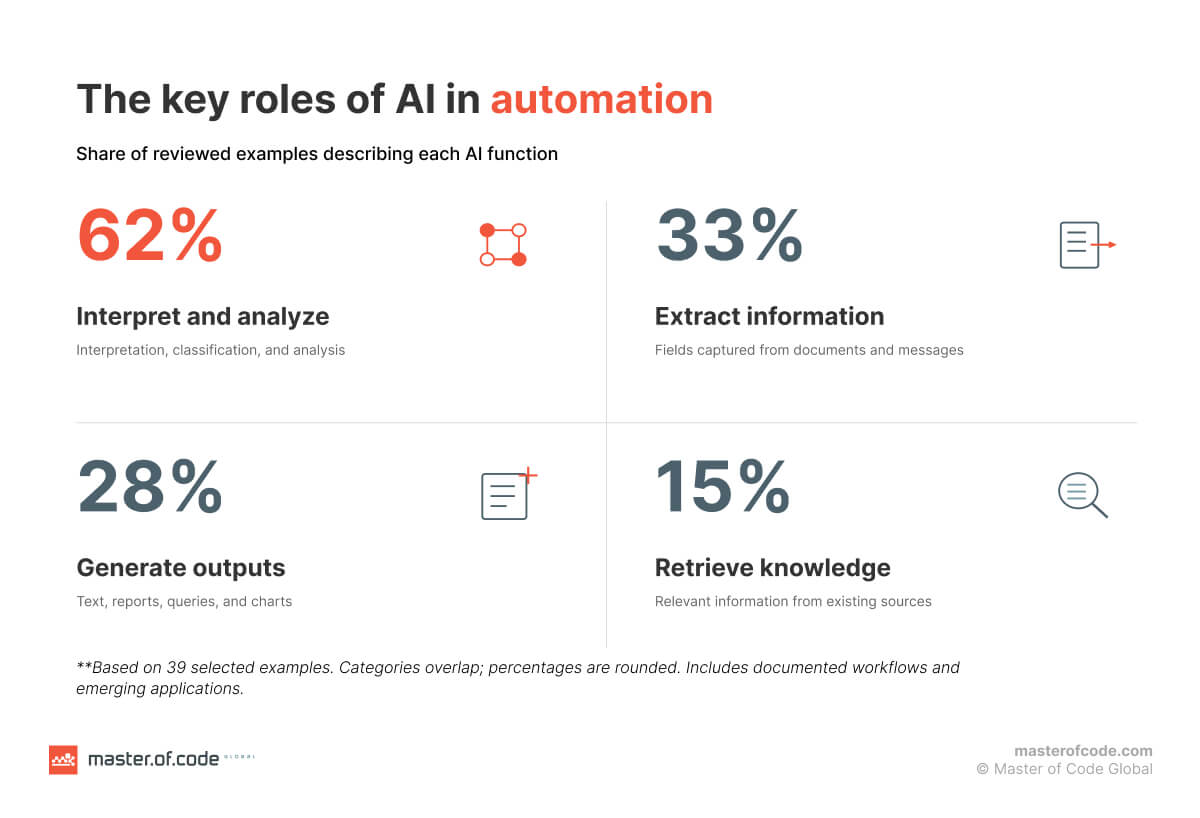
Sources described AI interpreting, classifying, or analyzing information in 62% of cases (24 of 39). Information extraction appeared in 33% (13 of 39), generation of text, reports, queries, or charts in 28% (11 of 39), and retrieval of existing knowledge in 15% (6 of 39).
How do automated workflows connect to existing systems?
A connection to a business application, platform, or data repository was defined in 77% of examples (30 of 39). Email was explicitly involved in 36% (14 of 39), databases or data stores in 31% (12 of 39), and ERP systems in 23% (9 of 39).
Where do people remain involved?
Human approval, exception handling, or resolution was explicitly described in 36% of examples (14 of 39). For example, SIP Manufacturing reviews quotes before sending them, while Nuvocargo flags shipment exceptions for attention.
What results do the sources report?
36% reported (14 of 39) a numerical improvement in task or process time. 10% (4 of 39) mentioned cost savings. The results vary by workflow and measure. Time saved, workload reduction, operating costs, and marketing ROMI measure different outcomes. They should be evaluated separately when building an automation business case.

Across the examples, automation addresses more than isolated tasks: it helps information move from an incoming request through checks, record updates, and follow-ups. AI contributes interpretation and generation, while rules, integrations, and people keep the workflow on track. For mid-market businesses, the practical starting point is one recurring bottleneck where the complete process can be measured and improved.
With those patterns in mind, let’s explore the backend of AI adoption in manual process automation: choosing the right technology, connecting existing systems, and putting the necessary controls in place.
How to Identify Manual Processes to Automate With AI
The best place to start is a workflow your team handles regularly, where delays, errors, or growing volumes create a measurable problem, such as lead qualification. Let’s take a closer look at how it all works.
How to identify which manual processes should be automated with AI?
Look for work that combines repetitive tasks with information that varies from one request to another. For example, employees may follow the same steps to process invoices, but the documents arrive in different formats and contain inconsistent descriptions.
To identify candidates for process optimization, review operations against these criteria:
- Volume and frequency. How many requests, documents, or records does the team handle each week?
- Time and delays. How long does each step take, including waiting for information, approvals, and handoffs?
- Errors and rework. Where do employees correct missing fields, reconcile mismatched records, or repeat a task because information was entered incorrectly?
- Variability. Does the process involve emails, documents, or requests that require interpretation?
- Data and system access. Can the necessary information be accessed, and can the solution connect to the systems where employees work?
- Risk and accountability. What happens if the output is incorrect, and who should review or approve it?
A practical way to compare opportunities is to document the current workflow before selecting a tool. Record the number of cases handled, time per case, error or rework rate, and the people and systems involved. This baseline will help you estimate potential value and measure results after the pilot.
Get more practical insights into mapping and connecting AI-driven processes in our guide on AI workflow automation.
When is AI the wrong choice for process automation?
If the inputs are consistent and the decision follows clear rules, conventional software, a system integration, or RPA may be simpler and easier to maintain. For example, moving a correctly formatted record from one system to another may not require a model to interpret the information.
AI may also be a poor fit when:
- The process rarely occurs.
- The workflow itself is unclear.
- Reliable data is unavailable.
- Errors have serious consequences without an appropriate review step.
- The expected value is too small.
Businesses can automate manual processes with AI selectively: use it where interpreting variable information is valuable, and apply deterministic rules where the outcome must follow a defined condition. The next step is deciding which combination of AI, RPA, and workflow tools fits the work.
AI Automation vs. RPA: Which Is Better for Manual Legacy Workflows?
The right automation approach depends on the task, the systems involved, and how much decision-making the workflow requires. In many manual workflows, several approaches work together.
| Approach | Best suited for | Example | Main consideration |
|---|---|---|---|
| Rules-based automation | Predictable decisions with clear conditions | Route invoices above a set amount to a manager | Rules need updating when conditions or policies change |
| RPA | Repetitive interactions with applications, especially where direct integration is unavailable | Copy approved order details into a legacy system | Interface changes can disrupt the automation |
| AI automation | Tasks involving variable documents, language, or information that needs interpretation | Extract order details from differently formatted emails | Outputs need validation, especially when information is incomplete |
| AI agents | Work requiring multiple steps, tool use, and decisions within defined boundaries | Gather missing order details, check records, and prepare an update for approval | Actions, permissions, and escalation points need clear limits |
In practice, AI process automation may combine all four. An order management workflow could use AI to interpret an email, rules to check required fields, an integration or RPA to update the order system, and a workflow tool to notify an employee when details are missing.
For a closer look at how these technologies complement each other, see our guide to RPA, DPA, and AI in business automation.
When Do You Need AI Agents Instead of Standard Workflow Automation Tools?
An agent is worth considering when you require several of these capabilities:
- Interpreting requests that arrive in different formats.
- Finding information across multiple approved sources.
- Choosing among several possible next steps.
- Using tools to update records or prepare documents.
- Asking for missing information or escalating exceptions.
For a stable process with a fixed sequence, a standard workflow may be sufficient. If an agent is needed, define which systems it can access, which actions it can take independently, and when a person must approve its work. If you need help designing and integrating an agent for your workflow, explore our AI agent development services.
AI Manual Process Automation Use Cases for Mid-Market Businesses
The following top use cases show where AI automation for mid-market businesses can fit into everyday operations.
Spreadsheet Reporting and Reconciliation
Many teams rely on spreadsheets to combine data from finance, sales, operations, and other departments. Preparing a report can involve downloading files, matching columns, checking discrepancies, and rewriting the same summary each week.
AI-assisted reporting can help by:
- Bringing data together from approved systems and files.
- Identifying missing values or unusual differences.
- Generating summaries or answering questions about the data.
- Preparing a report for an employee to review and share.
For reconciliation, rules can flag mismatches between records, while AI helps interpret descriptions or explain differences for review.
Data Entry From Emails, PDFs, and Other Documents
Manual data entry becomes difficult to scale when the same information arrives in different formats. An order may come through an email, an invoice as a PDF, and a customer request as an attachment.
With data entry automation, AI can extract relevant fields from these inputs and convert them into a consistent format. The algorithm can then check required fields against business rules, update an approved system, and send incomplete or uncertain cases for review.
Order Entry, Invoice Processing, and Other Back-Office Processes
Back-office processes often combine document handling with approvals, record updates, and follow-ups. Artificial intelligence can support these steps without requiring every decision to be automated.
Common applications include:
- Order entry: extract product, quantity, delivery, and customer details from incoming requests, then check them before creating an order.
- Invoice processing: capture invoice fields, compare them with purchase orders or existing records, and route discrepancies for review.
- Quote preparation: use customer requirements and historical information to prepare a draft for a sales employee.
- Loan or application review: organize documents and check them against defined conditions before an employee makes a decision.
For finance teams, our guide to Generative AI in accounts payable explains how AI can support invoice capture, checks, and exception handling.

What Is the ROI of AI Process Automation?
The ROI of AI automation for mid-sized businesses depends on the workflow, implementation costs, and the value of the improvement.
How to Calculate AI Automation ROI and Payback Period
To calculate AI ROI, compare the financial value of the benefits with the total cost of the solution over the same period:
ROI = (Financial benefits − Total costs) ÷ Total costs × 100
The payback period estimates how long it takes for benefits to recover the initial investment:
Payback period = Initial investment ÷ Net monthly benefit
Net monthly benefit is the monthly financial benefit minus recurring monthly costs.
For example, suppose a company invests $30,000 in an automation solution. It generates $5,000 in measurable monthly benefits and costs $1,000 per month to operate and support.
- Net monthly benefit: $5,000 − $1,000 = $4,000.
- Estimated payback: $30,000 ÷ $4,000 = 7.5 months.
- First-year ROI: ($60,000 in benefits − $42,000 in initial and operating costs) ÷ $42,000 × 100 ≈ 43%.
This is an illustrative calculation, not an expected return. It assumes the benefits begin immediately and remain consistent; a real business case should account for implementation time and adoption.
Other benefits, such as faster responses or fewer errors, may be valuable but should only be added to the financial calculation when the business can assign them a defensible monetary value.
How to Measure Whether Automation Improves Operational Efficiency
Measure operational efficiency against the baseline recorded before implementation. Choose a small set of metrics that reflects both speed and quality:
| Metric | What to measure | Why it matters |
|---|---|---|
| Processing time | Average time per document, request, or case | Shows whether individual tasks are faster |
| End-to-end cycle time | Time from receiving a request to completing it | Captures delays and handoffs across the full workflow |
| Manual effort | Employee hours spent processing, checking, and correcting work | Demonstrates whether automation reduces effort or shifts it to review |
| Accuracy and rework | Errors, corrections, or returned cases | Helps identify whether faster processing is creating additional work |
| Exception rate | Share of cases routed for human attention | Displays where the system needs help and where improvements may be useful |
| Throughput | Number of cases completed within a given period | Shows whether the team can handle more work |
| Cost per case | Processing and operating costs divided by completed cases | Connects workflow performance to business costs |
What Does AI Automation Require to Work With Existing Systems?
A workflow may begin in an inbox, continue in a spreadsheet, and end in an ERP or accounting system. Automating it requires more than selecting a model. The solution needs access to the right information, a way to move results between systems, and clear rules for human review.
How Can AI Automate Workflows Across Disconnected Legacy Systems?
An algorithm can interpret information from documents or messages, while integrations move that information between applications. The connection method depends on what each system supports:
- APIs allow applications to exchange data directly when suitable interfaces are available.
- Database connections provide controlled access to information stored in approved databases.
- File-based exchanges move data through formats such as CSV when direct connections are unavailable.
- RPA can interact with a system’s interface when the required data or actions cannot be accessed through another suitable method.
Before connecting systems, define which one is the authoritative source for each piece of information. Also decide what should happen if a connection fails, a record already exists, or two systems contain conflicting values.
If you need support connecting AI to your existing tech ecosystem, discover how our AI integration services can help.
Where Should Human Review Remain?
Human review should focus on decisions and exceptions where an error could create high cost, risk, or customer impact. The right checkpoint depends on the process and the consequences of acting on incorrect information.
Common review points include:
- Incomplete or uncertain inputs.
- Exceptions to business rules.
- High-impact decisions.
- External communications.
- Changes to sensitive records.
Not every item needs the same level of review. We recommend checking the article by Bogdan Sergiienko, our CTO, on human-in-the-loop for AI accuracy to learn more about how review and feedback can support an AI workflow.
What Data Preparation Is Required Before Automation?
Begin with a clear understanding of:
- The information required. List the fields, documents, and records needed to complete the task.
- Where it lives. Identify the applications, shared folders, databases, and other sources involved.
- Who can access it. Confirm permissions for the people and systems that will use the information.
- Quality issues. Check for missing fields, duplicate records, inconsistent formats, and outdated information.
- Representative examples. Collect examples that reflect the range of formats and exceptions the workflow must handle.
- Sensitive information. Decide what data should be masked, restricted, or excluded from the workflow.
- Validation criteria. Define how the team will check whether extracted information or generated outputs are correct.
AI data preparation does not have to mean cleaning every system before starting. Focus first on the information needed for the chosen workflow, then address the issues that would prevent a reliable pilot.
How to Implement AI Automation Without a Large IT Team
A mid-market company can start with one defined workflow and a small group of people who understand it. The team needs a process owner, access to the relevant systems and data, and someone responsible for technical delivery. Depending on internal capacity, that technical work may be handled in-house, by a partner, or through a combination of both.
Build vs. Buy: Which Approach Fits Your Workflow?
Choose between off-the-shelf tools, custom development, or a hybrid approach based on your workflow requirements, integration needs, and available resources.
| Approach | When to consider it | What to evaluate |
|---|---|---|
| Buy | The process is common and available tools support the required systems | Integration options, configuration limits, security, pricing, and ongoing ownership |
| Build | The workflow requires specialized logic, interfaces, or control over how the solution works | Development time, maintenance, technical resources, and total cost |
| Hybrid | Standard tools cover part of the workflow, but some capabilities need customization | How the components connect, who supports each part, and how changes affect the whole process |
Compare the options against the process requirements and expected value. Need help deciding which approach is right for your business? Check out our guides to build vs. buy AI solutions and custom AI solutions vs. off-the-shelf vs. hybrid.
How Should Mid-Market Companies Evaluate an AI Automation Partner?
During evaluation, ask:
- Workflow experience: Have they worked on a similar operational problem, and can they explain the outcome?
- Integration approach: How will the solution connect to your existing applications and legacy systems?
- Data and security: What information will the solution access, and how will permissions and sensitive data be handled?
- Human review: Where will employees validate outputs or resolve exceptions?
- Measurement: What baseline and success criteria will be used during the pilot?
- Ongoing support: Who will monitor performance, maintain integrations, and make changes after launch?
- Cost and ownership: What is included in the estimate, and who owns or administers the resulting solution?
Ask potential partners to walk through a real example of automating manual workflows similar to yours. Their answer should make the proposed scope, assumptions, dependencies, and responsibilities clear enough for your operational and tech teams to assess.
If you’re looking for a team to put these steps into practice, explore our custom AI development services.
How Can You Launch an AI Automation Pilot Without a Large IT Team?
Start with a process that has a clear owner, available examples, and a measurable baseline. The goal is to test whether automation improves the work under real conditions before expanding its scope.
- Choose one workflow.
- Map the current process.
- Set a baseline and target.
- Prepare a limited dataset.
- Build and test the workflow.
- Run with human review.
- Evaluate the outcome.
For example, an invoice pilot could begin with one supplier group. The team could measure extraction accuracy, review time, exception rates, and cost per invoice before adding more suppliers or automating record updates.
If you need help turning an automation idea into a working solution, our AI pilot approach helps you validate its potential with a real-world prototype in 30 days. Let’s explore how we can help you get started.