



A company’s AI agents connect to three MCP servers: one for the CRM, one for ticketing, and one for finance. Each server has its own credentials. None of them shares a log. Then security asks a simple question: “Which agent called which tool, and for whom?” Nobody can answer.
That question matters more every month. In agentic AI, agents don’t just answer questions. They create records, send messages, and change data. So access control and audit logs become a compliance problem.
The scale is real. Anthropic introduced the Model Context Protocol on November 25, 2024. A year later, MCP had more than 10,000 active public servers and 97M+ monthly SDK downloads, according to Anthropic.
This guide explains what an MCP gateway does, which security risks it helps contain, and when you need one.
Table of Contents
Key Takeaways
- An MCP gateway gives agents one endpoint, one access policy, and one audit trail for many servers.
- The spec forbids token passthrough, so a gateway must exchange tokens per server.
- Classify tools as read or write. In One Click Upsell, which we’ve built for Zipify for over a decade, the MCP connector reads orders but can’t change them.
- Our internal MCP layer gives a global tech company’s teams 85 tools through one controlled layer.
- 53% of open-source MCP servers rely on static secrets (Astrix).
- A gateway limits prompt injection damage. It can’t prevent injection.
What Is an MCP Gateway, and How Is It Different From an MCP Client and Server?
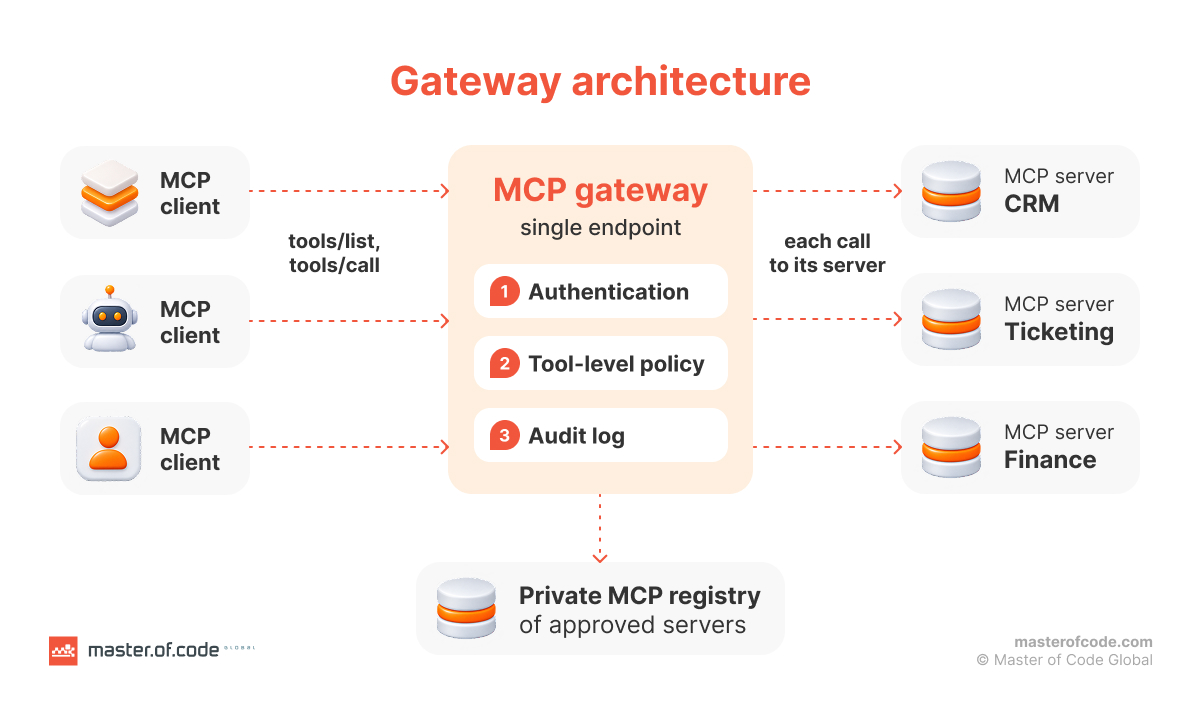
An MCP gateway sits between AI agents and many MCP servers. It exposes them through a single endpoint and enforces authentication, access policies, and logging in one place.
To see where it fits, start with the three roles in the Model Context Protocol. The MCP architecture docs define them this way:
- Host: the AI application, such as a chat app or a coding agent.
- Client: a connector inside the host. The host creates one MCP client for each MCP server, and each client keeps its own connection.
- Server: the program that provides tools, resources, and prompts.
A gateway plays two roles at once. To the agent, it looks like one MCP server. To the backends, it looks like a client. AWS describes this in its AgentCore Gateway docs: the gateway “operates in aggregation mode” and combines all its MCP targets “into a unified virtual MCP server.”
One point is easy to miss. The MCP specification doesn’t require a gateway. It’s an architecture choice for teams that run many servers, many agents, or both. With one agent and one server, a gateway adds a hop and little else.
MCP Gateway vs. AI Gateway vs. API Gateway
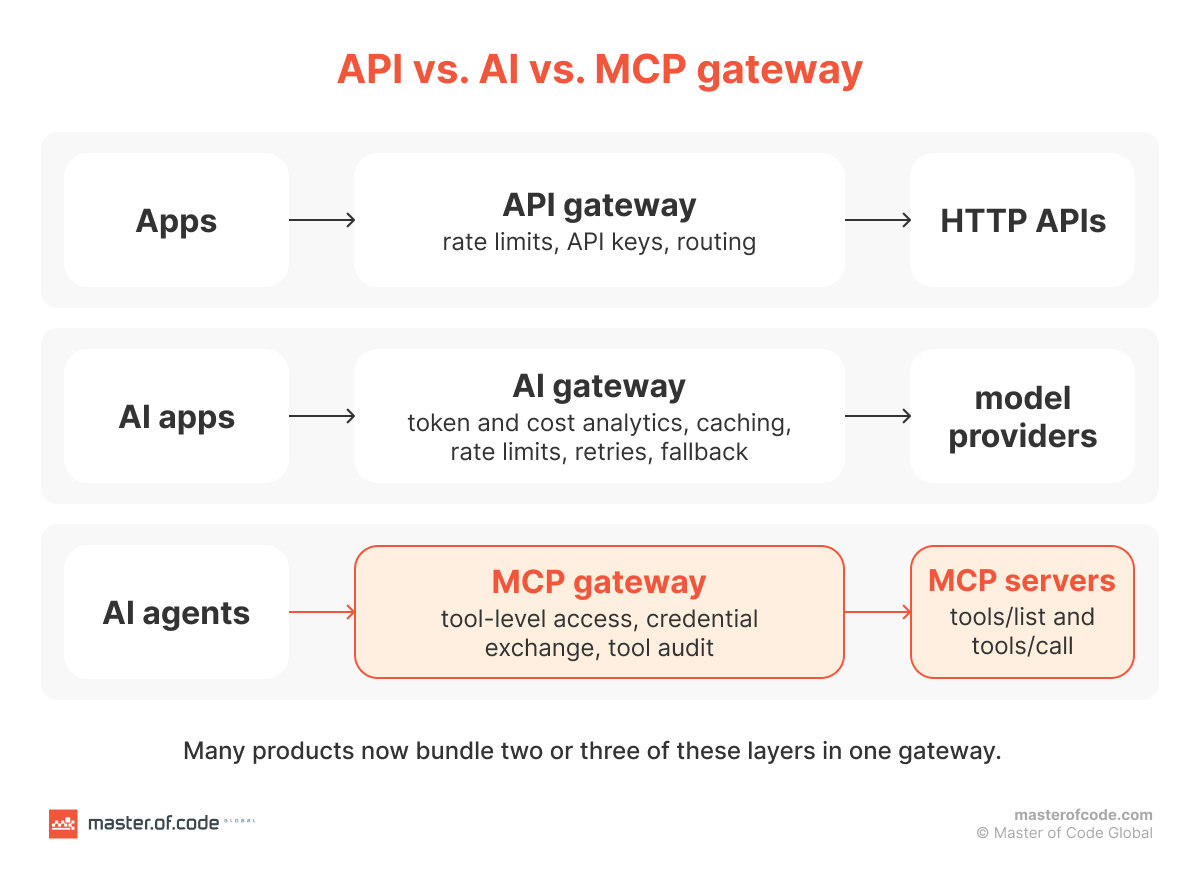
An API gateway manages HTTP APIs. An AI gateway manages traffic to language models. An MCP gateway manages agents’ tool calls. Many products now bundle two or three of these.
| Gateway type | What passes through it | Main controls |
|---|---|---|
| API gateway | REST and HTTP requests | Rate limits, API keys, routing |
| AI gateway | Prompts and completions to model providers | Token and cost analytics, caching, rate limits, retries, model fallback |
| MCP gateway | tools/list and tools/call between agents and MCP servers | Tool-level access, credential exchange, tool audit |
Sources: Cloudflare AI Gateway docs for AI gateway controls; the MCP architecture docs for MCP methods.
The categories are converging. AWS AgentCore Gateway supports MCP, HTTP, and inference targets in one product. Inference targets route LLM traffic to model providers. MCP targets aggregate tools.
So in the MCP gateway vs AI gateway question, the difference is what sits behind the gateway: tools or models. If your agents only call models, you need an AI gateway. Once they call tools that change data, you need the controls of an MCP gateway too.

How an MCP Gateway Routes Tool Calls and Manages Tool Discovery
An MCP gateway merges the tool lists from all backends into one catalog and forwards each call to the right server. Agents discover tools with tools/list and invoke them with tools/call. The gateway answers the first with the combined catalog and routes the second to the MCP server that owns the tool.

Routing can be stateless. Microsoft’s open-source MCP Gateway works this way: “Each request carries its protocol metadata and is independently authorized.” Several router instances can then share the load without session affinity.
The gateway also shapes what each agent sees. Red Hat’s MCP Gateway design calls this “identity-based tool filtering”: it filters the tools/list response based on user permissions. An agent can’t call a tool it never sees. The gateway can also keep the catalog current. Servers send notifications/tools/list_changed when their tools change, and in the 2026-07-28 spec clients opt in to these notifications.
The last piece is an MCP registry. The official MCP Registry launched in preview on September 8, 2025. Its announcement says private sub-registries “will exist within enterprises” with strict security needs. A gateway plus a private registry is how a team approves which servers its agents may use.
Ready-Made or Custom MCP Servers: Which Connector Type Fits?
Use a vendor’s official remote server when one exists and its scopes fit. Build your own when the system is yours, when you need your own read/write split, or when no maintained server exists. A gateway puts all of them under one policy.
| Connector type | Who builds and runs it | How it authenticates | What you control | Main risk | Fits when |
|---|---|---|---|---|---|
| Vendor-hosted remote server | The SaaS vendor | Usually OAuth | Which scopes you grant | Vendor sets the tool list and scopes | A maintained server exists and its scopes fit |
| Open-source server you self-host | Community; you run it | Often a static API key or PAT | Hosting, version, config | Unmaintained code, long-lived secrets | You need a quick connection to a common tool |
| Local stdio server | You, on one machine | Credentials from the environment | Everything on that machine | No central policy or log | One developer, local work |
| Custom server on your own API | You or a partner | Your identity provider, OAuth | Tools, scopes, read/write split | Build and upkeep effort | The system is yours or rules are specific |
Authentication is the column to watch. Astrix analyzed over 5,200 open-source MCP servers in October 2025. 53% rely on long-lived static secrets, such as API keys and personal access tokens. Only 8.5% use OAuth. Astrix used an LLM to classify credentials from README files, so treat the numbers as a strong signal, not a census.
A custom server lets you encode your own rules. We’ve built Zipify’s product suite, including the Shopify upsell app One Click Upsell (OCU), for over a decade. OCU launched an MCP connector for Claude and ChatGPT in September 2026. It exposes OCU’s own data with OCU’s own read/write split, which a generic server couldn’t know. If you need a server like that, our MCP connector development team builds them.
MCP Authorization: How Gateways Handle Authentication and Tool-Level Access Control
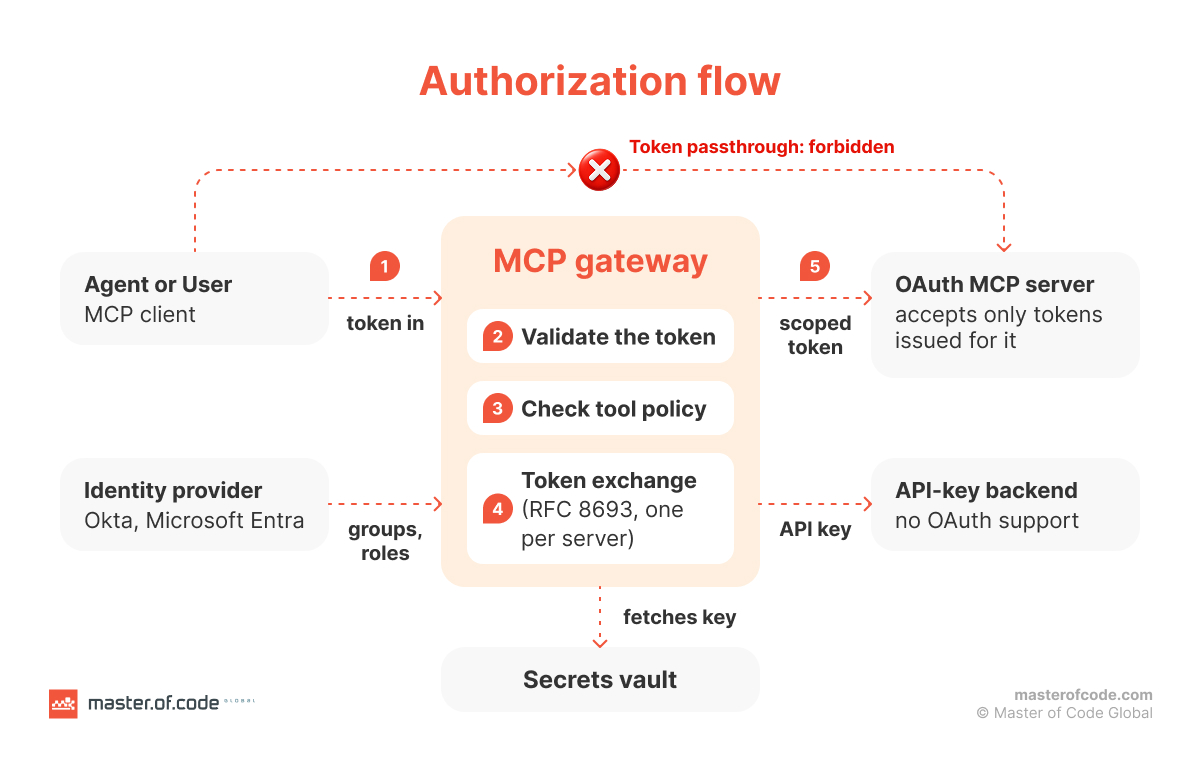
The gateway authenticates the agent or user once, checks which tools they may call, and gets a correctly scoped credential for each backend.
Start with what the MCP authorization spec (version 2026-07-28) requires:
- Authorization is optional. HTTP-based implementations should follow the spec, which builds on OAuth 2.1.
- A protected MCP server must publish Protected Resource Metadata (RFC 9728).
- Clients must use resource indicators (RFC 8707) to name the target server.
- Servers must check that each token was issued for them. They “MUST NOT accept or transit any other tokens.”
That last rule shapes every gateway design. A gateway can’t take the user’s token and forward it to the backend. The Security Best Practices call this “token passthrough” and say it is “explicitly forbidden.” The common pattern is token exchange (RFC 8693): the gateway swaps the incoming token for a narrower one issued for a single server. Red Hat’s design does this, and it pulls API keys from HashiCorp Vault for servers that don’t support OAuth.
On top of authentication sits tool-level access control. Map identity provider groups or app roles to allowed tools with role-based access control (RBAC). Microsoft’s MCP Gateway, for example, uses Entra ID app roles such as mcp.admin. The result: MCP authorization happens per tool, not per server.

On the User’s Behalf or as a Service Account?
Use delegated OAuth when the agent acts for a person and the backend has per-user permissions. Use a service account (OAuth client credentials) only for background jobs with no human involved, and scope it narrowly. Either way, the gateway logs the person behind the call.
Delegated access keeps the backend’s own permissions in play. If a sales rep can’t see finance records, their agent can’t either. A service account breaks that link. It sees whatever it was granted, for every request.
MCP supports both. The OAuth Client Credentials extension covers “machine-to-machine authentication.” It lets automated systems connect to MCP servers without interactive user authorization. Extensions are opt-in, though, and client support varies, so check your clients before you design around it.
Our work on OCU shows delegated consent in practice. According to the connector’s help article, “Nothing is shared until you approve the connection, and you can revoke it at any time.” The merchant decides, and the merchant can undo it.
Read Tools, Write Tools, and Where a Human Approves
Let agents call read tools freely within their scopes. Send write tools (create, update, delete, send, pay) through human approval or a draft-first step. The gateway enforces this by tool class, not by trusting the model.
The spec backs this up. The MCP Tools spec says “there SHOULD always be a human in the loop with the ability to deny tool invocations.” It also says clients “MUST consider tool annotations to be untrusted unless they come from trusted servers.” In other words, a server’s own label for a tool isn’t proof. The gateway should keep its own classification. OWASP gives the same advice for prompt injection: require human approval for high-risk actions.
In the OCU app we build for Zipify, the connector draws the line clearly:
- Read: funnels, offers, upsell performance, products, orders, and revenue metrics.
- Write, with approval: it can create and update funnels and offers. The AI tool asks the merchant to approve each change first.
- Off limits: it “cannot make changes to your orders, products or customers,” and it can’t delete funnels.
- Draft first: merchants are told to ask for new funnels to be “saved unpublished,” then review them in OCU before going live.
You can apply the same rules at the gateway:
- Classify each tool as read or write.
- Allow read tools within the user’s scopes.
- Require approval or draft mode for write tools.
- Block destructive tools by default.
MCP Security: Which Risks Does a Gateway Help Contain?
A gateway can’t make a model immune to prompt injection. It limits what an injected instruction can reach and records what happened. That’s the honest scope of MCP security at the gateway layer.
OWASP itself says “it is unclear if there are fool-proof methods of prevention” for prompt injection. Here’s where the gateway helps:
- Indirect prompt injection. Hidden instructions arrive in external content, such as a web page or a file. The gateway’s part is policy enforcement: least privilege and human approval for privileged tools, both OWASP mitigations.
- Tool poisoning, rug pulls, and cross-server shadowing. Invariant Labs described these on April 1, 2025: malicious instructions in tool descriptions, descriptions changed after approval, and one server altering how another is used. The gateway’s part is to allowlist servers and pin or hash tool descriptions.
- Confused deputy and over-broad scopes. The MCP security best practices say proxy servers “MUST implement per-client consent.” They also call for minimal scopes that step up per operation.
- Unauthorized tool execution. An agent calls a tool its user isn’t allowed to use, or runs a write tool nobody approved. Hiding a tool from tools/list isn’t enough, because an agent can still request it by name. The MCP Tools spec says servers must “implement proper access controls.” The gateway’s part is to check every tools/call against the caller’s policy, reject tools outside it, and hold write tools for approval.
Staging helps too. In our AI Assistant for Zipify, agents are “gradually gaining the ability to query more complex, production-mirrored data, but only in isolated, closely monitored stages.” For more on model-level risks, see our guide to LLM security.
Logging, Audit Logs, and Observability
Every tool call passes through the gateway, so it can log the full story in one place: who made the request, which agent, which tool, which arguments, the result, and the latency.
Without a gateway, those audit logs are scattered across servers, if they exist at all. Token passthrough makes it worse. When one token travels through several services, nobody can tell which system acted for whom. The MCP Security Best Practices also recommend logging scope elevation events “with correlation IDs,” so you can follow one request across systems.
For observability, look for open standards:
- OpenTelemetry export. agentgateway, now an Agentic AI Foundation project under the Linux Foundation, integrates with OpenTelemetry.
- Built-in call tracing. Docker’s MCP Gateway includes logging and call tracing for tool activity.
- SIEM export. Treat it as a requirement. Your security team already investigates incidents there.
Logs should also answer a simpler question: what has access right now? OCU lists every connected AI tool “with its approval date.” A merchant can see what’s connected and since when. A gateway should give your security team the same view across all agents and servers. Our AI governance maturity model shows where this fits in a wider governance program.
When Can’t You Do Without an Enterprise MCP Gateway?
You need an enterprise MCP gateway when several of these are true:
- You run more than a few MCP servers, or several teams add their own.
- Agents touch production or regulated data.
- Auditors or customers ask you to show who called which tool.
- Remote servers need OAuth, and credentials are piling up in agent configs.
- You’re moving agents from pilot to production.
Each item maps to a problem a gateway solves. Credentials stop living in every config file. Shadow servers show up in one inventory. One access policy and one audit trail cover every agent. Teams also stop rebuilding the same integrations. Unmanaged agents are a growing risk on their own, as we explain in our guide to shadow AI agent risks.
MCP Gateway, AI Agents, and Multi-Agent Workflows
Typical use cases:
- An internal tool hub that gives employees one place to reach company systems
- Multi-agent workflows, where each agent gets a different tool set
- Customer-facing agents that need strict scopes
- Coding agents that connect to internal repositories and services
Cross-vendor access is becoming the norm. The Model Context Protocol now sits under the Linux Foundation’s Agentic AI Foundation. Anthropic says MCP has been adopted by ChatGPT, Cursor, Gemini, Microsoft Copilot, and Visual Studio Code, and Claude has a directory of 75+ MCP-powered connectors. If you’re designing these systems from scratch, start with how to build agentic AI systems.
Direct connections are still fine in one case: a single local stdio server for one developer. The spec says stdio implementations “SHOULD NOT follow this specification, and instead retrieve credentials from the environment.”
How to Integrate an MCP Gateway Into Your Existing AI Architecture
Treat the gateway as a new layer between agents and systems. Wire it into the identity provider, secrets store, logging stack, and API gateway you already run.
- Inventory your agents and MCP servers.
- Connect the gateway to your identity provider (Okta or Microsoft Entra) for authentication.
- Define MCP authorization policies per tool and per tool class.
- Move backend credentials into a vault.
- Register approved servers in a private registry.
- Send logs to your SIEM or OpenTelemetry stack.
- Roll out team by team.
Deployment options vary. Microsoft’s gateway runs on Kubernetes, Docker runs each server in its own container, and AWS AgentCore is a managed cloud service. The gateway also sits next to your LLM orchestration layer, not inside it. Master of Code Global builds MCP connectors and is part of Anthropic’s Claude Partner Network. See our Claude consulting services for details.
How to Choose an MCP Gateway
Choose by controls first and product second. Check these criteria:
- Spec compliance: OAuth 2.1, Protected Resource Metadata, and no token passthrough
- Tool-level access control: RBAC per tool and read/write classes
- Credential vaulting for backends that only accept API keys
- Audit export to your SIEM or OpenTelemetry
- MCP gateway open source vs. managed: self-hosted means you run and patch it. Managed means you depend on the provider.
- Server support: both stdio and remote servers
- MCP security best practices: a documented path to the spec’s guidance
- Lock-in risk: how hard it is to leave
Building your own gateway is possible, but you’ll own the OAuth flows, the policy engine, and the patching. Master of Code Global is platform-agnostic, so the gateway choice should follow your stack, not a partnership. Good MCP security starts with that fit.
Performance, Scalability, and Latency Trade-offs
A gateway adds a network hop and becomes a critical dependency. The bigger cost is often tokens, not milliseconds. Anthropic’s engineering team notes that tool descriptions “occupy more context window space, increasing response time and costs.” In Anthropic’s own example, a different approach cut token use from 150,000 to 2,000. Per-user tool filtering and semantic tool search (AWS AgentCore) shrink the catalog each agent sees. Stateless routing scales horizontally. Plan for high availability: if the gateway fails, every agent loses its tools. Measure p95 latency in your own pilot. No neutral benchmark exists yet.
What We’ve Learned Building Agent Access to Real Systems
Two of our projects show the same principle: give agents access in stages, through one controlled layer.
AI Assistant for Zipify. We’ve built Zipify’s product suite, including One Click Upsell, for over a decade. When Zipify needed AI inside OCU, we built the Assistant on its own database and infrastructure, fully separate from the core app. Agents reach production-mirrored data only in isolated, closely monitored stages. The Assistant went from kickoff to release in about 2.5 months. Since launch, 617 merchants have started a conversation, with 1,749 conversations logged. OCU’s MCP connector for Claude and ChatGPT followed, with the same approve-first, read/write split described above.
Internal MCP Solution. A global technology company’s teams switched between dozens of platforms and portals, each with its own login. We built an internal MCP layer and a chat-first AI platform on top of it. It connects 85 enterprise tools through one MCP server layer. Employees connect their own accounts without admin help, and all credentials and API tokens are encrypted at rest with AES-256.
Conclusion
An MCP gateway is where agent access becomes governable: one endpoint, one policy, and one audit trail. It doesn’t replace secure servers, a clear read/write split, or least-privilege design. It makes them enforceable across every agent and every server.
Start small. Inventory your servers, classify your tools, and decide which actions need a human. Then put a gateway in front once the number of agents, servers, or auditors makes direct connections hard to defend.