



By 2030, most enterprise AI products won’t be single-channel, according to Gartner, which expects 80% of enterprise software to be multimodal by then. We’re already seeing this shift show up directly in the projects clients bring us. Voice, image, and video, combined in one interaction, are becoming the default.
That evolution comes with a problem most teams haven’t priced in yet. Voice-only latency (the delay between a user speaking and the assistant replying) was already hard to get right. A system that has to listen, watch, and respond at the same time doesn’t just add a bit more waiting. It changes the entire nature of the problem, since now several channels have to move independently and still land together. Get that wrong, and the smartest model in the world feels broken to the person using it.
We looked at the research on where those multimodal latencies actually come from. Then we paired it with what we’ve learned building these systems ourselves. Olga Hrom, our Chief Delivery Officer, commented on fixing it in live production, and Henrique Gomes, our Head of Conversational AI Design & Strategy, explained what keeps a wait from feeling like a failure to the user.
This article is what came out of putting research and hard-won delivery experience side by side. If you’re already running into this on a live product, talk to our team directly, everything below is also the shortest path to a working fix.

Table of Contents
Key Takeaways
- More businesses are building multimodal AI products, and latency is the problem that comes with that shift, one we’re seeing directly in client work like our Nord Anglia project.
- Multimodal latency isn’t voice latency with extra steps. It’s a coordination problem across several channels running at different speeds, not one chain you can speed up by fixing a single stage.
- Across the pipeline, image and video encoding is often the heaviest single stage, ahead of the language model itself.
- Fixing it takes engineering work (parallel processing, caching, smart routing) paired with design work (signaling to the user that the system is still working), and neither one substitutes for the other.
- Scaling a multimodal system in production depends on decoupling stages so one slow modality doesn’t hold up the rest, not just making individual models faster.
- Master of Code Global has been solving this problem from both the engineering and design side long enough to know where it actually breaks, which is what makes us a reliable partner for tackling it in your product.
From Voice-Only to Multimodal: Why This Problem Landed on Our Desk
As we mentioned in the intro, Gartner predicts that 80% of enterprise software and applications will be multimodal by 2030, up from less than 10% in 2024. Our Chief Delivery Officer Olga Hrom has watched this shift show up directly in client conversations: companies that once asked for a chatbot now ask for something that sees, listens, and responds across formats in the same session.
Clients increasingly come to us with multimodal ideas already in mind, and that has forced us to rethink how we approach latency. A single-channel voice assistant only has one clock to manage. A multimodal system has several running at different speeds, and they all have to land together in real time.

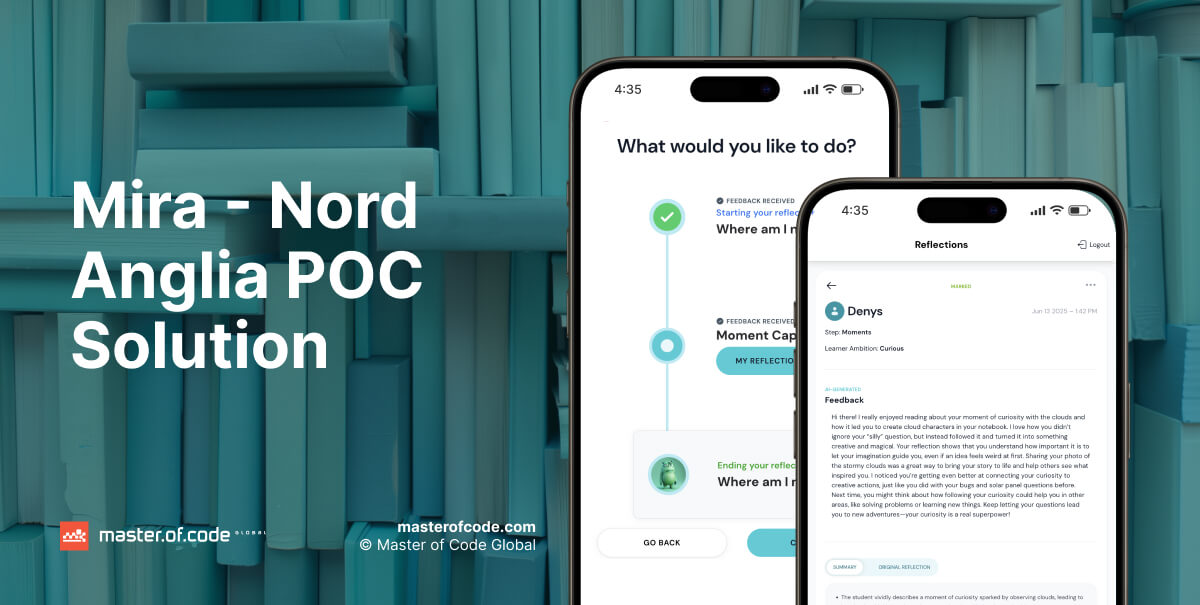
Education is one of the sectors where this shows up most. Our recent work with Nord Anglia Education is a direct example. We built Mira, a reflection assistant for students that combines voice conversation, an animated avatar, and image uploads in one multimodal AI pipeline. Students talk to Mira and can share images as part of their reflections. Teachers get automatic summaries instead of reading every conversation. The results: 11.6x more words per reflection compared to the traditional tool, and 2x deeper thinking in student responses.
Building Mira meant retiring a lot of what we’d assumed about latency from years of voice-only work. And fitting three modalities into one product turned out to be as much an AI integration services aspect as a modeling one. Meanwhile, let’s look at what actually makes multimodal latency different.
Why Multimodal Latency Isn’t Just Voice Latency With Extra Steps
A voice bot moves through one sequence: capture speech, transcribe it, generate a response, speak it back. Every stage waits for the one before it, so speeding up any single stage speeds up the whole turn. Add a second modality, like an avatar that has to render or an uploaded image that needs analysis, and that single sequence is gone. The system now runs several sequences side by side, and none of them move at the same speed.
That’s the real difference behind multimodal latencies. Voice-only latency is a chain. Multimodal AI latency is a coordination problem. Each modality runs its own pipeline:
- Speech goes through capture, transcription, and generation.
- Images go through upload, encoding, and analysis.
- Avatars or generated videos go through rendering, frame by frame.
The slowest one sets the pace for the whole interaction, whether or not the others have already finished.

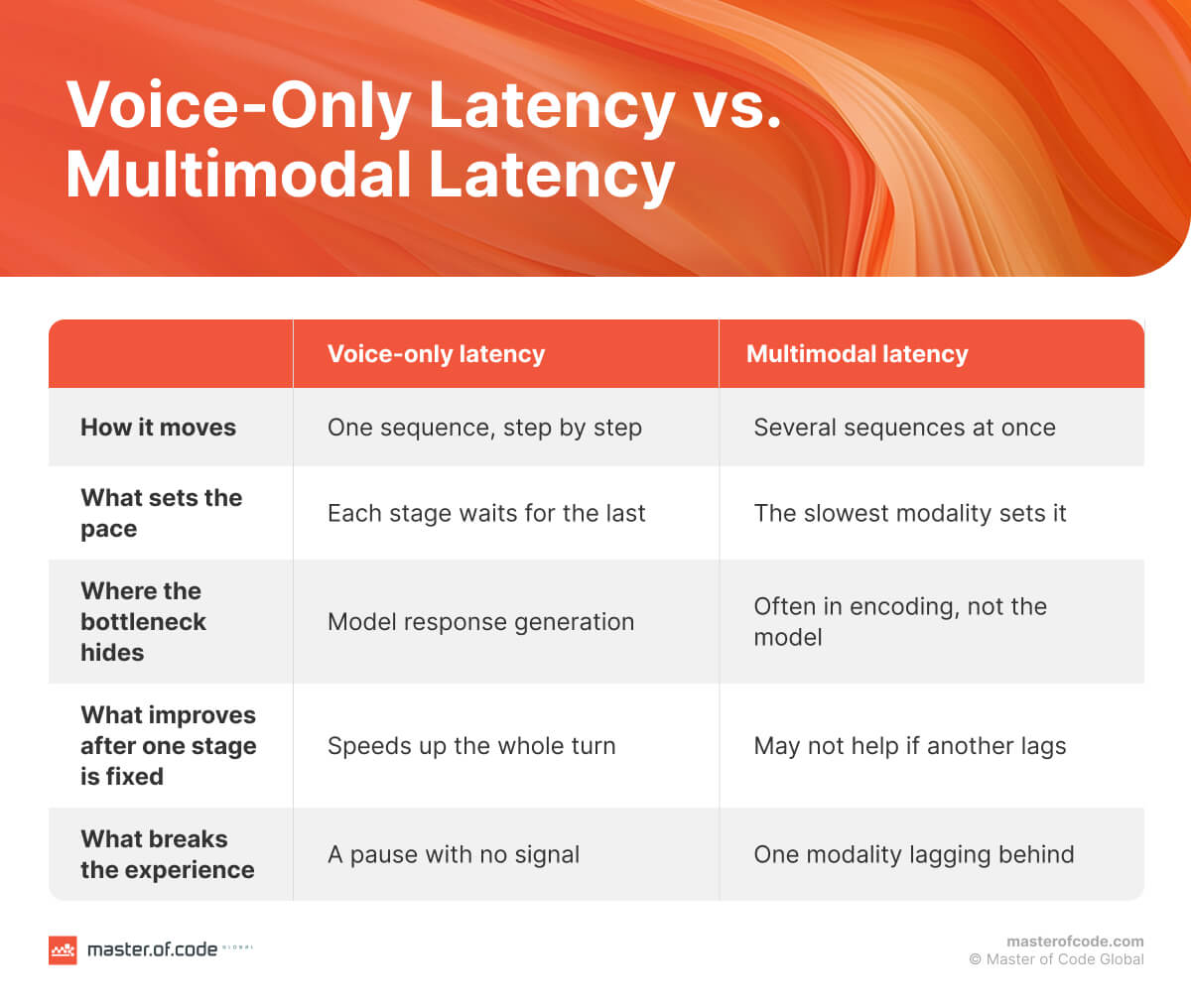
Image encoding shows how much weight one added modality can carry. A study from Microsoft and University of Virginia researchers found that image encoding alone accounts for 65% to 79% of time-to-first-token in the multimodal models they tested (Llama3.2-90B and Llama3.2-11B), with other model architectures in the study landing lower but still substantial. In some architectures, encoding the image took longer than everything else in the pipeline combined. Some of that added weight comes down to well-documented LLM limitations around context and attention cost.
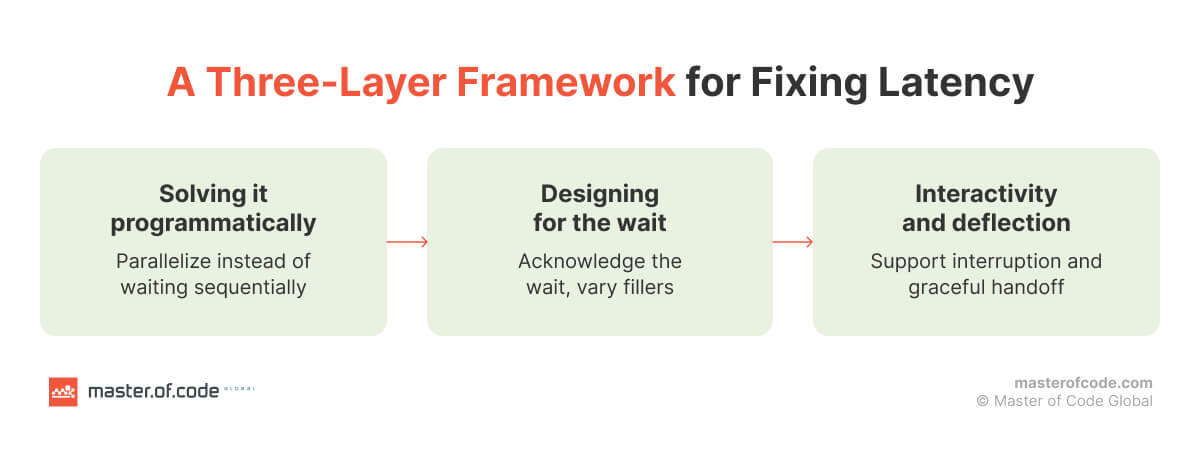
This is where the three-layer approach Master of Code Global uses for voice AI latency:
- fix it at the engineering level,
- design around what can’t be fixed, and
- give the user something to do while waiting, still holds.
Olga Hrom puts it simply: “Latency isn’t just a performance metric, it’s a trust metric.” That’s still true here. It just now applies to more than one channel at once, which means more chances for a single slow bottleneck to make the whole interaction feel broken.
Where Latency Actually Builds Up in a Multimodal AI Pipeline
Every stage in a multimodal AI pipeline adds its own delay, and each one behaves differently depending on model choice and how many modalities are running at once. Breaking it down by stage makes the problem easier to fix, since the fix for one stage rarely works for another.
- Capture and input. Speech, images, and video frames each arrive on their own schedule. Network hops and codec choices add delay before any model runs.
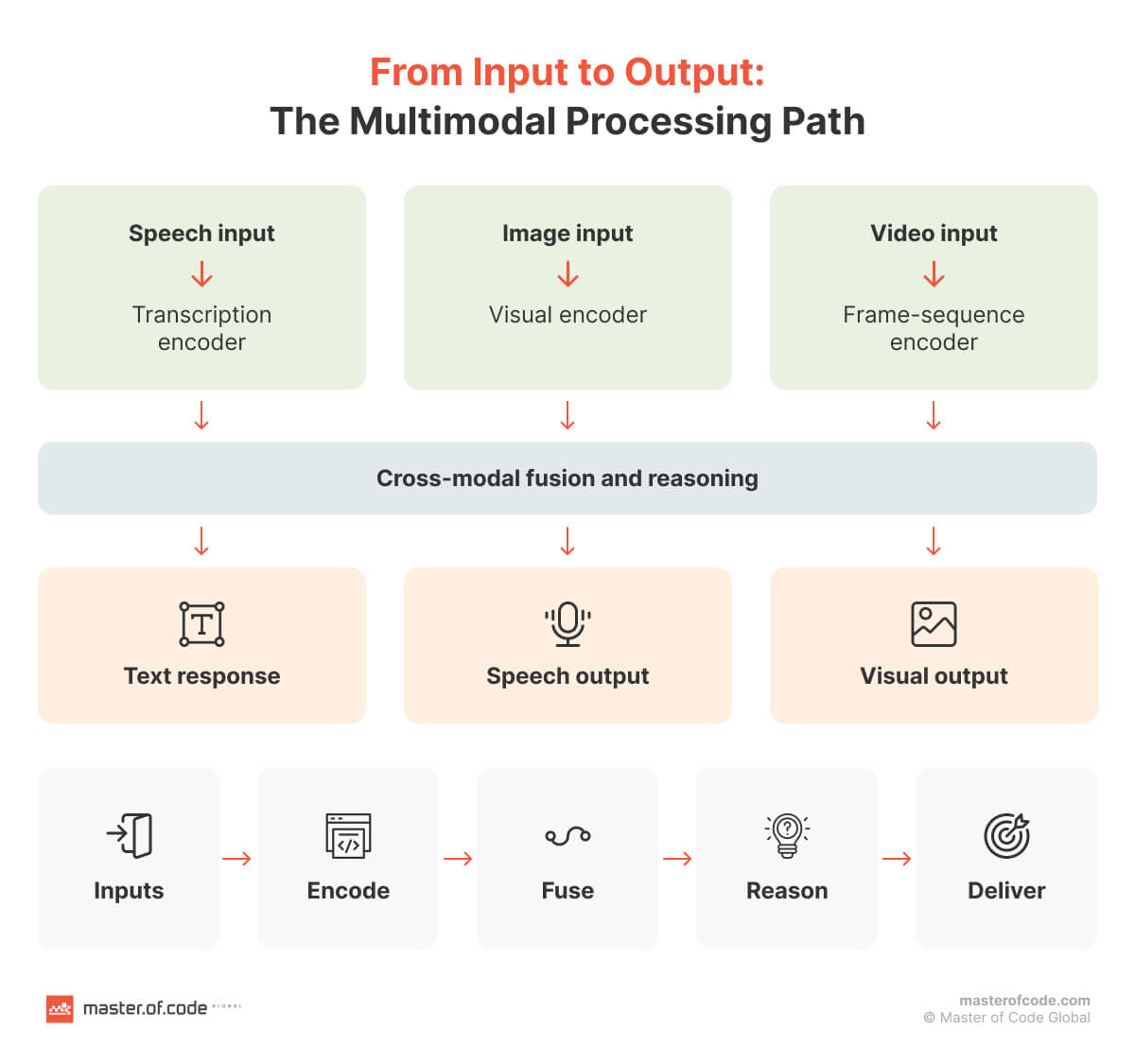
- Per-modality encoding. Each input type gets converted into something a model can use: transcribed text, visual embeddings, a sequence of frames, through encoder models that are themselves a deep learning development step to get right.
- Cross-modal fusion. The system combines signals from different modalities into one representation that the algorithm can reason over. Google Research’s Multimodal Bottleneck Transformer found that restricting attention to a small set of bottleneck tokens, instead of letting every modality attend to every other modality directly, cut compute by roughly 50% compared to standard cross-attention fusion, without losing accuracy.
- Multimodal inference. The system generates a response from the combined input. This stage is compute-bound and scales with how much context each modality contributed, which is why a heavy image or video input slows down text generation too, even when the text itself is short.
- Retrieval, where the system uses it. Some multimodal software pulls in prior context through embedding search. Milvus, a vector database built for this kind of retrieval, notes that resizing user-uploaded images before generating embeddings cuts processing time by 40% in one production case. Moreover, combining lighter preprocessing with tuned indexing and infrastructure can bring even complex multimodal queries under 100 milliseconds. Vector search tuning matters more as a system scales.
- Output generation. Text, speech, and rendered visuals often need to land in sync. An avatar that renders instantly but waits on audio still looks broken.
None of these stages fix each other. Optimizing multimodal inference doesn’t help if encoding is still slow, and a fast encoder doesn’t matter if fusion is what’s holding up the response. If any of these stages sound like where your own product is losing time, reach out so our team can help you find it.
The next section covers what actually works at each stage.
Fixing It: Multimodal Latency Optimization Techniques That Work
Olga Hrom’s framework for voice latency breaks the fix into three layers: engineering, design, and interactivity. The same three layers hold for multimodal latency optimization; they just have to work across more than one channel at once.

#1. Engineering the pipeline itself
- Parallel processing per modality. Encode the image and transcribe the speech at the same time instead of one after the other. Nothing about analyzing an image depends on the transcript finishing first, so running them sequentially just adds wait time for no reason.
- Stream instead of batch. Start generating a spoken response before the full text is ready, and start rendering an avatar before the entire audio clip exists. Waiting for a complete output before starting the next stage is one of the most common places where multimodal systems lose time.
- Cache what repeats. Prompt prefixes, common embeddings, and warm connections all shave real time off every turn instead of rebuilding context from scratch each time.
- Route by modality. Not every request needs the same path through the system. A text-only follow-up shouldn’t sit behind a heavier image-analysis request in the same queue. Request routing that accounts for which modalities are actually in play keeps light requests from getting stuck behind heavy ones.
- Keep non-essential work off the critical path. Logging, quality scoring, and compliance checks can run after the response goes out, not before. It’s the kind of discipline that holds up better when it’s built into a team’s AI SDLC rather than bolted on per project.
#2. Designing for the wait across modalities
In voice alone, a filler phrase covers a gap. With more than one modality, there’s more surface to work with. A visual thinking state can cover an image being analyzed. An idle animation can hold the moment while a response streams in.
As Olga puts it, “the agents that feel the most human aren’t necessarily the fastest ones.” They’re the ones that signal what’s happening instead of leaving the user to guess.
#3. Interactivity and deflection
Letting a user interrupt or redirect mid-response matters more, not less, once an avatar or visual is rendering alongside the audio. Tappable shortcuts save a full round trip when someone can act faster than they can speak and wait to be transcribed. And if a request will genuinely take too long, a graceful handoff beats making someone sit through a long wait for an answer they could get another way.
Getting each of these right for a single channel is one problem. Making them all work at the same time, without one modality’s fix breaking another’s, is where architecture choices start to matter.

Architecture Choices That Determine Whether You Can Scale
Fixing latency at each stage only gets you so far if the system falls over the moment real traffic hits it. That’s an architecture question, not a per-stage fix, and it’s where most teams building a multimodal AI pipeline run into trouble once they move past a demo.
The pattern that shows up across recent research is decoupling stages.
- A study from Microsoft and the University of Virginia built ModServe, a system that separates image encoding, prefill, and decoding onto dedicated resources rather than bundling them together. Tested on a 128-GPU cluster against real production traffic, it delivered 3.3 to 5.5 times higher throughput and cut serving costs by 25 to 41.3%, while still meeting latency targets.
- A related approach, EPD (Encode-Prefill-Decode) Disaggregation, reported up to 71% lower time-to-first-token and 22 times larger batch sizes once encoding was pulled off the same resources as the language model.
The logic behind both: image encoding is compute-bound, decode is memory-bound, and forcing them to share the same GPU means one starves the other. Splitting them lets each stage scale on its own terms, which is where scalability, throughput, and resource efficiency actually come from, not from making any single model faster.
A few practical implications follow from this:
- Distributed processing across dedicated pools beats a single monolithic deployment once request volume gets real.
- Edge computing earns its place for latency-critical steps that don’t need a round trip to the cloud, like initial capture or lightweight filtering, while heavier reasoning stays centralized.
- Coordinating multiple models or agents across these stages is its own discipline. It’s also where LLM orchestration matters as much as raw model speed. Getting stages to hand off cleanly is what keeps a decoupled system from becoming unmanageable.
How Master of Code Global Approaches Multimodal AI Latency
Latency isn’t only an engineering problem. How it’s handled changes by channel, and getting the perception of speed right is its own discipline. Henrique Gomes, our Head of Conversational AI Design & Strategy, explains how that plays out across chat and voice:
In multimodal AI experiences (both chat and voice), latency can definitely become a UX challenge, but the way we handle it depends on the channel.
From a UX perspective, one of the key principles we follow is Nielsen’s heuristic of Visibility of System Status. The idea is that users should always understand what’s happening, especially when they’re waiting.
For chat, once the response time starts getting too long (I’d say around 8+ seconds), users may think the bot has stopped responding. To avoid that, we provide clear feedback that the system is still working. This can be done through typing indicators and messages like “Please wait a moment while I retrieve that information for you.”
For voice, we use the same principle, but with voice-specific patterns. The assistant can say something like, “Let me check that for you. This may take a few seconds.” Depending on the experience, subtle background sounds (such as keyboard typing or a processing sound) can also reinforce that the assistant is actively working instead of being silent.
If the wait is longer (e.g., 10-15+ seconds), it’s usually better not to stay silent. We often add another progress update, such as “I’m still checking that for you. Thanks for your patience, I’ll be with you in just a moment.” This reassures users that everything is working as expected and significantly reduces the perception that the experience has failed.
So, in general, our approach isn’t only about reducing latency (which is obviously important), but also about designing for latency by proactively managing user expectations and making the system status visible throughout the waiting period.
That distinction, between fixing latency and designing around it, runs through everything we build. Our delivery team handles the engineering side: parallelizing what can run at once, decoupling stages so one slow modality doesn’t stall the rest, and monitoring performance once a system is live as part of our MLOps consulting.
Our conversational design team handles the perception side: the specific wording, timing, and channel-appropriate cues that keep a wait from feeling like a failure. Neither one covers for the other. A perfectly optimized backend still feels broken if the interface goes silent at second nine, and the best-written waiting message can’t fix a system that’s actually too slow.
FAQs
How do multimodal AI solutions work?
A multimodal system takes in more than one type of input, usually some combination of speech, text, image, or video, and processes each through its own encoder before combining them into one shared representation the model can reason over. From there it generates a response, which can itself span multiple formats: text, spoken audio, or a rendered visual.
How can you cut down latency in a multimodal AI system?
There’s no single fix, since latency builds up at different stages for different reasons. Parallelizing per-modality processing, streaming outputs instead of waiting for a full response, caching what repeats, and decoupling compute-heavy stages like image encoding from the rest of the pipeline all address different parts of the problem. Just as important is designing the wait itself, signaling to the user that the system is still working, since a technically fast system can still feel slow if it goes silent.
What’s a reasonable latency target for a multimodal AI product?
There isn’t one universal number the way voice has its roughly 800-millisecond rule of thumb. A voice-and-avatar assistant, a system doing heavy image analysis, and a retrieval-based product all have different latency budgets, since each combination of modalities carries different bottlenecks. The right approach is setting a target per modality combination based on what the interaction actually requires, not chasing an industry-wide benchmark.
Is multimodal latency a technical problem or a design problem?
Both, and treating it as only one or the other is where most fixes fall short. Engineering work like parallel processing and decoupled architecture addresses the actual speed. Design work, clear signals that the system is still working, appropriate wording, channel-specific cues, addresses how that speed is perceived. A fast backend with no feedback during a wait can still feel broken to the user.
In the End …
This time, we discussed the problem of latency, specifically in multimodal contexts. We tried to share practical tips from our delivery leaders, learned the hard way from our own projects, rather than repeating generic advice that doesn’t hold up once real users and real-time traffic show up.
Multimodal AI is moving fast, and the teams that get ahead of latency now will spend a lot less time firefighting it later. If you’re building a low-latency AI product or planning to, and need guidance or help, get in touch, and we’ll use our expertise to bring your idea to life while keeping users comfortable and happy.